I use the Educon template. My site is Chinese based pages, so I want to select some Chinese Google font such as "Noto Sans TC" as default font.
but I can't see it in the "Font Family" list.
How can I do?
Awaiting an answer
Templates
How to add Chinese Google fonts?
5 replies

Ariba Staff
5 years ago
· edited
Hello
There is another method that you can try:
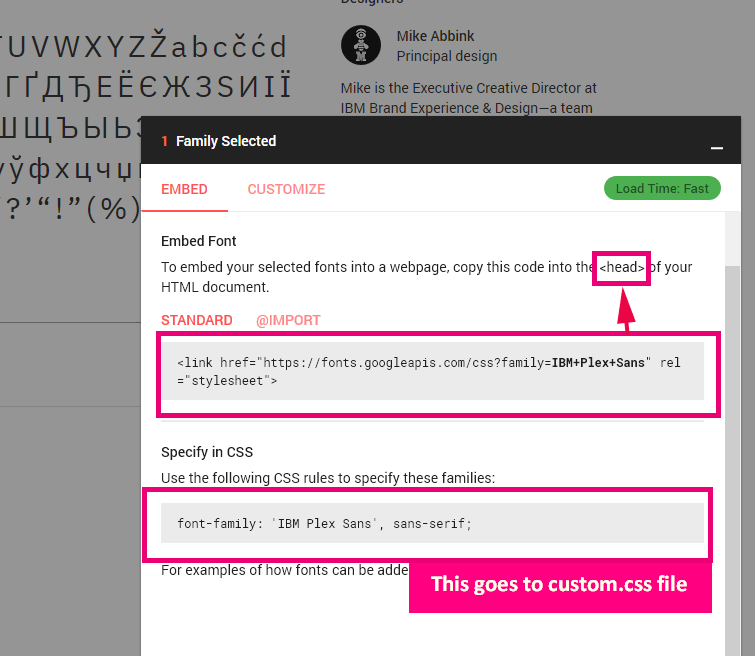
- Use Google Font service to generate code
- Edit: templates\shaper_educon\index.php
and add code there in < head > section, before end. - Then inside custom.css file add rest of code from Google Fonts generator
Of course with your class name(!), for example:.bigletter {font-family: 'IBM Plex Sans', sans-serif;}
Yung-Hung Asked this
thanks for reply.
I've tried the step 1 and 2 you've told, but failed on step 3.
I can't find the "custom.css" files under the \templates\shaper_educon. Where can I find it?
Moreover, is there a way that I can choose the font via drop-down menu in the template's Typography page? I want to set HEADING 1 to Heading 6 font seperately.
Why can I choose more fonts in SP Page Builder(includes Google Noto Sans TC), but not as much as in the template?
Yung-Hung Asked this
Is there any Joomshaper staff can reply my question?
Ariba Staff
Hello
My sincere apologies for the late response. Have you kindly checked out the Typography page in our documentation: https://www.joomshaper.com/documentation/helix-framework/helixultimate/typography-settings I hope this helps you.
Also, can you please provide your admin access? Use the hidden mode to share the log in credentials .
Yung-Hung Asked this
5 years ago
· edited
Thanks for your suggestion. If I switch the template to Helix Ultimate, there are truely Chinese google fonts support.
However for now I am planning to use the "Educon" template, but I can't see any Chinese google font in the "Font Family" list at Typography section. I even tried a google font API but nothing happened.
Is there any way to update or increase such list in "Educon" template?
Log in to reply.