Vertical Menu & Slideshow Addon
M
Manuel
Hi all,
- Navigation addon I use now the navigation addon as a modul on position left. Looks not so bad but a few configurations I dont know how I have to do that. Maybe someone can give an explaination how I can fix it. First I was changing the Template style - Layout to 2+2+4+4. Actual lokks like so: https://prnt.sc/1qn4j3f
First Problem what I have is to add a Pagebuilder page. In the addon navigation under the different items where you put the link is on the right side a small icon but when I use it then only goes the media-data open. It will be really really helpfull when that shows you all Pagebuilder pages too. https://prnt.sc/1qn4wli https://prnt.sc/1qn4xys Personally I think the most clients use on the addons where is a Link icon a page not a media-part like a foto. I was trying a view things: I was creating on the Mainmenu the submenus but on hide. In the hide modus it not will be work on the left side. When I unhide it then yes. https://prnt.sc/1qn5h9s I was using the links like so because I like when it looks in the adress-line clearly. https://prnt.sc/1qn5kop https://prnt.sc/1qn5m23
How I have to fix that?
- The Slideshow addon I was making a Pagebuilder modul und put the Slideshow inside. I use the position slider. Then on the Mainpage I use the addon Joomla modul. The Slideshow works but not in Full width. https://prnt.sc/1qn5viz https://prnt.sc/1qn5xrs Full width is on yes: https://prnt.sc/1qn65bh How I fix it with the full widh? Can the Slideshow work too without that I have to do then on every page the addon Joomla modul?
Then when we fix the Slideshow to the full width how I can bring the navigation addon that I have on modul position left more down? https://prnt.sc/1qn6hhm
Best Regards Manuel
6 Answers
Order by
Oldest

Toufiq
Accepted AnswerHi there,
Thanks for contacting us. Sorry for the inconvenience. Will you please share an screencast video about the full process that you have applied your site and share a final screenshot that you want to do exactly.
-Thanks
M
Manuel
Accepted AnswerHi Toufiq, How I can upload the screencast here? I want to do it with Win + G in Windows 10 or is there an another way to do it?
Regards Manuel
M
Manuel
Accepted AnswerSorry for the long time, right now I was wantening to make the screencast. I was doing first the new updates and then comes a new problem that under site modules the addons not going open again. Here comes then a small video. Before I can make the another screencast we have to fix that first. https://my.hidrive.com/lnk/n0CiU7ju
Best Regards Manuel
Toufiq
Accepted AnswerThanks for your feedback. After severel test no clue found. Even there is no issue found about our product except sp cookie consent. Thanks

Pavel
Accepted AnswerHi Manuel. If you allow...
Navigation addon I use now the navigation addon as a modul on position left.
Navigation Addon is intended only for single-page Landing Page, to use anchor links. Not that you can not build with it navigation for multi-page site, but it is extremely not convenient. And some things are not fulfilled in principle with this addon. Instead, use the standard Joomla menu module plus some JS encoding for the dropdown list. Or third-party menu module having a dropdown list on board.
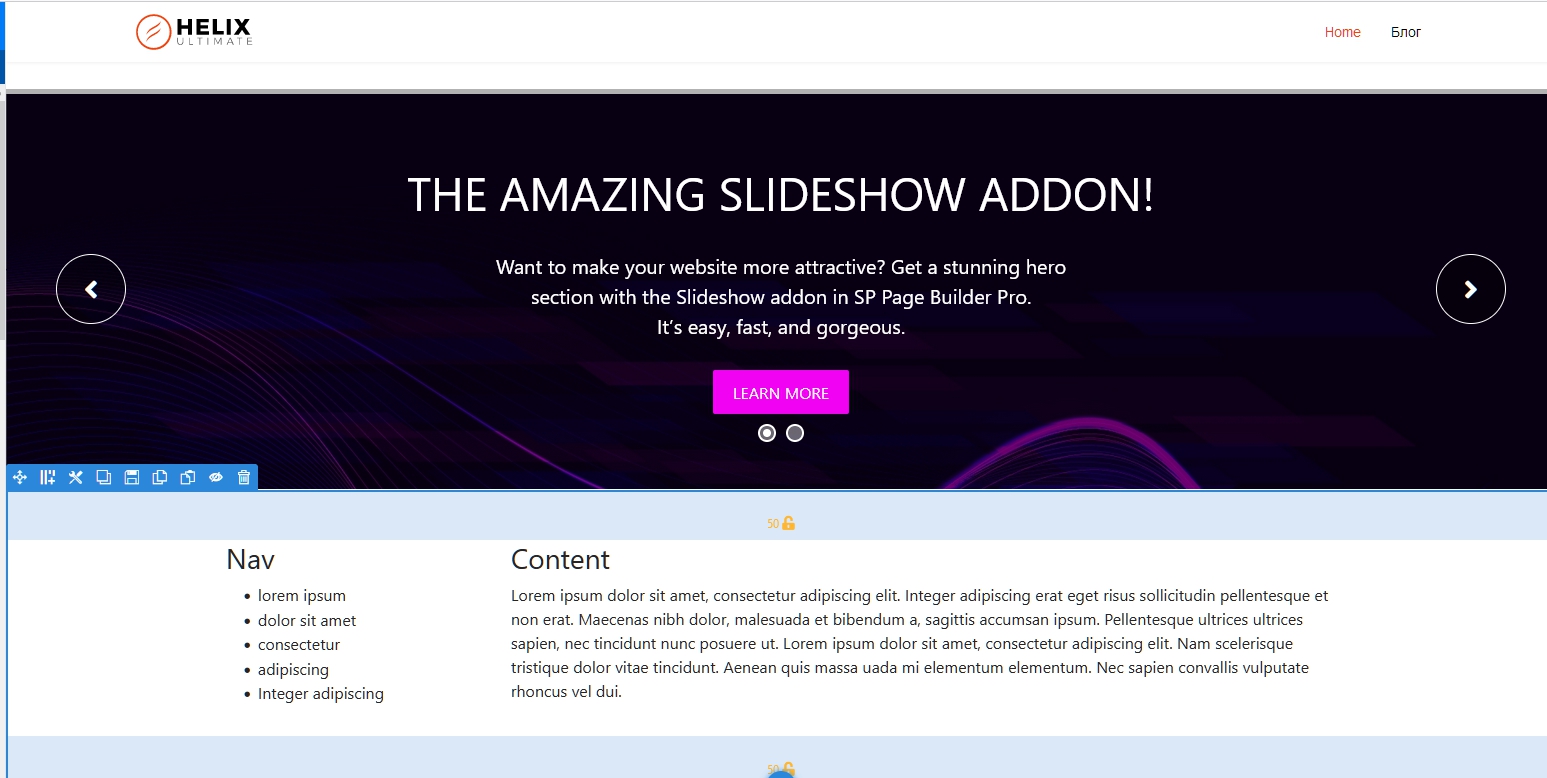
On SP PB pages, you cannot use the left and right position of the template modules. Such a layout must be fully built inside SP PB Page using one global section divided into a column for navigation and column for content and inner sections in content column. To output the side menu, use the Joomla Module Addon with the "module position" mode. Create your own position for this. For example Custom-left.
The Slideshow works but not in Full width.
In this case, the full width setting does not matter, since the width is limited to the page container and the width of the section. Do not use the module. Place the slideshow right on the SP PB page and switch the section in which it is located to Fluid Width.
Here is layout exemple