Editing Using Pagebuilder - Forum | JoomShaper
Solved SP Page Builder

Editing Using Pagebuilder

Asked by Ruth Donnelly 5 years ago Last activity 5 years ago

Hi I'm using the contact page from the template 'Interiors' in the pagebuilder layout section. I want to change the colour and width of the black frame around the contact info at the top of the page but can't seem to find where to edit it. Can you help me please.

If you look at the demo page https://sppagebuilder.com/interior-contact you will see the box that I am referring to.

Cheers, Ruth

Accepted answer

Marked as the solution
Ofi Khan Staff

Hello Ruth Donnelly

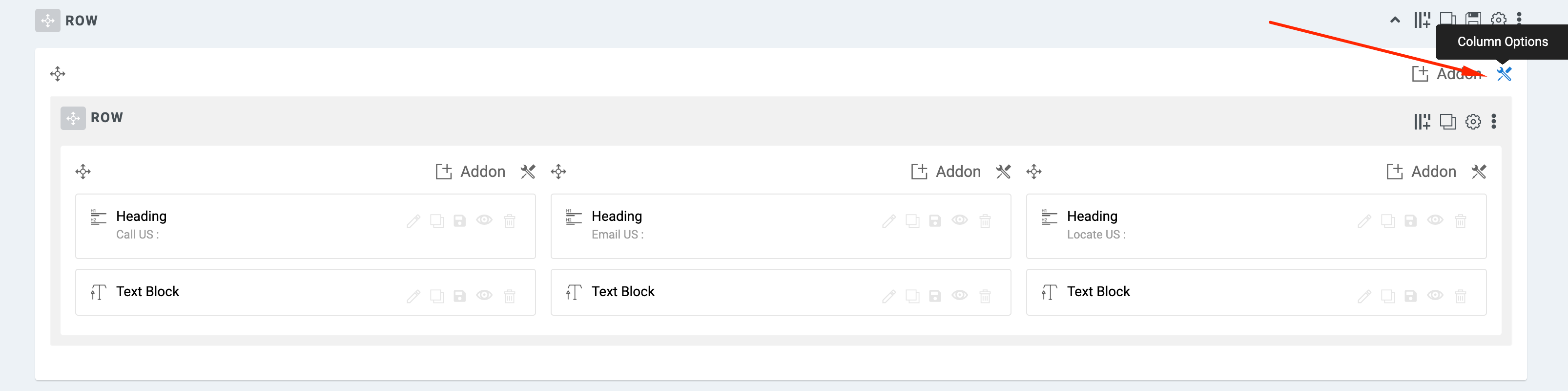
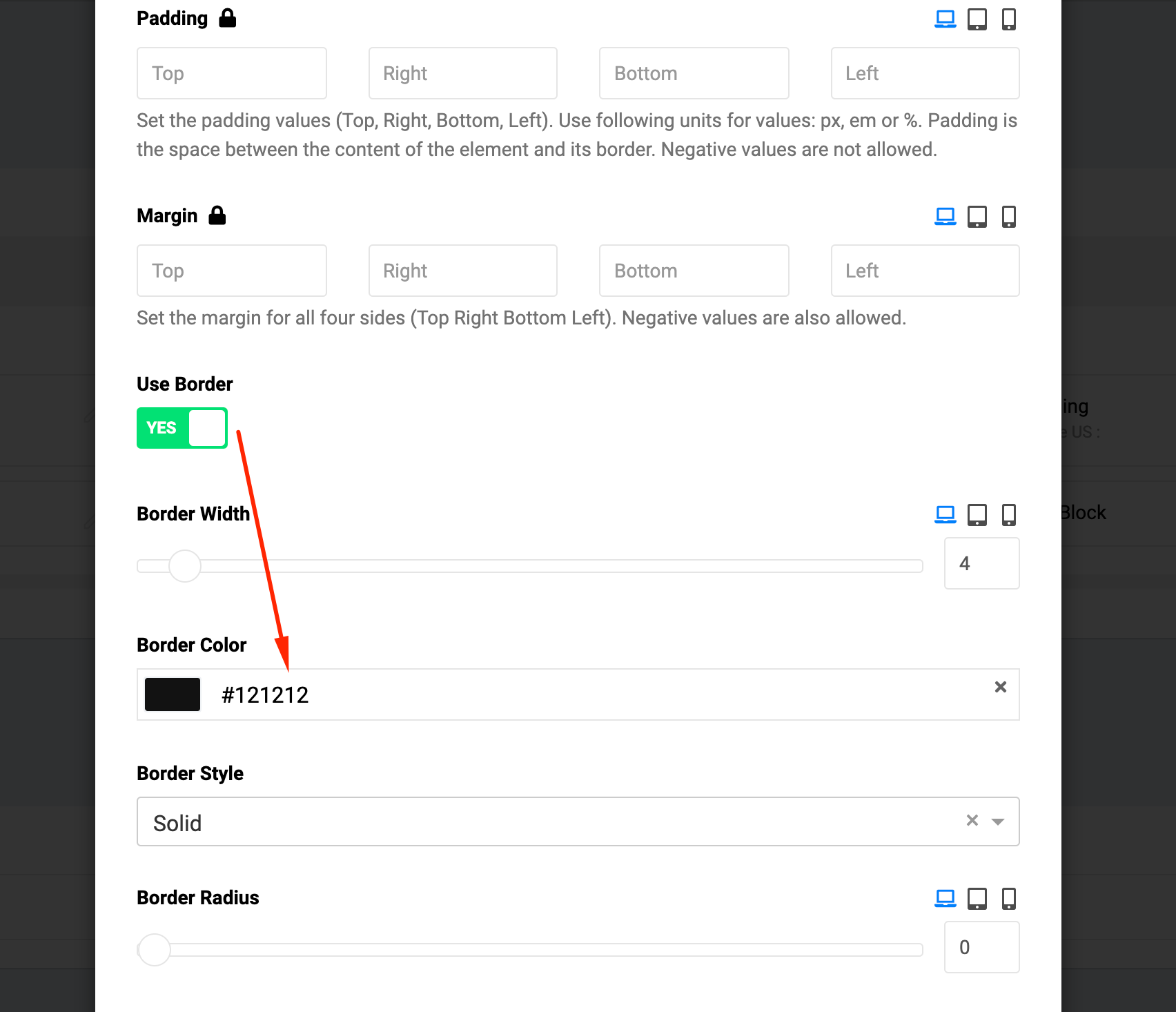
Please import the page and in the backend editor edit border in the column options.

Screenshot at Oct 09 12-44-00.png

Screenshot at Oct 09 12-44-35.png

Best regards

8 more replies

Ruth Donnelly Asked this

Ahhhh, Thank you so much Ofi - that's fantastic! It never occured to me to use the backend editor.
Cheers, Ruth

Ruth Donnelly Asked this

YAY! It worked!!! Thank you so much.

Ofi Khan Staff

You are welcome. Please accept the answer that helped you. It will be then easier to find the solution for the other users with the same issue. There is a button to accept answer after each comment.

Ruth Donnelly Asked this

I'd be happy to do that!

You might be able to help me with another problem - this is the first time I've used Page Builder so it's a bit of a steep learning curve at the moment. I have a news section in the menu which at the moment I have set up in the joomla backend as a blog article/category, but I'd like to bring it into page builder. This section will be used to publish important news items such as the latest covid restrictions or events, so what should I be using in Page Builder?

I won't be looking after the site so I need something easy for another person to quickly update this section from the frontend editor. Would you be able to give me some advice on the best way to do this?

Cheers, Ruth

Ofi Khan Staff

Thanks. You can check Articles or Article Scroller addon to do this. Please follow this documentation to understand the addon differences.

Please check this tutorial playlist on SP Page Builder. It will help you to learn easily.

Ruth Donnelly Asked this

Thanks once more, you have helped hugely! I have been watching the OS Training videos - he's fantastic at teaching in an easily understandable way. I will have a read of the documentation - it helps when you know what you are looking for!

Cheers, Ruth

Ofi Khan Staff

You are welcome. I am glad that you are getting it.

Log in to reply.