

Small Contact Form On Top Of Background Image With Heading And Text
MM
marley man
Hi all - does anyone know if it's possible to create a section like this example using SP Page Builder Pro? A banner image - a square containing a text heading and text below the heading - and a small contact form. Any help would be appreciated!
https://photos.app.goo.gl/P1NAVKGNS67LJELL9
I need a step-by-step explaination please ....newbie.
And yes, I have watched all of these tutorial videos but they didn't help me.
Thank you!
5 Answers
Order by
Oldest

Paul Frankowski
Accepted AnswerHi Marley, "Step-by-step" -- not really, becuase support =/= learning course.
But I can give you few useful tips:
- Create a new Row with 2 columns, in Row Options set background image.
- In first column add for example Text addon add your text and set black background with transprency
- In 2nd column add Form Builder addon with fields and also black background with transprency
MM
marley man
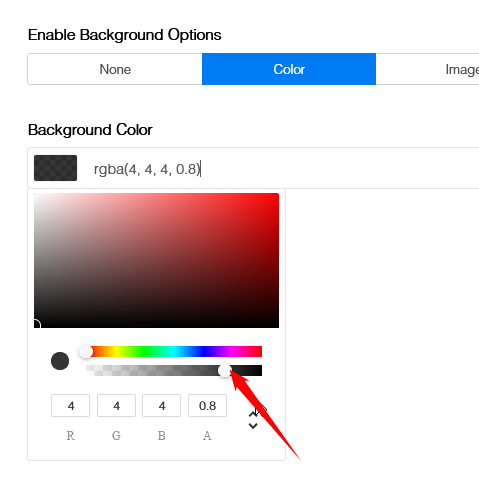
Accepted AnswerPaul In step 2. I did add the black background but I don't see any options to set the transparency...can you tell me where I can find that? thanks again
Paul Frankowski
Accepted Answerin RGBA color scheme, you have 3 colors and transparency value. Look at my arrow here
MM
marley man
Accepted AnswerThanks again Paul...I feel a bit silly that I didn't realize that! thanks