

Zoom In Images SP Page Builder
C
Chris
Hello together,
i need your help. I'm new on SP Page Builder and want to create a new homepage for my little business.
I want the costumer choose if he is private or business costumer and many other block A oder block B desicions on other pages.
For that i planned a Image with Title and Subtitle and also as the most important part: a link to the next page.
With the addon "images" there is no nice function for display my box-title in the image. I decided to use the image-overlay addon. Looks great and the zoom in is an eye catcher for me. But the image (because it's a bg image I think) is not linkable. Only a button or the title.
As a third and also nice, hopefully final solution, I chosed the image carousel addon. I use gradient with mouseover, i have the links and the display of title I like. Only one thing is missing and i hope you can help me to solve my wish: i would like to zoom in the carousel (or background-) picture like in the addon image-overlay. How could i do that. I already tried many custom codes, but I'm not that good in css at all and I have no idea left.
Thank you very much and best wishes from Germany!
Chris
9 Answers
Order by
Oldest

Pavel
Accepted AnswerHi Chris.
We will use Image Overlay Addon.
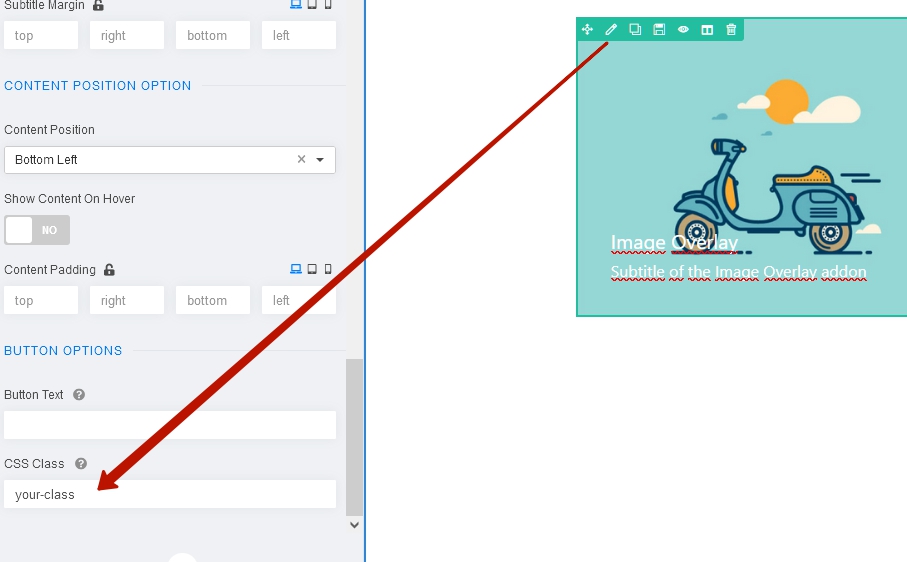
Add some your own class name here.
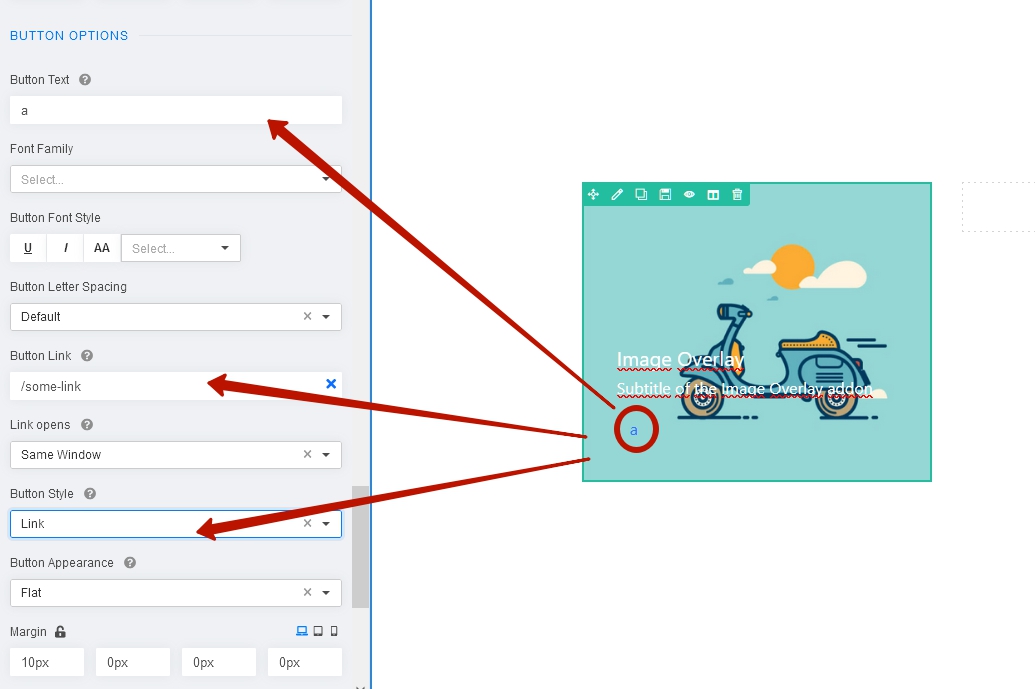
 Type some semantic text (need for SEO) in Button Text field, add link and choose style "link".
 Use the following code (add this code in custom.css file)
.your-class .overlay-image-title {
    position: static;
}
.your-class .overlay-image-button-wrap {
    transform: none !important;
    margin: 0 !important;
    position: absolute;
    top: 0;
    left: 0;
    width: 100%;
    height: 100%;
}
.your-class .overlay-image-button-wrap a {
    font-size: 0;
    padding: 0;
    width: 100%;
    height: 100%;
}
Replace .your-class to your own class name. After that, you just need to add your own class to any other Image Overlay Addon and it will be fully clicked.

Toufiq
Accepted AnswerHi there,
Thanks for contacting us. Sorry for the inconvenience. Can you share a screenshot that you want to do exactly?
-Thanks

Paul Frankowski
Accepted AnswerHi Chris,
if you can share mock-up image or screenshot from other website (or link to it) where you've seen this effect - it will be easier for us to give you a tip/clue. As we say - one picture is worth more than a thousand words.
C
Chris
Accepted AnswerHello together,
thank you very much for your fast responses. In attachment i have two mock-ups.
I think the best description is what I like (I think easiest way would be addon 'image content', but there is no option to link the whole box, bg image and text):
- moving bg picture
- fully linkable box
- overlay and mouseover effect
Paul Frankowski
Accepted Answer- Have you played with Image Layout addon
- If above is not what you wanted, I guess you have to customize code one of our addons. This is beyond support (Support Policy rules).
Pavel
Accepted AnswerHi Chris. I am not an employee of Joomshaper, so it does not limit me the company's policies. If you provide a public link to your page, I could help you.
Image Addon can be configured via CSS with the title location as you need and complete clickability. Also concerns the Image Overlay Addon. I can be wrong, but I do not think that the carousel is suitable for your task from the point of view of UI.
C
Chris
Accepted AnswerHello Pavel.
Thank you very much for your support.
The Link is http://team-englert.de
I published the page 'home', there you can find my boxes. :-)
Thank you very much.