

Move Blocks Of Menu Items And Logos.
P
Pinella
Hi,
I would like to move the menu item block to the right by about 80 / 100px as indicated: https://prnt.sc/1y34yi5
contextually I would like to move the logo block to the left about 80 / 100px as indicated: https://prnt.sc/1y35j27
I believe the solution is via bootstrap.
Website: http://dentrobase.sitoweblab.it/
Can you help me?
Thanks, Pinella
3 Answers
Order by
Oldest

Ariba
Accepted AnswerHello
Thank you for your query.
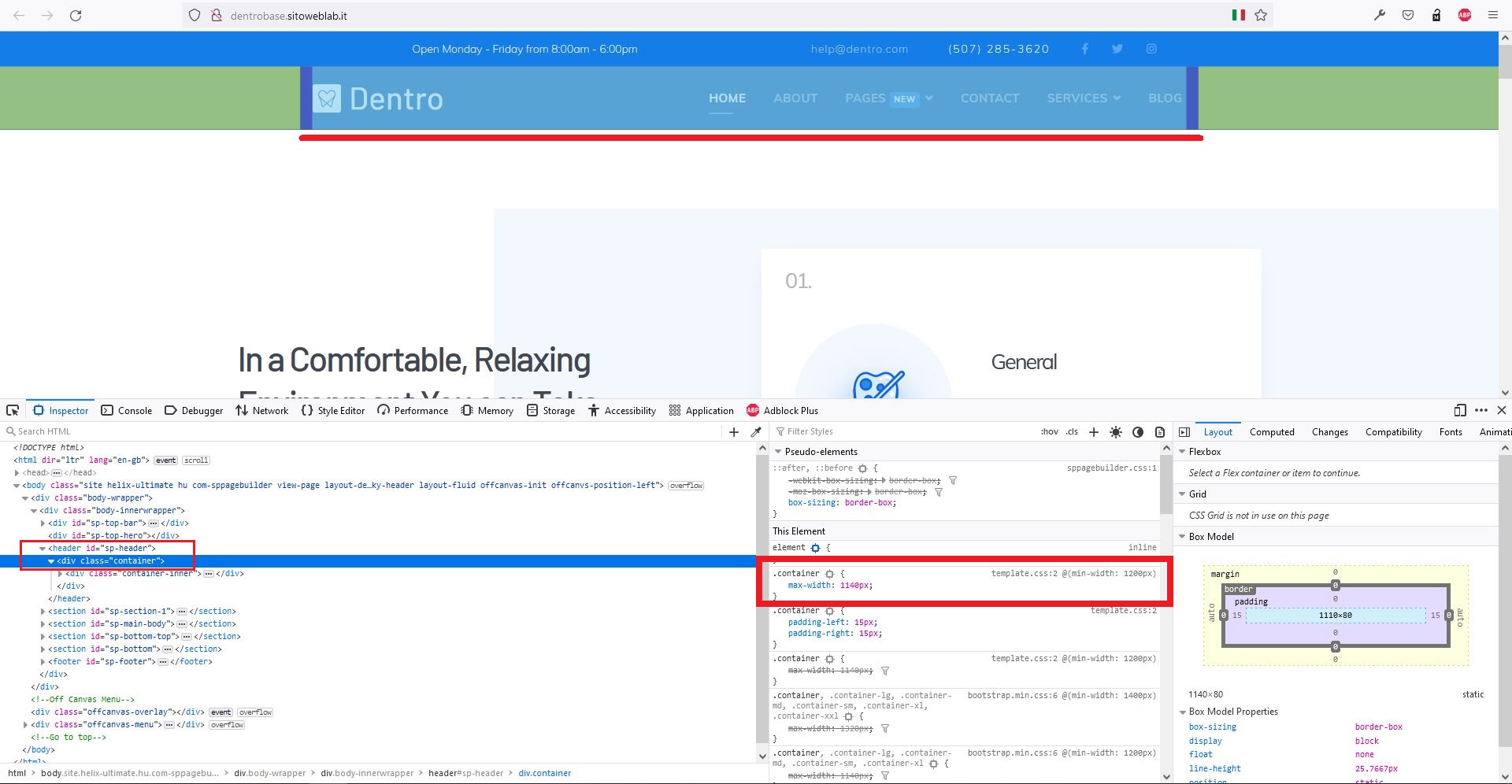
Please check the screenshot below. If you want to move them left and right, you need to increase the width of the container inside sp-header. It is set to 1140px by bootstrap. You will need to override this and give it a larger value.
P
Pinella
Accepted AnswerHi,
but in which area can I increase this value in the template? I mean in which template file can I change this value indicated by you?
It is set to 1140px by bootstrap, what value do you recommend to apply for what I want to do?
Thanks, Pinella