

Menu Changed Upon Update..
B
Bob
Greetings, I am using the meganic template on 4 sites. Since the last updates the menu drop downs have a white background as expected except now the text link is also white, it was black. Here is a link to one of the sites. Roll over "home" you will see the white background and what seems to be no text link, roll over it and it turns dark. https://jobs610.com
I am using the "default blue" template. This was fine prior to update? Help, need to get the black text link back on the drop downs Thanks, Bob
20 Answers
Order by
Oldest

Ofi Khan
Accepted AnswerHello Bob
I have used this CSS to Template Options -> Custom Code -> Custom CSS
.sp-megamenu-parent .sp-dropdown li.sp-menu-item>a {
    color: #252525 !important;
}
It is okay now. Please check.
Best regards
B
Bob
Accepted AnswerI have one link with 2 drop down links. Notice you can't see the test unless you roll over it Thanks again, Bob
Ofi Khan
Accepted AnswerI am sorry, I could not find the issue. Please share a screenshot of your issue to understand it better.
B
Bob
Accepted AnswerJust sent you a screen shot via email.
Here is a link to the screen shot http://pamspress.com/jobs717.jpg Thanks, Bob
B
Bob
Accepted AnswerCan't attach image. Go to jobs717.com
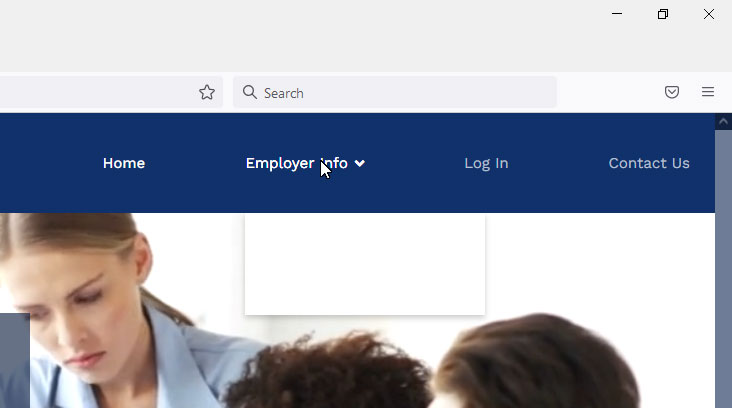
You will see a link that says "employer info" on the main menu. when you roll over it only a white roll down box comes down. If you roll over the drop down white box you will see the links but not till you roll over them. Your "insert image" on this fourm does not let you upload an image? So I sent it via email
They need to be black on roll down and not white as they are now? Make sense Thanks, Bob
Ofi Khan
Accepted AnswerPlease use this CSS to Template Options -> Custom Code -> Custom CSS for black color
.sp-megamenu-parent .sp-dropdown .sp-dropdown-inner{
    background: #000;
}
For the header color use this CSS
.sp-megamenu-parent .sp-dropdown .sp-dropdown-inner{
    background: #10316B;
}
B
Bob
Accepted AnswerHi Ofi Khan ,
Almost there. I can now see the drop down roll over, excellent!
Now when you roll over the drop down text link the text turns to the blue back ground and appears to disapear. When that text which is white is rolled over should see a lighter color. Take a look, roll over the drop down text and it works but you cannot see it when the mouse is on it?
Also I just noticed if you look at the site link there are 2 drop down links under "employers info", and the drop down links are Exibitor Registrations and Prostive. If you look at the site on the phone you cannot see the two drop down links? Fix? Same thing on jobs610.com
Big thanks, Bob,
Ofi Khan
Accepted AnswerPlease use this CSS to Template Options -> Custom Code -> Custom CSS It will change the mouse on color to white. You can use any color that you want.
.sp-megamenu-parent .sp-dropdown li.sp-menu-item>a:hover {
    color: #fff;
}
Please share your administrator access here to check the mobile menu issue. Use the Hidden Content box to share the credentials.
B
Bob
Accepted AnswerHi Ofi Khan, Below hidden is both the administrator access and the ftp access Thanks, Bob
B
Bob
Accepted AnswerAny word on the drop down issue yet? Have the same thing going on on this site as well jobs610.com I would think what you do to fix the first will also work on the second site. Thanks, Bob

B
Bob
Accepted AnswerHi Ofi Khan, I just signed into jobs717.com without issue? See private for steps
B
Bob
Accepted AnswerStanding by if you have any issues accessing.
Try using passive FTP if you have issue acessing.
B
Bob
Accepted AnswerHi Ofi Khan, Excellent!! You saved my day<G> I have the same issue on jobs610.com. If you can do your magic on that one.
See below
Thank you Bob
B
Bob
Accepted AnswerHi Ofi Khan
Any luck on fixing jobs610.com responsive link issue. Same as 717.com
Thanks,
Ofi Khan
Accepted AnswerYou are welcome. I am happy to help. Please accept the answer that helped you. It will be then easier to find the solution for the other users with the same issue. There is a button to accept answer after each comment.
Also, I have a humble request. It would be very kind of you if you can manage some moment to give us feedback on Joomla Extension Directory. This will inspire us to improve.