

SPPB Module Add-on Container When Editing Vs Rendered With HelixUltimate Template On Joomla 4
LW
LAC Webadmin
Hello!
I am editing SPPB Module and the add-on container looks good and rendering properly while editing, see screenshot:
https://monosnap.com/file/AHscOGyNtvemZ8WHb0cfTKRVyZV4UN
Notice the row width? While editing, the container div with class="sppb-row-container" which has max width of 1140px as defined in sppagebuilder.css.
The issue is when I close the editor and the module is rendered in the page the add-on container with class="sppb-row-container" disappear, it is like I enabled Fluid Row but I did not as you can see in the screen shot above.
https://monosnap.com/file/D4vXsYO5DDkJklmZZR2cQON85afnC1
Why is this happening? Is there a way to fix this?
Thanks!
5 Answers
Order by
Oldest

Ofi Khan
Accepted AnswerYes, I agree with you. I think it happens because the layouts are designed long ago. In the newer versions the layout is a bit different.
Ofi Khan
Accepted AnswerHello LAC Webadmin
Please share your administrator access and the module name here to check the issue. Use the Hidden Content box to share the credentials.
Best regards
LW
LAC Webadmin
Accepted AnswerHi Ofi,
I would love to show you my dev site but unfortunately it is behind a firewall. Since you ask to see it I tried to install a fresh vanilla Joomla 4 in my localhost with only SPPage Builder installed and HelixUltimate (Free) template. I created 2 SPPB pages and set a menu item for it then I published a SPPB Module in one of the page (About) using the prebuilt Section > Hero > Hello! I'm Leila Jackson and it does the same thing without the left and right margin.
Please test it in your end using a fresh new install so you won't think that it is an issue in my setup. I would not post a forum question or help if the issue is coming my own setup, it would not be fair you guys. I would rather report a real issue with your product and/or would make feature requests.
I have done this before the COVID with Joomla 3 setup with SPPB and Helix Ultimate (free template )and I have not encountered this issue. Since your SPPB and Helix Ultimate code are supporting both J3 and J4 so there must be an issue with the J4 code.
Thank you!
Ofi Khan
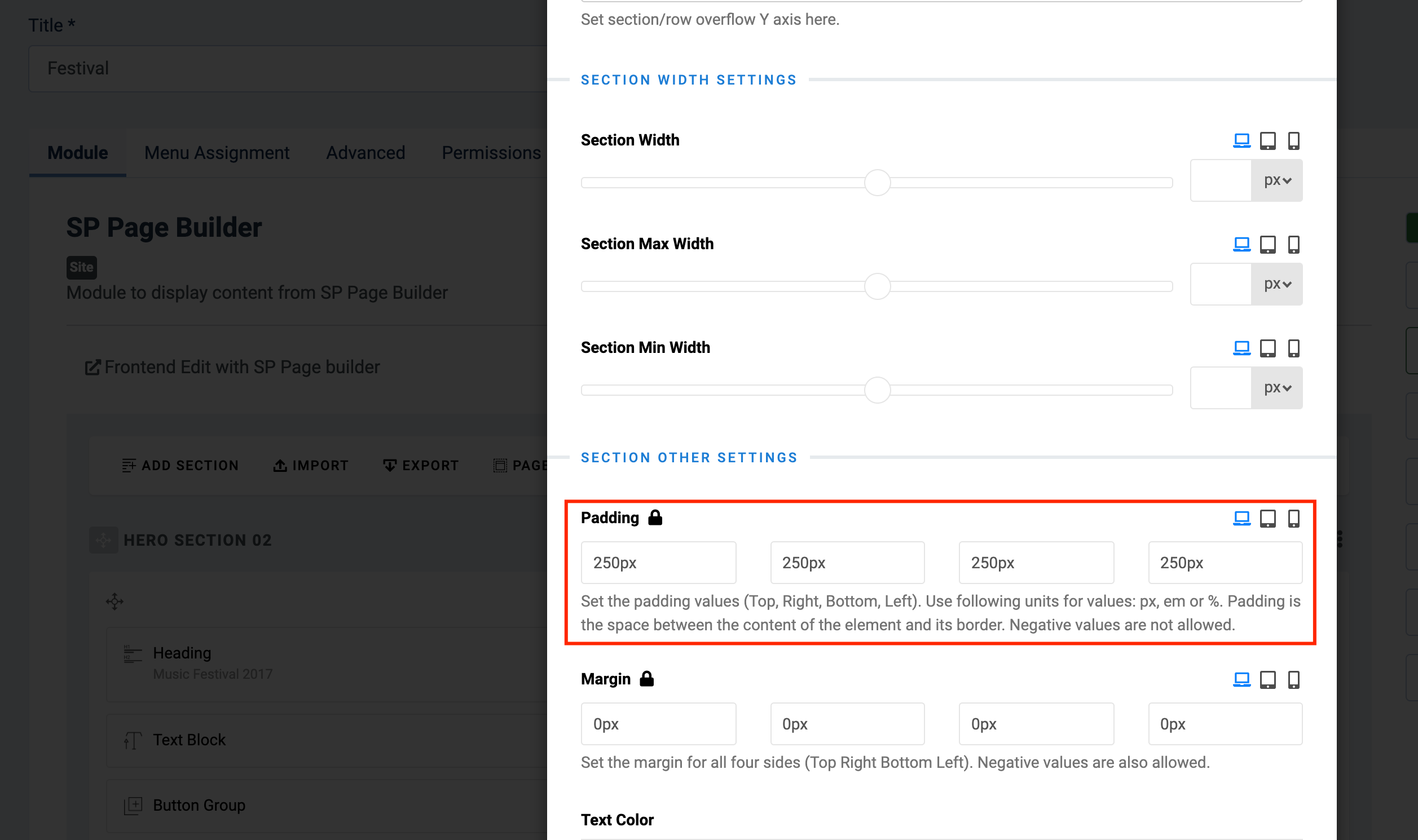
Accepted AnswerThanks for your detailed investigation. I have tested and found the issue. Please go to the module and change the padding value. Then it will show fine.
LW
LAC Webadmin
Accepted AnswerHi Ofi,
Thanks for the pointing out that settings.
By the way, why is the SPPB module behave like this by default? Like I said, if you look at the html structure when editing, there is a div with a class where the width of the section row is set just like bootstrap "container" class is. But when you go out of the editor, that container disappear.
Anyhow, I added a class "container" in the Row Section Settings and that fixed my issue. But still my question above, when someone use the pre-made layouts, it is kind of confusing. I think this is happening to some pre-made layouts only.
Anyhow, thanks again!
Jackson