

Template Error

Daniel Jubelt
Paul I accomplished what the company wanted (No Space between header and content) by making the following change: Changed
sp-main-body {
padding: 100px 0;} To:
sp-main-body { }
I tried putting the change in every custom CSS area I could find but nothing holds. It always changes back to the incorrect way. Are we supposed to rewrite the template? In the Domain name below, replace the 'www' with 'New'
Website
HTTPS://www.uniteduga.com
7 Answers
Order by
Oldest

Paul Frankowski
Accepted AnswerHi Daniel.
No space at all - should be:
#sp-main-body { padding: 0px !important; }
BTW
can you disable template preload animation... is not needed, and may harm your site speed score.
Daniel Jubelt
Accepted AnswerChanged to your recommendation and disabled preload animation - NOTHING. All my changes are gone. The space is back on all pages.
Paul Frankowski
Accepted AnswerDaniel but link which you gave me is with Wordpress site, not Joomla !
- Please send me correct URL
- Tell me where you put my CSS code?
Daniel Jubelt
Accepted AnswerThe Wordpress site is the one I have to replace. The URL is NEW.UNITEDUGA.COM. I changed the code in /home/unitedug/new.uniteduga.com/templates/shaper_helixultimate/css/template.css No mater where I put it in custom code, it would not hold.
Paul Frankowski
Accepted AnswerDaniel, Please, I told you to not edit template.css file (!), we have this same information in template documenation. You are killing me softly :[
create custom.css file inside this same folder and add there all custom CSS changes.
Paul Frankowski
Accepted AnswerI did the right thing, also to safe time (yours and mine) - I already created custom.css file with needed CSS styles.
Here:
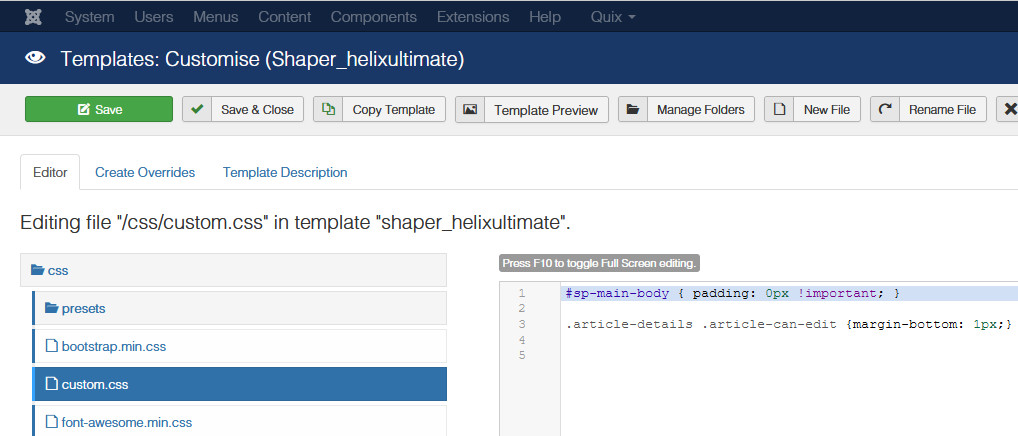
And I also removed "#sp-main-body { } " which you added in wrong place in Template Options.
And now is fully OK.

Daniel Jubelt
Accepted AnswerI see what you did and I thank you. It still makes no sense to me. When a change has to be made, you modify the code, not leave the code with an error (presumed) and make another file to correct the first file. All my life I've delt with structured programming. Website building, to me, is complete chaos. Now I can finish and get rid of Wordpress. Again, thank you.