

Menu Suddenly Aligned Wrong
AW
Anders Wiik
Hi, After updating to new Joomla version or upgrading the SP Page builder / Helix Ultimate. My main meny has been aligned to the right where it before upgrading was centered positioned. I am afraid I am not aware of how I change this back again and ask if there is someone who can help with this issue. On the link you can see the result of the upgrade: https://www.dropbox.com/sh/b0wct0ydhokrv6k/AACUEHhyNaRs-C6U_Cbm6aEga?dl=0
What can I do to fix this?
/Anders
Website
https://www.annlizcup.se
11 Answers
Order by
Oldest

Paul Frankowski
Accepted AnswerHi,
hopefully easy to fix. One of solution:
- Here: templates/shaper_helixultimate/css/custom.css
- Add the below custom CSS,
- then clear browser cache deeply. Tip was also inside Helix documenation.
#sp-menu .align-items-center.justify-content-end {
    justify-content: center !important;}
Ariba
Accepted AnswerHello
Thank you for your query.
Please go to "Template Options", from "Basic" settings select "Fullwidth Center" as the header and see if it helps.
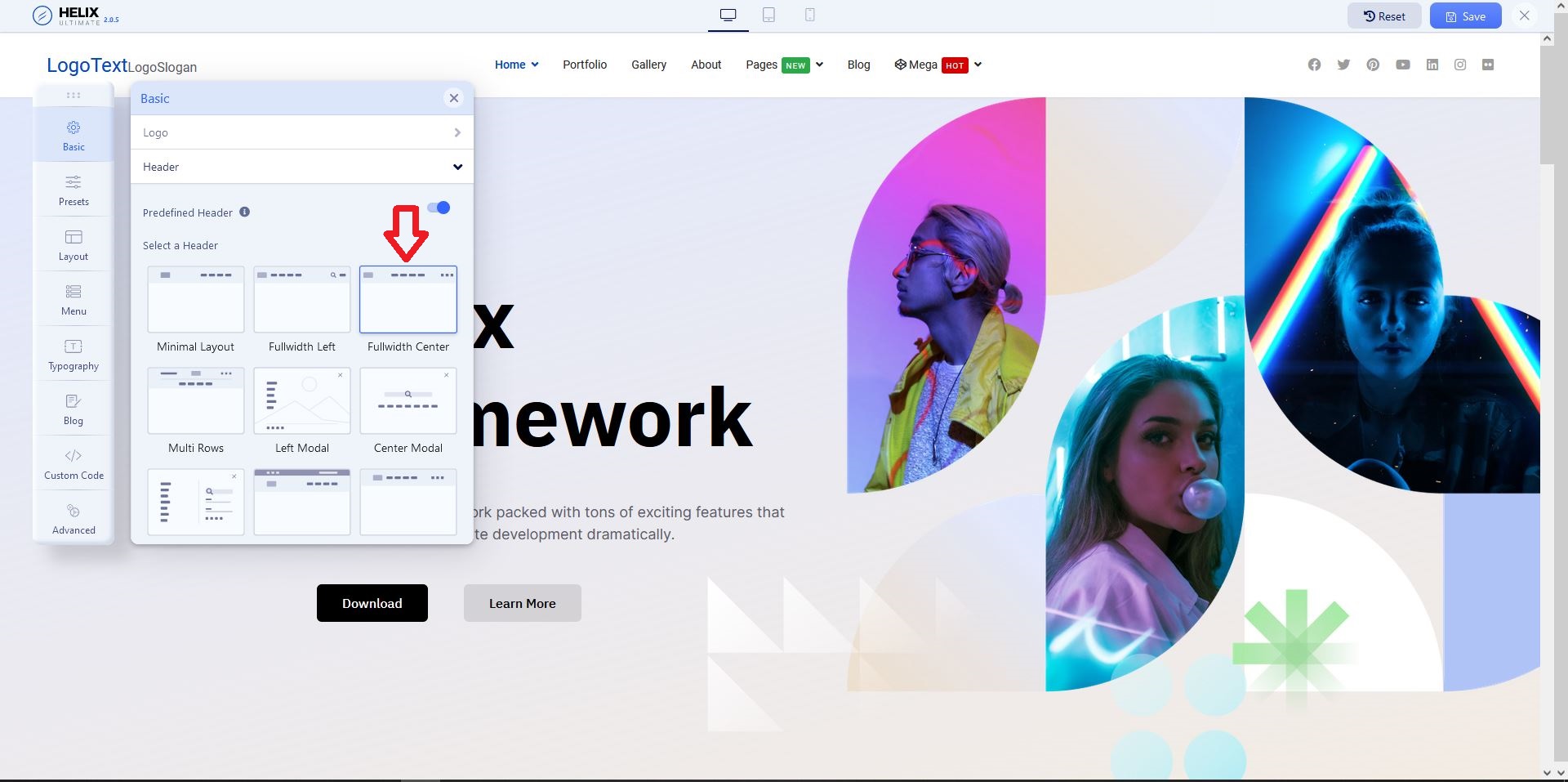
AW
Anders Wiik
Accepted AnswerSorry, Tried both and still the same result. Menu aligned to the right.
Seems lite more css code has vanished. Links that are active are suddenly black which was white before...
/Anders

AW
Anders Wiik
Accepted AnswerSorry again, I was wrong. It is centered. Must have been cache.... The menu is with transparent background and when scrolling down it turns white but now it is not 100% width as before. See picture: https://www.dropbox.com/sh/b0wct0ydhokrv6k/AACUEHhyNaRs-C6U_Cbm6aEga?dl=0
- active meny item is black. Should only be black when white background.
Paul Frankowski
Accepted Answeradd also this:
.sp-megamenu-wrapper.d-flex {
    width: 100%; justify-content: center;}
AW
Anders Wiik
Accepted AnswerChanged this as well but have still design difference since before upgrading.
AW
Anders Wiik
Accepted Answerwhen scrolling down on the page the menu should change color and have the width of 100% of the page size. This has changed and I demonstrate it in the picture: https://www.dropbox.com/sh/b0wct0ydhokrv6k/AACUEHhyNaRs-C6U_Cbm6aEga?dl=0
Seems to be that custom css has been overwritten when the upgrade took place.
Paul Frankowski
Accepted AnswerSorry, my mistake I forgot to paste you also this line
#sp-header.header-sticky .sp-megamenu-parent {
    width: 100%; }
AW
Anders Wiik
Accepted AnswerHi. I have added this lines of code:
#sp-menu .align-items-center.justify-content-end {
    justify-content: center !important;}

.sp-megamenu-wrapper.d-flex {
    width: 100%; justify-content: center;}

#sp-header.header-sticky .sp-megamenu-parent {
    width: 100%; }
Still when scrolling down the menu bar is not 100% wide.