I want a position above the menu in order to display email, phone, working hours. i will show what i mean in the hidden content below. I show you the website. In image 1 i am showing the where i want the the above details and on image 2 i will show the module i would like to make smaller. Moreover what exaclty is that module where can i find it (its name). Also what is the smaller text that is in that module?
Staff replied
Helix Framework
Position above menu and make a module smaller
4 replies

Paul Frankowski Senior Staff
4 years ago
· edited
Hi,
Not all pre-made headers have top-bar position, in that case you have at least two options:
- Use premade header that already have top-bar (with top1 and top2 positions)
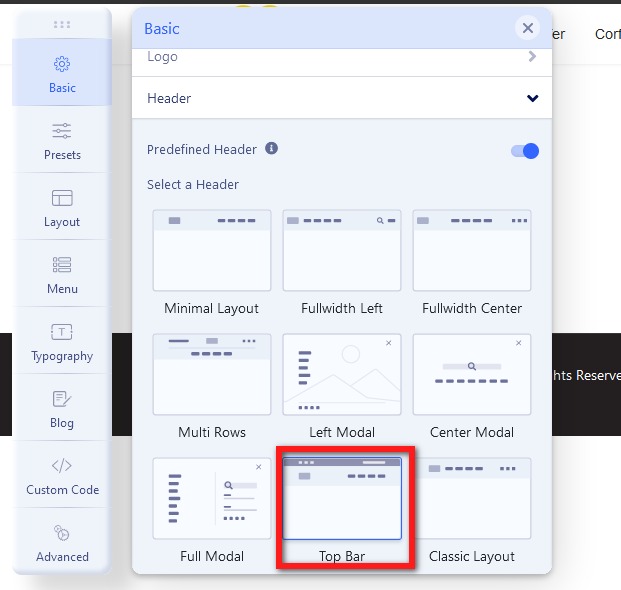
OR
- Disable predefined header and create your own custom header and top-bar position >> https://www.joomshaper.com/documentation/helix-framework/helix-ultimate-2/custom-header
Athanasios Ioannidis Asked this
Do have in landio template?
Paul Frankowski Senior Staff
4 years ago
· edited
About Question #2:
You already have set padding top and bottom inside that area inside custom.css file (line 2247)
.sp-page-title {
  padding-top: 145px;
  padding-bottom: 145px;}
Change values instead of 145px use 90px etc.
Your template is from payo-themes_com so support should be from them about template redesign.
If it's you, you forgot that you defined that extra space.
Paul Frankowski Senior Staff
4 years ago
· edited
Do have in landio template?
Don't ask me, ask payo-themes_com support from where you got this template ;)
They used our Helix framework, but template its theirs. If it was based on Helix Ultimate our guides should help. But customization is on your hands.
Log in to reply.