Is there a way to downgrade the Page Builder 4 to the previous version 3.8.? - Forum | JoomShaper
Staff replied SP Page Builder

Is there a way to downgrade the Page Builder 4 to the previous version 3.8.?

Asked by Saam 4 years ago Last activity 4 years ago

I have been working on a website which is almost done and I thought that updating to the latest version would have been the best thing to do but it has become a nightmare.

There is no way I can edit my Slideshows and Modules at the Backend. They continue appearing and disappearing and I have no control over anything again.

I can not just get along with the Frontend editing with multiple popups.

The whole thing is driving me crazy and the only alternative for me right now is to downgrade back to version 3.8.8 if possible or find another Framework or Page Builder to build the rest of my websites.

I can not continue with the rest of my website with this version 4. SORRY..!!

So any solution?

Thanks in advance.

21 replies

Mehtaz Afsana Borsha Staff
4 years ago · edited

Hi

Apology for your experiece with our product. You can downgrade it but make sure you have backup before doing any changes. You can find out SPPB 3.8.8 from here( please scroll down)

https://www.joomshaper.com/downloads/extension

-Regards.

Saam Asked this

Thanks so much for the link and is there any other thing I should take care of apart from Backup before?

Thanks again in advance.

Saam Asked this

I have successfully downgraded but the only issue that pop up is, my Welcome Page (Home) page is reporting this error: Attempt to assign property "row_id" on null when I tried to open the page and the whole page disappeared with only the Title of the page but other pages are still there without any problem and I can continue to edit.

There is no option for Add New Row, Import, Page Templates or even ADD SECTION etc.

Is this error a serious problem or I can just ignore and create a new Welcome Page from scratches?

Saam Asked this

404 Error:
Attempt to assign property "row_id" on null

Can this error be fix..? I am not really sure whether this error has something to do with the Update to Version 4 because after the update the Welcome Page refused to load but there was no error and I lost control of editing my Pages from the Frontend. But I am really happy that at least the Downgrade went on well with this "little" problem and I hope that it's not a big problem.

If this can not be fix then, is it something I should be worried about?

Your advice please before I continue.

Thanks again in advance.

Paul Frankowski Senior Staff
4 years ago · edited

@Saam

If I may add important tip.

If you made downgrade from SPPB 4.0 to SPPB 3.x - some pages that you edited using SPPB 4.0.x can be damaged becuase of different code structure between those. So I strongly recommend to recover database from the day before of SPPB 4.x installation. Or at least recover only table with prefix_sppagebuilder from that backup.

We cannot fix it, so this is the only way.

Saam Asked this

Hello Paul,

Thanks so much for the tip, it's very reasonable.

Let me try to recover from my Database backup and see whether that resolve the issue and I shall get back with my feedback.

Thanks once again.

Saam Asked this
4 years ago · edited

Hello Paul,

Update:
Thanks so much again for your kind tips. I Drop the whole Database with phpMyAdmin and Restored from a three days down Backup before the update to SPPB version 4 and everything went well with any problem. Apart from that I have my Pages back and only some few editings to make.

But one thing I realized after the Downgrade was when I tried to create a new Menu when my Welcome page won't load, there was this strange line under the Menu Item Type-> SP Page Builder:

COM_SPPAGEBUILDER_DASHBOARD_DEFAULT_TITLE
COM_SPPAGEBUILDER_DASHBOARD_VIEW_DEFAULT_DESC

Screenshot:
https://prnt.sc/wg0OC6IwdTyh

But after the Database restore it's still there. What is it?

What does this message mean and how can I resolve it.? Because it does not used to be there.

Thanks in advance.

Paul Frankowski Senior Staff
4 years ago · edited

Maybe files from 4.0.x left that's why Joomla trying to load that view. I mean from: administrator\components\com_sppagebuilder - there should be only files from SPPB 3.8 if possible.

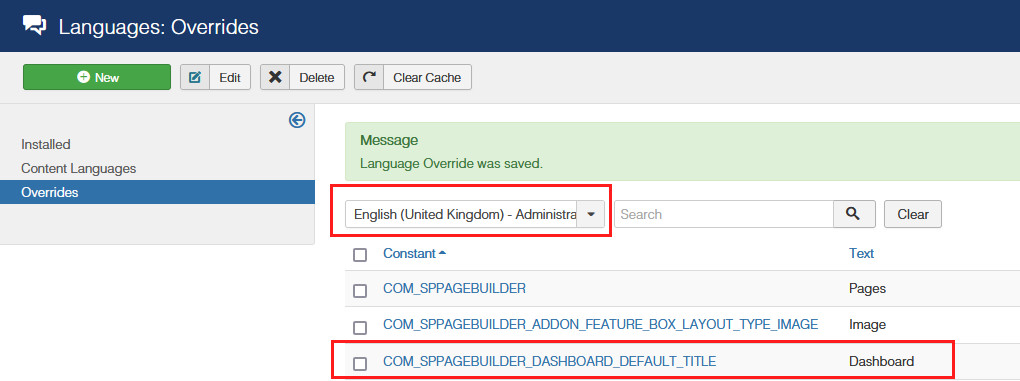
You can just override Langugae phrases by now and forget. You use only Pages anyway.

COM_SPPAGEBUILDER_DASHBOARD_DEFAULT_TITLE = Dashboard COM_SPPAGEBUILDER_DASHBOARD_VIEW_DEFAULT_DESC = SP Page Builder Dashboard

foto_8815_2022.jpg

Saam Asked this

Hello,

Thanks once again for your help.

The issue is not about language override but rather on creating a new Menu.

Main Menu-> New-> Menu Item Type -> Select-> SP Page Builder-> and on clicking the SP Page Builder then appear:

COM_SPPAGEBUILDER_DASHBOARD_DEFAULT_TITLE
COM_SPPAGEBUILDER_DASHBOARD_VIEW_DEFAULT_DESC

Page

SP Page Builder

Instead of the Page and the SP Page Builder just as it is in the screenshot.

Screenshot: https://prnt.sc/wg0OC6IwdTyh

Please there is something not right and I need a solution?

Thanks again in advance.

Paul Frankowski Senior Staff

As I said before it's code from SPPB 4.x.

please delete that folder: components\com_sppagebuilder\views\dashboard

it should help to remove not needed in SPPB 3.x menu item.

Log in to reply.