How to make whole featurebox clickable - Forum | JoomShaper
Solved SP Page Builder

How to make whole featurebox clickable

Asked by Remco 5 years ago Last activity 4 years ago

Good morning all,

I have a question. I have a page with functionalities on it. They all link to their own pages. Now only the icon and title are clickable. I would like the entire area to be clickable. See also the image below. How do I get this done? I hope someone can help me with this soon? Thank you in advance.

This is the page: https://www.huisstijlmanager.nl/functionaliteiten

Best regards,
Remco

Accepted answer

Marked as the solution
Remco Asked this

I solved it with custom html and css:

<a href="/functionaliteiten/templates" class="panel">
<i class="fas fa-edit"></i>
<h4>Templates</h4>
<p>In de Huisstijlmanager kun je talloze templates opnemen.</p>
</a>
.panel {
    box-sizing: border-box;
    padding: 20px 20px 10px 20px;
    background-color: white;
    border-radius: 0px;
    display: block;
    text-align: center;

}

.panel:hover {
    background: #ffffff;
    box-shadow: 0px 0px 30px 0px rgba(0, 0, 0, 0.2);
}

.panel .fa, .fas:hover {
    color: #5c79ba !important;
}

.panel h4 {
    margin-top: 15px;
    margin-bottom: 10px;
    color: #0b3754;
}

.panel h4:hover {
    color: #5c79ba;
}

.panel p {
    color: #0b3754;
}

.panel i {
    font-size: 48px;
    color: #e84277;
}

Pretty time consuming, so hopefully this functionality will be included in a future update.

Regards,
Remco

12 more replies

Ofi Khan Staff

Hello Remco

You can customize the addon to do this. Or use Raw HTML addon to make the feature box by yourself. Sorry, we do not provide customization support.

Best regards

Remco Asked this

Hi,

I know, but this is a forum. So there are also other people on it and not just you as support employees. Maybe someone else has an idea how I can do this with css or custom html, because I don't know.

Best regards,
Remco

Remco Asked this

By the way... It might be a good idea to include this as a feature request in a future update. Because in terms of usability and UX, it is in many cases desirable to make a complete block clickable ;)

Let me know what you think.

Best regards,
Remco

Ofi Khan Staff

Sure, any user can help here. Okay, I will share the idea with the developers as a feature request.

Pavel

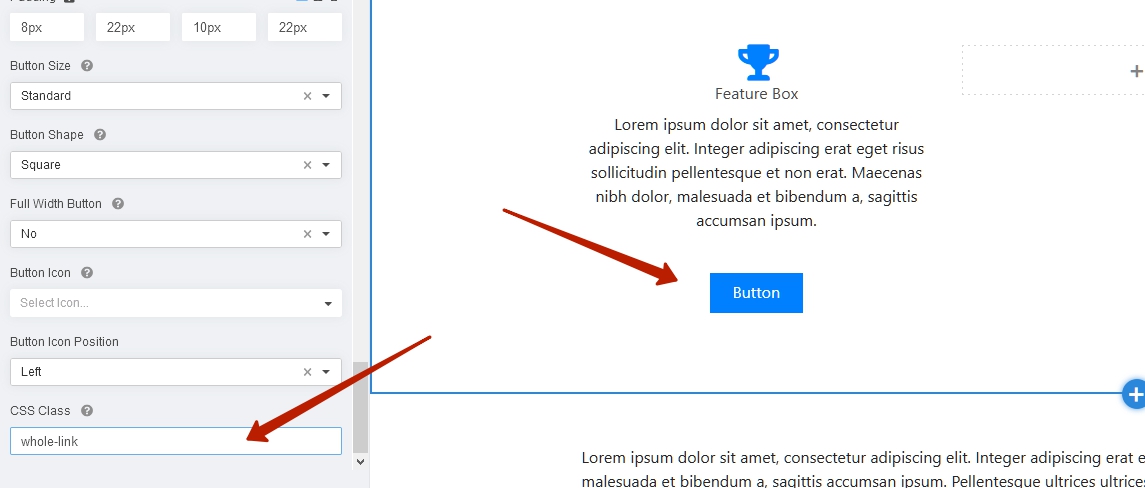
Hi Remco. Add class and custom style button with link.

Use the following code.

.whole-link {
    position: relative;
}
.whole-link .sppb-btn-custom {
    background-color: transparent !important;
    padding: 0 !important;
    font-size: 0 !important;
    position: absolute;
    top: 0;
    left: 0;
    width: 100%;
    height: 100%;
    margin-top: 0 !important;
}
Al

Hi,
please tell, where this code has to be placed exactly.
Thanks in advance.
Regards

Dishon

Hi, Pavel. But Feature box addon is without button or am I miss something?

Pavel

Hi. Start type something and you will see button and its settings

Drew

@Pavel

Thanks for this. Exactly what i needed!

I am having difficulty removing (what i think is focus) the blue line arround the feature box
when it is clicked (dont think this is active link as it remains after release).

Any ideas on how to achieve this would be appreciated!

Log in to reply.