
Dear the template of the following link https://www.joomshaper.com/joomla-templates/politicas does not work, the template file, if the header is changed to the one with the social networks on top in the top 1 and top 2 positions, they do not come out, also there is no documentation where you can see the configurations if only the template is installed
Solved
Templates
policy template problem
Asked by Carlos Miguel Soria
5 years ago
Last activity 5 years ago
Accepted answer
Marked as the solution
Rashida Rahman Staff
Hi,
Really sorry for the unwanted delay, but happy to see you have sorted things out!
Regards
8 more replies
Rashida Rahman Staff
Hi,
Thanks for contacting us.
Basic settings don't have any demo content, only some very basic styles.
However, I can suggest you install on TEST sub-domain quickstart to see how all was made or you can install on your localhost.
So on your working domain, you can install :
-
Template package
-
SP Page Builder Pro
and recover only those areas from the demo which you really need.
Here is how to reuse:
https://www.joomshaper.com/blog/how-to-reuse-custom-designs-in-sp-page-builder
If you want you can download the template's basic settings and open it. Copy the code and put it in the template Import box then click on Import.
Note: Path towards Import Settings:
Extensions>Templates>Styles>
Click on your current default template name then choose Template Options.
Then find Import settings within the Advanced tab.
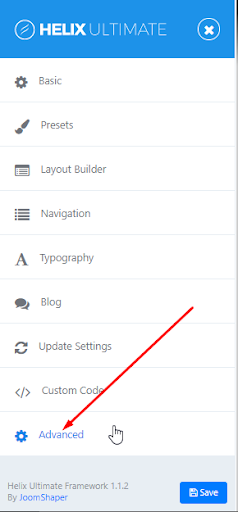
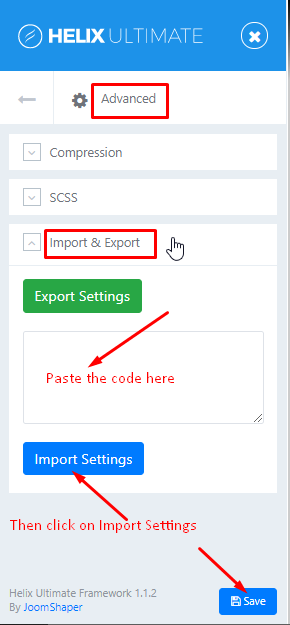
And, the following documentation will help you understand better about the Layout and how to create a custom header:
https://www.joomshaper.com/documentation/helix-framework/helixultimate/layout-builder
Hope this helps!
Best Regards
Carlos Miguel Soria Asked this
Dear importing the code, I have already done it, what does not work is the option of the layout builder, when I want to select the header that has the icons of social networks on top, it does not accept it, also even if I disable the predefined layout options and create the positions, the icons do not appear. And I am working on a server, php version 7.3
Carlos Miguel Soria Asked this
Dear, I can send you the accesses so that you can see that the header part of the templates does not work if you do not install them from the Quickstart
Rashida Rahman Staff
Hi,
You mean you have tried to create a custom header too?
Did you follow the video tutorial of creating it?
So the top1, top2 position doesn't show up? Actually, you need to publish modules in that positions to appear.
If yes, you can send me your Joomla admin access to check it.
Regards
Carlos Miguel Soria Asked this
Dear, the social networks section and contact information of the staff were activated and they were assigned to those positions that were created manually but still do not appear
Rashida Rahman Staff
Hi,
Would you please give me your Joomla admin access through the Hidden content to check the issue?
Best Regards
Carlos Miguel Soria Asked this
Ok ready send the accesses I just want the X to appear in the off-canvas menu so that the user can exit the menu
Carlos Miguel Soria Asked this
Dear, I already solved the problem I had
Log in to reply.