
Hi, it seems is not possible to delete images of the products from backend. https://capture.dropbox.com/7MoTV8ZHqkT7Pgxc
Thanks
Solved
EasyStore
Cannot possible to delete images from product
Asked by Andrea
2 years ago
Last activity 2 years ago
Accepted answer
Marked as the solution
Paul Frankowski Senior Staff
2 years ago
· edited
As I promised I talked with our developer, the problem is on your server side.
Your NGINX server disallow delete method :/
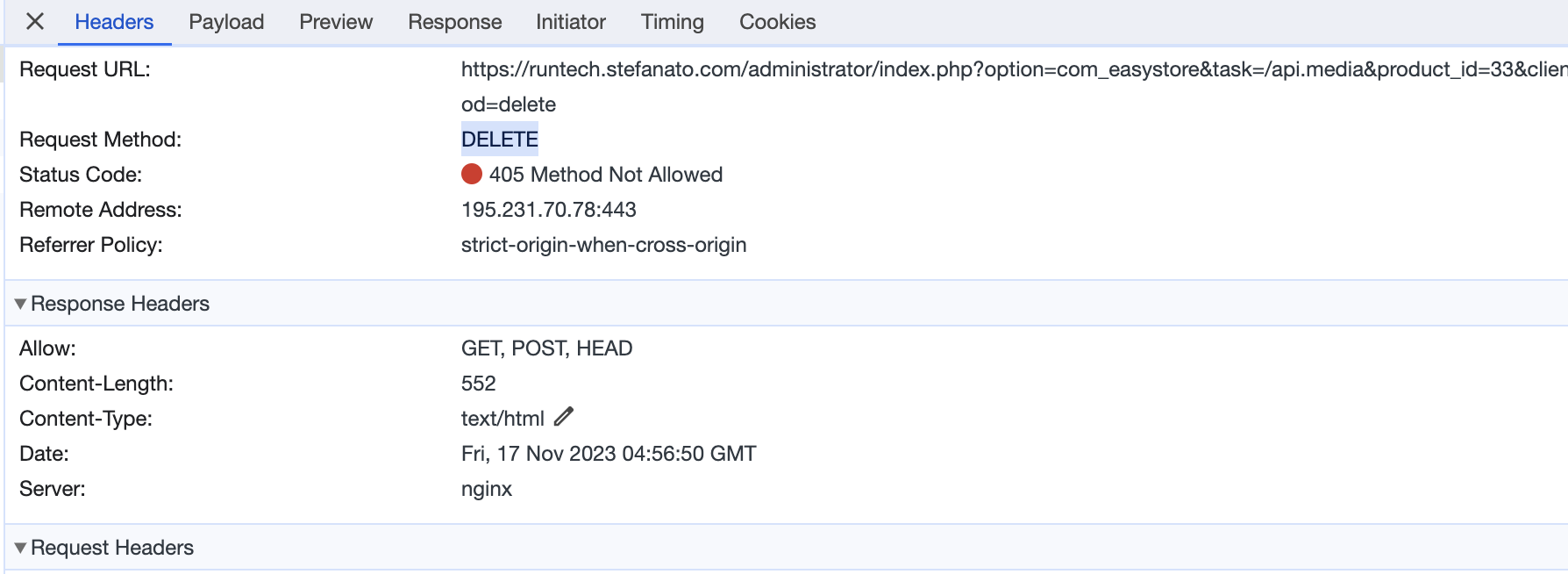
please contact with Hosting Support and ask them to enable/add "DELETE" method for NGINX. It's beyond us, we cannot change that in Joomla or component settings.
9 more replies
Paul Frankowski Senior Staff
2 years ago
· edited
Hi Andrea,
indeed that is a bug, we will fix it in next version. By now you can delete that image by:
- file override with different image (use that same filename and file path location)
- Or, by PHPMyAdmin - Database manager
Andrea Asked this
Ok, fine.
Thanks
Andrea Asked this
Hi,
any news about the new release with fix ? I need to add many products, and it's not very practcal use the component with this limitation.
Thanks in advance
Regards
Paul Frankowski Senior Staff
If you have EasyStore 1.0.3 it should work. Please try from different browser, I noticed that uBlock may lock that "delete" feature.
Paul Frankowski Senior Staff
2 years ago
· edited
I will ask tomorrow our developer, becuase since Friday we couldn't reproduce that issue on our websites.
Andrea Asked this
Hi,
I have tried to install it into 2 different hostings (OVH and Aruba) unfortunately the provider does not allow to change the standard server configuration.
I have also a dedicated server but also it does not allow the DELETE method by default: I'll try to enable it...
Andrea Asked this
Solved: added DELETE method on NGINX.
Thanks. Bye
Paul Frankowski Senior Staff
We delivered all info that we could, I am glad that you was able to install/enable that.
Please mark topic as solved.
digitalmaster
FYI, for anyone having this problem, you can edit htaccess and add the following and it should fix it:
<Limit GET POST HEAD PUT DELETE OPTIONS>
Require all granted
</Limit>
Log in to reply.