EasyStore: Stripe payment issue - click Pay, not sent to Stripe but Order email generated - Forum | JoomShaper
Staff replied EasyStore

EasyStore: Stripe payment issue - click Pay, not sent to Stripe but Order email generated

Asked by Eleanora 2 years ago Last activity 2 years ago

Hello JoomShaper,

Using EasyStore 1.05, Joomla 5.01, PHP 8.2

Setup Stripe Manually as per the Documentation on the JoomShaper website
[the Press to Create WebHook URL button was greyed out (technically light greened out) so I couldn't press that]...

AND, when I press the Pay button, it spins for a second and about 10-15 seconds later, I receive an order email but I never get sent to Stripe for payment!

;(

HELP, can't process ANY payments!

Sincerely,

E.

30 replies

Toufiq Senior Staff

Hi there,

Thank you for reaching out, and I apologize for any inconvenience caused by this oversight. I have checked your issue and tried to solve the issue. But, i need the developer team assistance. I will get back to you soon.

Best regards,

Toufiqur Rahman (Team Lead, Support)

Eleanora Asked this

Hello Toufiq,

Thank you - we are dead in the water as you can see so please resolve this as quickly as you can.

Thanks again,
Sincerely,

E.

swemmel

An order is sent to the customer as soon as he/she hit the Pay-button. It does not matter what the return-value of the payment is (Paid, Failed, Cancelled, etc.).

I mentioned this also to JS in this post: https://www.joomshaper.com/forum/question/29372

I hope we get a new version of EasyStore soon with all the bugs/flaws repaired.

Kind regards,
Peter

Toufiq Senior Staff

Please check now.

Eleanora Asked this

Hi Swemmel,

Yes, when I pressed the Pay button, an email arrived and it created orders in the EasyStore Orders area with Payment Status: Unpaid and Fulfilment Status: Unfulfilled.

But nothing reached Stripe which shows no transactions failed or otherwise...

:(

Hope they can fix this ASAP as well as the issues you mentioned.

Cheers,

E.

Toufiq Senior Staff

I have updated fix package. Please check now & let me know. Thanks

Eleanora Asked this

Hello Toufiq,

Thanks for the new version of the payment plugin which does indeed get us 1 step closer but it does not seem to be working properly still...

I think I might have misunderstood something or missed a steps... ;( lol

I did a transaction and it only gets 'picked up'/registered by Stripe under TEST mode, and not live mode yet, I am not in TEST mode in Stripe that I know of... My Webhook is setup and everything.

I also checked: https://www.joomshaper.com/documentation/easystore/stripe-integration-in-easystore
and do not see any mention of having to or a place to switch from TEST to LIVE mode...

So why is the transaction being processed as a TEST mode transaction?

Also, as mentioned above by swemmel, there is a incoherence in the way EasyStore handles the payment processing steps.

I put something in cart, I visit the Cart, fill in customer/address etc and I go to Pay, I receive an Order Confirmation email and then I am sent to Stripe to pay for it - once I pay with Stripe [currently stuck in TEST mode as mentioned in this message], I receive a message from EasyStore that the Order is Confirmed via this link:

https://yourdomainename.com/component/easystore/?view=payment&layout=success&Itemid=600

and You will receive an order confirmation email shortly. Except I don't [probably because I received it too early in the process].

What it should say if you want to keep this concept of Order Confirmation email before payment is a Order Payment Confirmation email after payment...

P.S.: I also do not see how to make a multi-lingual setup for EasyStore, currently the main focus is Italian so I am putting everything I can get my hands on in Italian but we want to be able to have Italian and English and as mentioned in other forum posts, that seems very difficult to not possible.

Toufiq Senior Staff

I have shared your information to our developer team. I will get back to you soon. Thanks

Eleanora Asked this

Hello Toufiq,

10 more hours have passed and still not fixed. Almost 4 days since the problem was first reported.

We are having a fund-raising type event this Sunday, is there ANY chance that it will be fixed by then?
It will be detrimental to us if it isn't.

Thank you for making this a priority.
Sincerely,

E.

Toufiq Senior Staff

I deeply apologize for the extended delay, and I understand the urgency with your upcoming event this Sunday. I want to assure you that resolving this issue is our top priority. Our team is working diligently to expedite the resolution. We are trying to figure out the issue.

I truly appreciate your patience and understanding in this matter. If there are any updates or progress, I will make sure to keep you informed promptly.

Thank you for your continued patience and cooperation.

Toufiq Senior Staff

I have checked your checkout problem & it works fine. You need to use the production key of stripe. Now you are using test mode key of stripe payment system. Thanks

https://prnt.sc/joOw1VuqQ0zg

Eleanora Asked this

Hi Toufiq,

This a bit infuriating... either I have the intelligence of a 5 year old [possible but maybe unlikely] or either your documentation or your explanation is not good enough.

In the EasyStore Stripe Payment area, there are 4 fields:

Title: Stripe

Stripe Test Secret Key: sk_test_5xxxxxxxxxxxxxx [very long key]

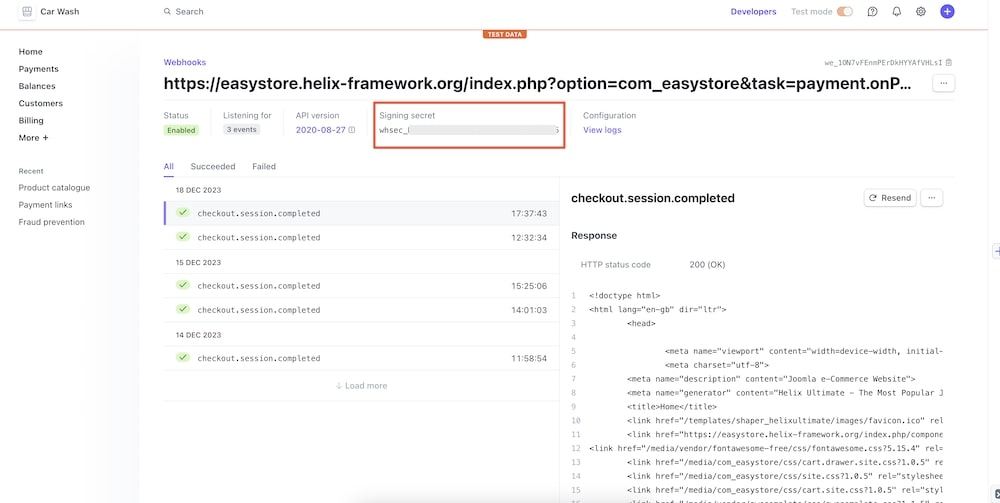
Stripe Webhook Secret Key: we_1xxxxxxxxxx [webhook ID as per your documentation].

Payment Instruction: You will be redirected to the secure Stripe payment portal to complete your purchase. After the payment is processed, you will be redirected back to this website.

I have entered as I should the Webhook Secret Key as per your documentation BUT even though in the Stripe interface I am NOT in the Test Mode environment, EasyStore + Stripe payment method is INDEEED going to TEST MODE as I mentioned in the message #141652 from 18 hrs ago.

So can you PLEASE either tell me WHAT I am doing wrong?
[do I need to leave the Stripe Test Secret Key field blank or something?!] or have it fixed ASAP.

THANK YOU very much,
Sincerely,

E.

Toufiq Senior Staff

Developer team checking your issue. Thanks

Eleanora Asked this

Hello Toufiq,

I had hidden the EasyStore shopping cart for the event, but I have removed the display:none so that now it appears again :)

Thanks,
Sincerely,

E.

David Collado

Im having the same issue on my store as well. This product does not work out of the box for stripe it seems. Can you please check my site as well and also figure out why unpaid orders are being counted in the analytics and not as a cancelled order?

Why would you launch this product with so many issues?

Log in to reply.