Hi,
When I choos voor extern URL en then for a item of a menu head, i can still click on it.
Normaly when you hover over the head of the menu nothing is happing, but now my cursor changed in a hand icon.
Kind Regards,
Hi,
When I choos voor extern URL en then for a item of a menu head, i can still click on it.
Normaly when you hover over the head of the menu nothing is happing, but now my cursor changed in a hand icon.
Kind Regards,
Hi,
Tip:
If you use External link as menu item -- inside URL link use: #
then it would not redirect to home page! I talk about "INFO" menu item.
2nd tip: To hide link hover behavior (also mouse icon) you have to use custom CSS.
But I don't think it's recommened for "INFO" menu item. People should know that this is active position, but remember about tip #1.
Hi,
Yes, I use already the #. But it isn't so nice because you see the hand icon on the header.
So, can you send me the custom CSS to avoid the hand-icon?
Kind Regards,
Serge
first you have to add class name to that menu item, for example, add name: hide
Hi,
I know CSS but I never used it on Joomla templates.
Kind regards,
Serge
OK, have you added class name for menu item link ?
yes, from Menu item manager.
No, where do I have to ad it?
ex. #hide
Oh, ... I guess you need Joomla Course.
Step 1 and Step 2
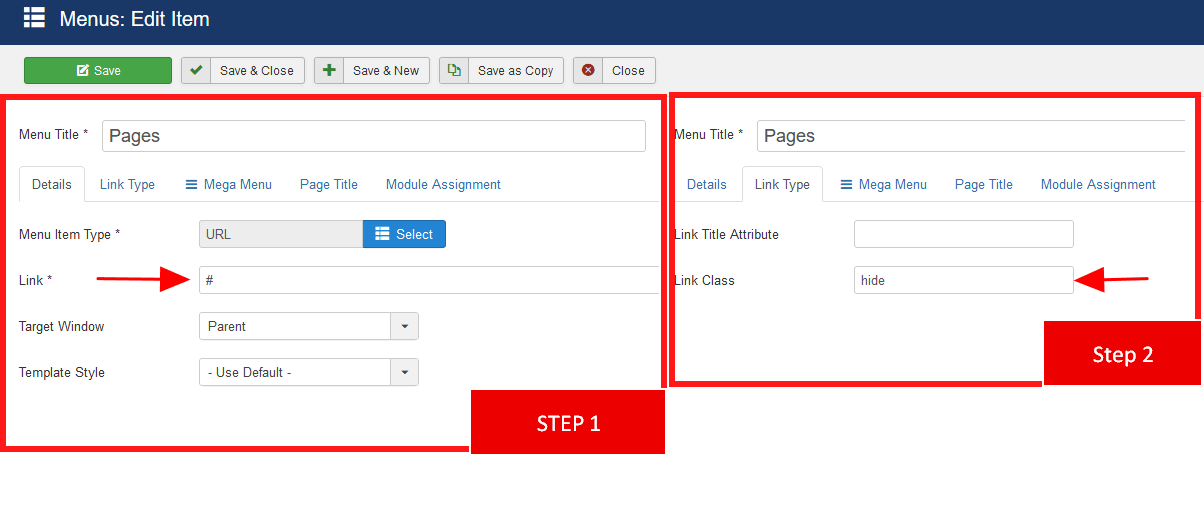
Step 3: Now use custom CSS:
a.hide, a.hide:hover {cursor: default;}
BTW
Good advice: Please do not use old modules nor plugins that loads: mootools-core.js, mootools-more.js - it cause only conflicts and problems(!) . In your case it may be: ytshortcodes. You have been warned.
That's all from my side. Whole rest is on yours now. Have a nice day.
