

3 Submenu Styling Problems On A Mega Menu With Helix Ultimate
CP
Christopher Parthier
I just started a new site and ran into some problems.
SP Page builder Pro 6.2.2 Helix ultimate 2.2.3 Joomla 6.0.1
I try to achieve the following:
The submenu items of the megamenu I created shall appear on a background that stretches from the left end to the right end of the screen just like the sections of the pagebuilder pages. I set the menu width to 100% in the template settings menu > megamenu item properties but there is a gap on both sides
Secondly I want the white background of the submenu to be a bit translucent so that you can see a bit of the content behind something like 70% opacity.
Third problem. The letters of the submenu of the megamenu are all in uppercase letters. I didn't change anything there. How did this happen and how can I change that back to normal settings?
http://www.lesparthiers.de/screenshot_megamenu.png
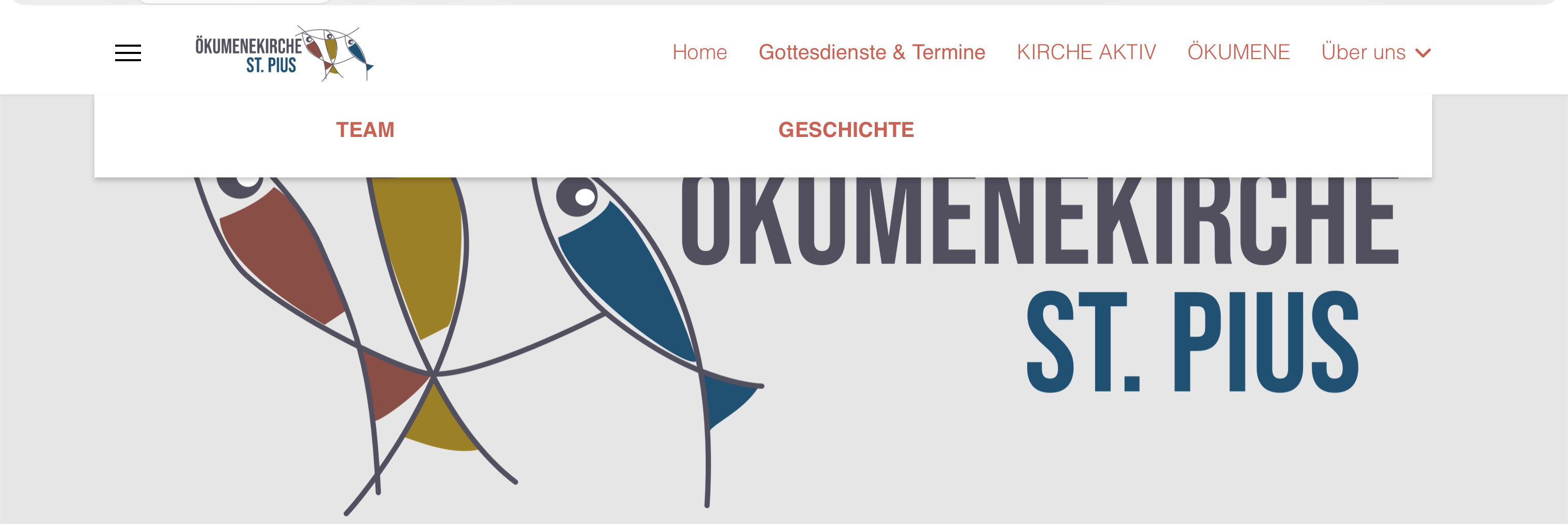
Thanks for your advice.
18 Answers
Order by
Oldest
CP
Christopher Parthier
Accepted AnswerWell not exactly, as I went down the site again the megamenu dropdown was right but all the other dropdowns now had an offset of 250px - so that was not the solution to my problem.
But I finally figured out that the positioning of a megamenu in the header only works in certain combinations with the Basic Template Settings of Helix Ultimate. I changed the Header to Minimal Layout and have (nearly) the desired look. At least now the dropdown stays within the boundarys of the 12column wide middlesection.
I also figured out why the Off-canvas menu made problems. There were a bunch of dropdown arrows missing - as soon as I changed the "menu heading" setting for the menu entry to URL with just a "#" as target the menu was fine.
I always thought that using a pagebuilder would be easier but it seems there's also a steep learning curve.

Mehtaz Afsana Borsha
Accepted AnswerHi
Thanks for contacting us and sorry for your issue, Could you please give me your site URL? So that I can check.
-Regards.
Mehtaz Afsana Borsha
Accepted AnswerHi
Do you want it like this? Then you can use this CSS in your custom.css file
.sp-megamenu-parent > li > a, .sp-megamenu-parent > li > span, .sp-megamenu-parent .sp-dropdown li.sp-menu-item > a{
    font-size: 16px !important;
        }
CP
Christopher Parthier
Accepted AnswerI'd like it to look like on this page as for the width of the submenu und the translucency: https://zukunftsprozess.kathma.de
The background of the Submenu of the Megamenu on that page stretches across the whole browser width.
but it still doesn't stretch from end to end.
As for the text styling, I just put your code into my custom CSS field of the Helix template. I set up two Mega Menus now - the first I did looks different for linked items and such that I placed just as "Menu Heading" without them being linked.
I set the Typography for Navigation to Helvetica Thin. This works for the first level of the menu but for the submenu it only works when I choose the default menu - then the text is also Helvetica Thin. When I choose the Megamenu the font changes to a) Helvetica, uppercase, 14px, weight 600 when the item is linked to a page b) Helvetica, 1.2rem (as set for general fontsize) when I set a menu Item that isn't linked to an article butr is just a "menu heading"
I'd like all levels of the menu to be in helvetica thin with 1.2rem of size without uppercase.
and wich css settings do I have to change when I want to change the colour of a module heading in bottom positions. I didn't find a setting in the helix template where I could change the color of a module heading in the bottom positions.
Mehtaz Afsana Borsha
Accepted AnswerYou can use this CSS in your custom.css file.
span.sp-group-title.sp-menu-heading {
    font-family: 'Helvetica', sans-serif !important;
        font-weight: 100 !important;
    color: #d9594c !important;
        font-size: 1.25 rem !important;
}
.sp-megamenu-parent .sp-dropdown li.sp-menu-item>a, .sp-megamenu-parent .sp-dropdown li.sp-menu-item span:not(.sp-menu-badge){
    font-family: 'Helvetica', sans-serif !important;
        font-weight: 100 !important;
    color: #d9594c !important;
        font-size: 1.25 rem !important;
}
.sp-megamenu-parent .sp-mega-group>li>a {
    font-family: 'Helvetica', sans-serif !important;
    font-weight: 100 !important;
    color: #d9594c !important;
    font-size: 1.25 rem !important;
}
I prefer you should see this tutorial and make your dropdown menu again, and change all these changes from settings.
CP
Christopher Parthier
Accepted AnswerThanks for your advice but the video needs a major overhaul as all the menu creation and settings isn't done in Joomla anymore with the latest versions but in the template style options. Video didn't help.
As for the width of the Menu stretching all across the browser - I gave up on this.
But I have the strange behaviour that the Megamenu has an offset to the left - depending on the screen resolution part of the Submenu is hidden.
Mehtaz Afsana Borsha
Accepted AnswerHi,
Could you please give me a screencast video of this issue? It will help me to understand your issue properly.
CP
Christopher Parthier
Accepted AnswerHello, thanks for coming back to me on this matter. I attach the link to the screencast where you can see that the dropdown is offset to the left and not centered on the layout as it should. On smaller resolutions part of the megamenu dropdown vanishes outside the visible screenspace.
CP
Christopher Parthier
Accepted AnswerJust reuploaded them to a Server using https:// perhaps some filters prevented the download from the other server
Mehtaz Afsana Borsha
Accepted AnswerHi
Your links are not working. Are you talking about this portion?
CP
Christopher Parthier
Accepted Answeryes, thats the problem I have with the megamenu dropdown.
CP
Christopher Parthier
Accepted AnswerThank you, adding 250px instead of 100 centers the dropdown perfectly now.