Touble with layout manager in Kidzy - Forum | JoomShaper
Staff replied Templates

Touble with layout manager in Kidzy

Asked by Miguel 5 years ago Last activity 5 years ago

Hi, I'm having a trouble with kidzy layout manager.
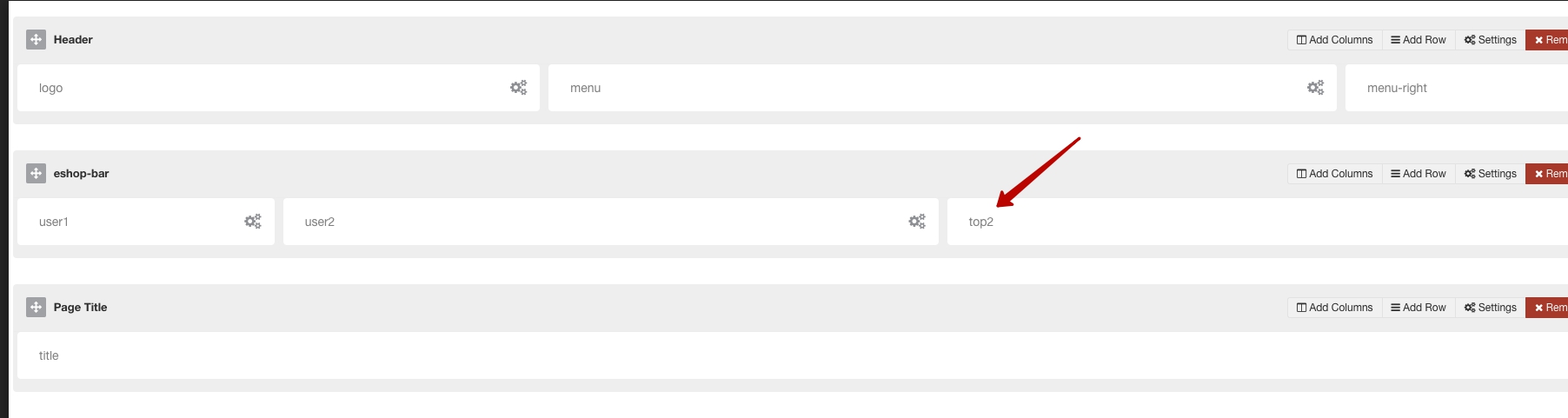
I have created a new row, with three columns assigned to user1, user2 and user3

But when I put a module on user3, it doesn't display.

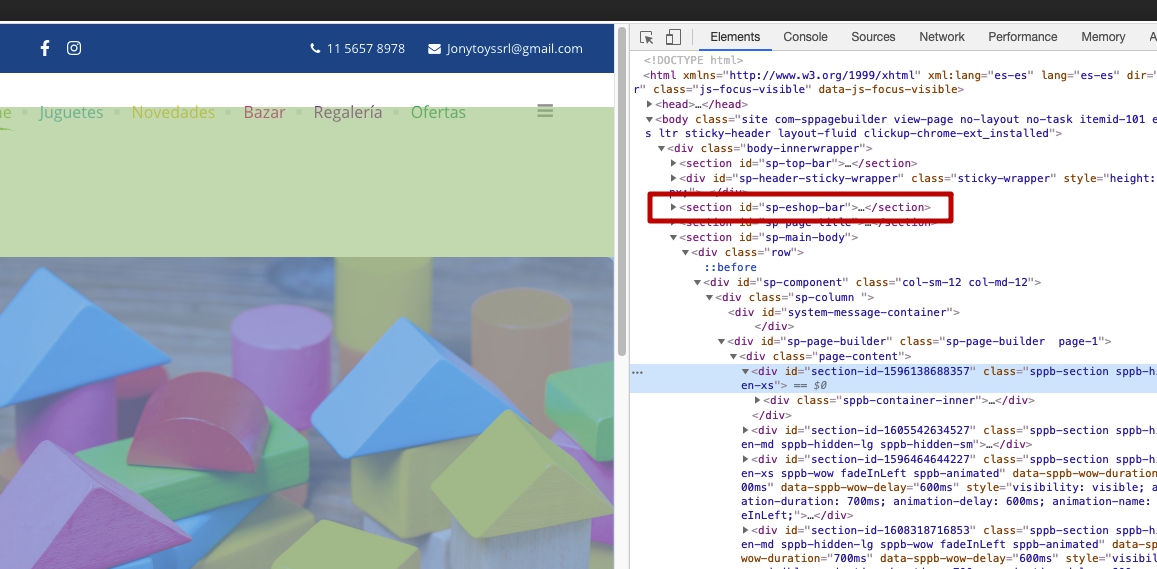
Checking the code on the front end, the row doesn't show any content.

Helix framework: 2.5.8
Joomla: 3.9.26

17 replies

Rashida Rahman Staff

Hi there!

Did you mean different user groups with user1, user2, user3, please?

Then please check how you try to see in the site, I mean with which access level.

Sharing Joomla ACL tutorial if it helps somehow:

https://docs.joomla.org/J3.x:Access_Control_List_Tutorial

Here is how SP Page Builder ACL works:

https://www.joomshaper.com/blog/update-sp-page-builder-2-4-8-introduces-per-page-acl

https://www.joomshaper.com/documentation/sp-page-builder/sp-page-builder-2-x

Best Regards

Miguel Asked this
5 years ago · edited

Hi Rashida, thanks for your answer.
No. It's no ACL or user groups thing. Sorry for my bad explanation.
I'm traying to mean modules position user 1, user2 user3 (like top1, top2, top3, menu, right, etc)
In Layout manager, I've got this new row


https://drive.google.com/file/d/1UbqVaZ4qIhX5SwsMXQF5e8t5-0FzNxIc/view?usp=sharing

I set a module in user3 position, visible in all pages


https://drive.google.com/file/d/1LGVJi9xtvJV-VEILZqTfq6k3MRCnlAm7/view?usp=sharing

But in front end, the module is not visible

https://drive.google.com/file/d/1iqyVW3Uqm81ZP_epMPx1cv70jXqTGkKa/view?usp=sharing

If you check the code, the row doesn't exists

https://drive.google.com/file/d/1qHNDmM0gMgK2xb1VYj0pN0ZxbZlyacFQ/view?usp=sharing

Miguel Asked this

You can see the pictures I've placed in previous message?

Miguel Asked this

Hi, how are you?
Any update on this?

Rashida Rahman Staff
5 years ago · edited

Hi,

Sorry for the delayed response.

Yes, I can see your images..

I am trying to look into your issue

Please allow me time.

Thanks

Rashida Rahman Staff

Hi,

I have checked your backend, and found out there is no module published on user1, user2 or user3 position.

So, without publishing any module to those position nothing can appear...

The module named Eshop cart it published on menu right position:
https://prnt.sc/127sel0

Please create and publish your desired module in those positions you assign to that section.

The following blog post may help you in case:

https://www.joomshaper.com/blog/a-detailed-guide-to-the-helix3-layout-manager

Best Regards

Miguel Asked this

Hi Rashida! Glad to hear from you!
Sorry, must change some module positions on the fly to calm down my customer.

I've put the "buscar" module in user3 position.
Checked the TemplateDetails.xml and user3 position exists.

The module displays above the top bar.

Also tried with new module position, following the guide, with similar result. It supposed to display between the menu bar and slider (or component position).

What's wrong?

Rashida Rahman Staff

Hi,

My apology!

I'm checking the issue.

Best Regards

Rashida Rahman Staff

The issue seems solved now.

Would you please check and let me know?

Sorry for the delay again.

Best Regards

Rashida Rahman Staff

I have created a test module, published in user1 position and left it for you.

Log in to reply.