Unable to change Helix Ultimate Header height to fit logo - Forum | JoomShaper
Solved Templates

Unable to change Helix Ultimate Header height to fit logo

Asked by Dina Abramson 1 year ago Last activity 1 year ago

Hi,
I cannot change the header height in either template styles or with custom code. I used to be able to just specify the height in the template styles, but this is no longer working. I added custom code and it still does not increase the height of sp-header. What am i doing wrong?

https://awdtest1.com/images/header-size.png

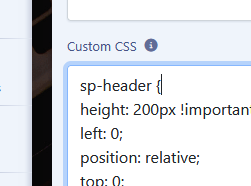
The custom code i added is :

sp-header {

height: 100px !important;
left: 0;
position: relative;
top: 0;
width: 100%;
z-index: 99;
box-shadow: 0 0 4px 0 rgba(0, 0, 0, 0.1);

}

For the last few years, I have always been able to adjust the logo and header size and height through template styles, now you can't seem to do that. Is there some reason for this?

Thanks.

Accepted answer

Marked as the solution
Paul Frankowski Senior Staff
1 year ago · edited

Now is perfect.

info_2807_2025.png

The right menu position I hidden from Mobile view, no place for those two objects on small screen.

5 more replies

Paul Frankowski Senior Staff

Is there some reason for this?

Bad luck, Bad day, The curse of the black pearl

I will check soon.

Dina Abramson Asked this

Its more complicated as I have to make a custom header to display an image and text on the right side of the menu and I just can't make it all display on one row which is not helping the situation.

Paul Frankowski Senior Staff

Access do not work.

BTW

Remove

#sp-header {margin:0px 10px 0px 10px;}

it only make mess on header , use padding instead (!)

info_2802_2025.gif

Dina Abramson Asked this

sorry, was experimenting. Padding does not make a difference either. Still not right, and i can't seem to display logo, menu and module on one row.

Paul Frankowski Senior Staff
1 year ago · edited

YOU USED WRONG CSS SYNTAX, you forgot "#" - next time check twice ;]

info_2806_2025.png

and right side module had too big paddings.

In total many small mistakes and header looked how it looked :/

Log in to reply.