When adding a menu item, it shifts it down below.
Is there some CSS I can add to shift the items left so they all fit?
See screenshot:
https://prnt.sc/wm3uhv
When adding a menu item, it shifts it down below.
Is there some CSS I can add to shift the items left so they all fit?
See screenshot:
https://prnt.sc/wm3uhv
Read this post
https://www.joomshaper.com/blog/a-detailed-guide-to-the-helix3-layout-manager
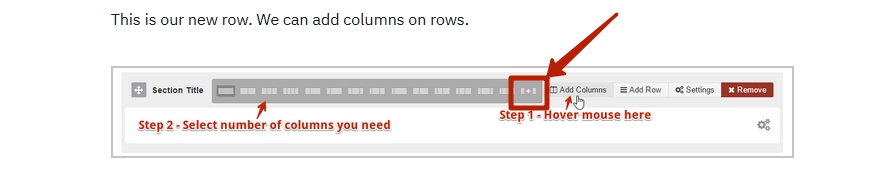
Set it up as 1 + 11 in the Header section
Hi there!
You can try this to put on custom css:
@media (min-width: 992px){
.sp-megamenu-wrapper {
    display: flex;
    justify-content: flex-start;
}
}
Hope this helps!
Best Regards
That did not seem to work.
I added in these but and it seems to have worked, does this code look right?
@media (min-width: 992px)
{
.col-md-3 {
width: 15%;
}
.col-md-9 {
width: 85%;
}
.sp-megamenu-parent {
float: left;}
}
Hi.
Change the column sizes in the Header settings. Select 1 for the logo, 11 for the menu.
where are these settings Pavel?
I'm using the calcio template.
where are these settings
https://www.joomshaper.com/documentation/helix-framework/helix3/layout-manager-settings
OK, however, inside of those settings I do not see an option for width or height, etc.

