Problem with modal on website - Forum | JoomShaper
Staff replied Helix Framework

Problem with modal on website

Asked by David Podesta 4 years ago Last activity 4 years ago

Hi

I use an ecommerce extension jcart.

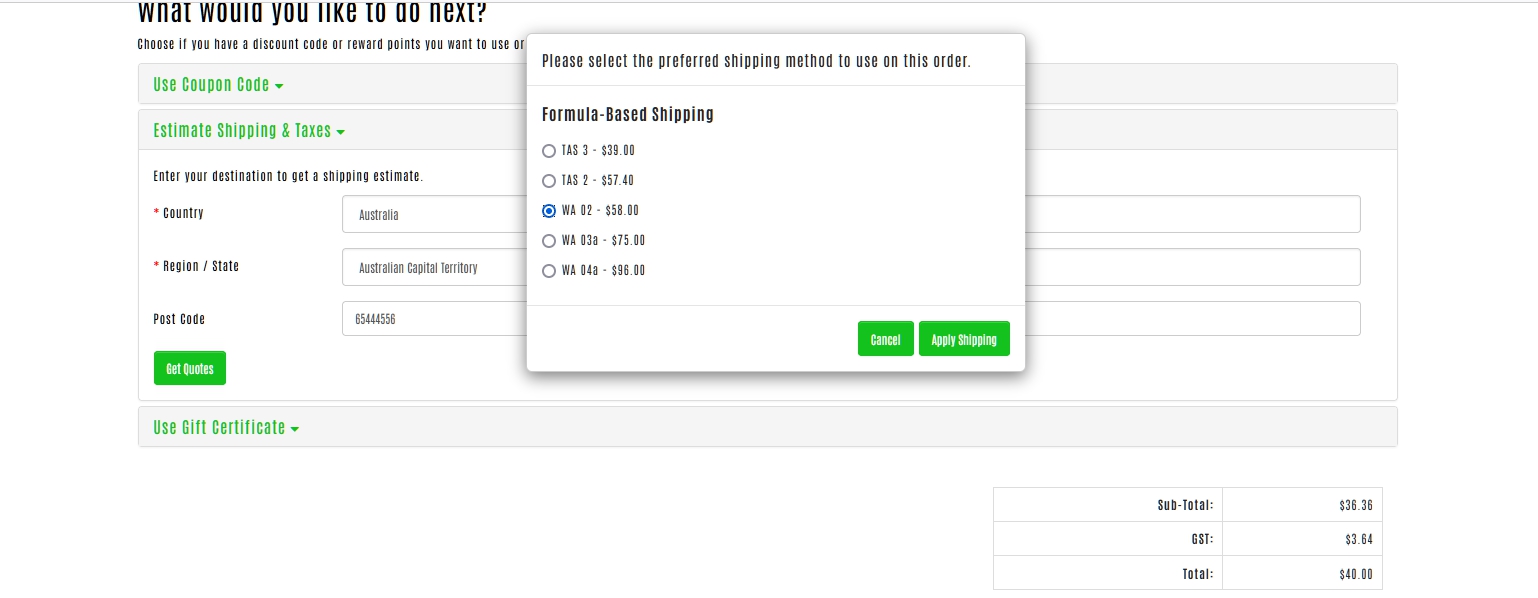
I have upgraded the Helix ultimate template and am having an issue with a modal when I try to get a quote for shipping.

On this page
https://ethanolfireplacefuel.com.au/my-cart

To duplicate the issue, you would need to add a product to cart and then go to cart page and try to get an estimate for shipping and taxes.

Estimate Shipping & Taxes

I just get .modal-backdrop covering over the page and can't make a selection as the modal popup is sitting behind it.

As in this image
https://www.dropbox.com/s/wgk02ryi2nvsxpq/Capture-modal-issue.JPG?dl=0

4 replies

Pavel
4 years ago · edited

Hi. It looks like the conflict of the old jQuery approach and the new Native JavaScript approach (from Bootstrap 5 That Helix Uses) to call the overlay layer of modal window.

I see two solutions:

  1. rewrite jQuery and CSS for this modal window, so that this does not appeal to the standard Bootstrap class for the overlay layer. (to do this you need to see how it worked before Helix update)
  2. Or just disable it through CSS.
.body-oc + .modal-backdrop.show {
    display: none !important;
}

That will looks like this

David Podesta Asked this

Amazing Pavel

Thanks so much.

Rashida Rahman Staff

Hi David,

Glad that your problem has been solved already.

Thanks, @Pavel for helping him out.

Best Regards

Log in to reply.