

Sp Pb Frontpage Editor does Not Save

Alpha24 Group
frontpage editor does not save my work. (Joomla 4.0.5 SP Pagebuilder pro 3.8.2)
Thank You
28 Answers
Order by
Oldest

Mehtaz Afsana Borsha
Accepted Answer Mehtaz Afsana Borsha
Accepted AnswerNo sorry it still shows this error
Alpha24 Group
Accepted AnswerHi I have contacted with my hosting support!
Please check the hidden content!
greetings
J
Jesper
Accepted AnswerHi Nanto Let me know if you have a solution. I have the same problem. Since I can not see the hidden text from Mehtaz Afsana Borsha, I am wondering whether you have found a solution
Alpha24 Group
Accepted AnswerHi Jesper,<br> I still do not have a solution to the problem, <br> I hope this happens as soon as possible.<br> In my opinion the approach to the problem is wrong. <br> I say this and I believe you will agree, that this is not a problem of the Template's, but of the SP pagebuilder in combination with Joomla 4x. <br> Because even if the template is fixed on this site today, generaly the problem for the rest of the templates will not be solved. <br> I think, in this case, we will have the same problem continuously in every new site.<br> What we definitely need here and now, is an upgrade and fixing all issues on sp pagebuilder for joom 4.05.<br> I'm sure the developers at Joomshaper are hard working on the problem.<br> I'm looking forward to the outcome.<br>
greetings
J
Jesper
Accepted AnswerHi Nanto.
I have the same feeling and believe you are right. Hope the developers will find a solution fast. /Jesper
Alpha24 Group
Accepted AnswerHello, <br> The problem for this page has been fixed!<br> For other pages in Joomla 4.05 that have the same problem, are you preparing some update? <br>
Thank you for your immediate response
Alpha24 Group
Accepted AnswerHi<br> Yesterday for a few hours it worked perfectly without any problems<br> But today the same problem occurred again.<br> Fronteditor does not save my work.<br>
Greetings
J
Jesper
Accepted AnswerSorry to here.
Lets hope they find a solution. Also, you write frontend saving. I also have the problem in backend saving. I guess two reasons why I dont hear much on my question on same issue. New Years celebration and they have problem solving the issue.

Paul Frankowski
Accepted AnswerHi,
about custom Code. The best way to use it is by Custom Code Modules or Custom Code Plugin. I don't recommend adding inside addons. Of course if we talk about custom JavaScript or PHP code only.
And yes, custom code as well as cookie module can lock SPPB front-end editor.
J
Jesper
Accepted Answerhttps://ollerupbunkeren.dk/joomla&pagebuilder.mp4 I have added no custom code, not even created the custom.css
Paul Frankowski
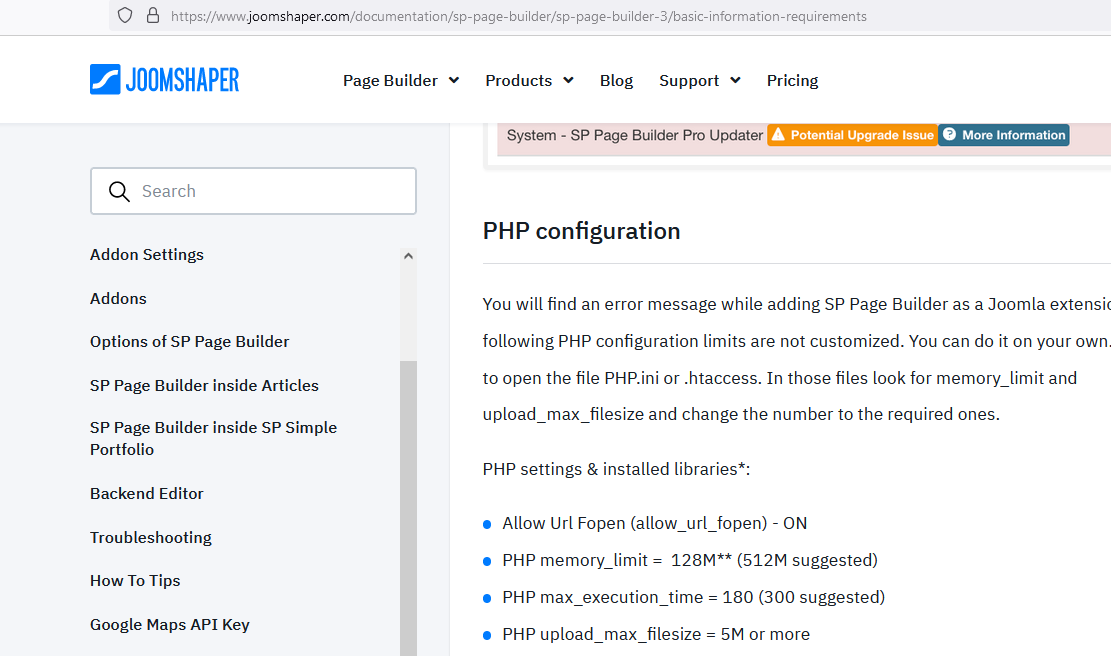
Accepted AnswerWhat PHP settings you have, I mean those values? (below are recommendations)
J
Jesper
Accepted AnswerHi Paul
Perhaps you may find a good reason for the odd behaviour.
https://ollerupbunkeren.dk/indstillinger1.jpg

https://ollerupbunkeren.dk/indstillinger2.jpg

https://ollerupbunkeren.dk/indstillinger3.1.jpg

https://ollerupbunkeren.dk/indstillinger3.2.jpg

https://ollerupbunkeren.dk/indstillinger4.jpg

Thanks
J
Jesper
Accepted AnswerHi Nanto
Do not know whether you have found a solution. I received a solution for my problem. Very simple but very effective.
From Pavel: Hi Jesper. Rename htaccess.txt to .htaccess and turn ON "Search Engine Friendly URLs" & "Use URL Rewriting" in global Joomla settings
Alpha24 Group
Accepted AnswerHello Pavel, (and the others who read my message)
Rest assured it is not my intention to offend you,<br> We are all looking for a solution for a better result.<br> I acknowledge your intention to help in the problem that we have with Joomshape PB in the release of joomla 4x<br> The necessary conditions for the proper operation of the tool we have, are far higher than what you indicate to me.<br> I want you to know that the problem that has not existed in me for three days, since the last post I made, because it has to do only with its PB program itself.<br> I have found that it has to do PB in combination with Helix Framework, because every time I make adjustments and changes to the template, the frontpage editor stops working.<br> So I'm forced to upload the last backup from my server.<br> Let the Joomshape developers in charge look at it <br> (If something is not read correctly it is to blame google translation (:P .)
Happy New Year to All
Nanto
J
Jesper
Accepted AnswerSorry Nanto
I was too fast in my conclusions. It did not work. I was sitting with another computer. At lease Now I know that the SP page builder version and Joomla 4 problem is caused by my computer. Or in other words that the programme does not work with my computer.
Paul Frankowski
Accepted Answer@Jesper
Maybe recored video and share. Also check back-end editor.
IMPORTANAT! Please disable JS compression from Helix Template Options. Before testing of front-end editor.
J
Jesper
Accepted AnswerHi Paul
Thanks for adding your expertise in this issue.
the JS compression is already disabled
also I recorded these videos 3 days ago and posted in this forum. Please see below.
https://ollerupbunkeren.dk/joomla&pagebuilder.mp4 I have added no custom code, not even created the custom.css
Paul Frankowski
Accepted Answer@Jesper
if we talk about domain that you shared video I saw that your website loads a lot of extra js files
That can make this problem, look below , they are not from SPPB nor Helix, so maybe you have extra extension (plugin?) that you can disable and solve all problems.
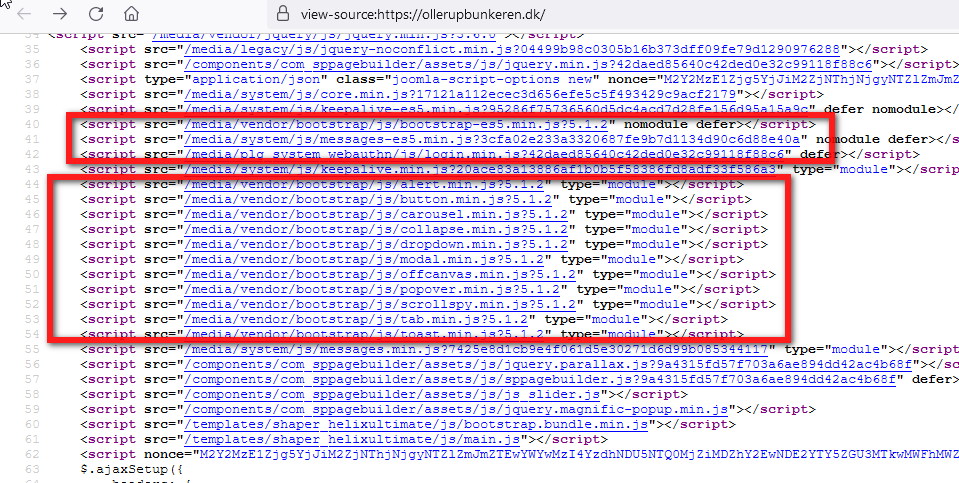
For example, You don't have to load boostrap twice. It's loaded from template already. I know it's Joomla 4 core folder, but not all files should be loaded everytime.
J
Jesper
Accepted AnswerHi Paul
I do think, that quite funny, since I have not installed any other extentions that the SP Pagebuilder This is a (as clean as can be) Joomla 4 and SP Pagebuilder site only. And the only things I have used is the Layouts and the SP Builders library with slideshows, hero, content etc. And, by the way, how can that be loaded and causing the problem, when there is no problem on other computers. I guess the same will be loaded on every computer.
Do you have a suggestion on how to find the JS source?
thanks
Paul Frankowski
Accepted AnswerI wish to know. It's Joomla 4 new feature. In Joomla 3.10 CMS didn't load boostrap file without asking.
I have to play on my own demo.
J
Jesper
Accepted AnswerI found my solution https://www.joomshaper.com/forum/question/10130#qa-answer-50930 see accepted answer. thanks to all
Alpha24 Group
Accepted AnswerHi @Jasper<br> Really, do you think your problem is solved, or are you kidding?<br> I find it hard to believe,<br> For my part, I do not dare to change the settings in the helix workspace, so as not to detune the PB fronteditor.<br> Maybe that's why I don't have any more problems with it.<br> So please, Joomshape developers take this case seriously so that a solution can be found for all of us.<br> I know that moving to Joomla 4 is not as easy as some people try to convince us of,<br> I was transferred to joomshape, for better or worse, by another company that ceased to exist, (those who understood, understood, (I do not know the reasons why they resigned ...)) expecting things and miracles in this area, which concerns the proper operation to create websites. <br>Certainly no one gave us these programs for free. We paid the price and for this reason we demand a proper operation, without wasting time on their solution, this is not our business.<br> I close here, with the statement to Joomshape: <br>We are waiting with due patience, facts and not for nice answers here in the Forum.<br> Always friendly!<br> Nanto