
Hi,
Highlight search result do not works.
I'm using Helixultimate 2.0.6, Joomla 4.0.5
I have tested with another template (Cassiopeia - Default) and Highlight search result works fine.
Do you have any idea ?
Thank you in advance.
Best regards
Solved
Templates
Highlight search result do not works
Asked by esf
4 years ago
Last activity 4 years ago
Accepted answer
Marked as the solution
Paul Frankowski Senior Staff
I thought so.
6 more replies
Paul Frankowski Senior Staff
4 years ago
· edited
Hi,
Good point, Hopefully easy to correct this, just add:
.highlight { background: yellow; }
I will add to bug-list.
After using above.
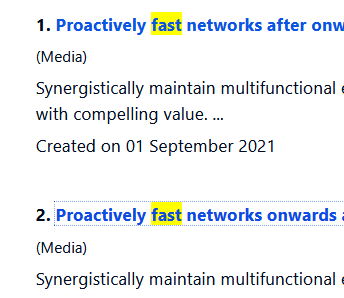
esf Asked this
Thank you, but the problem is that : span class="highlight" do not appear in html code
It should be like that : span class="highlight" some texte...
Could you help me ?
Best regards
Paul Frankowski Senior Staff
4 years ago
· edited
Do we talk about normal Search or Smart Search (Finder) ?
Make a test and DELETE/RENAME that file:
templates\shaper_helixultimate\html\com_search\search\default_results.php
and
plugins\system\helixultimate\overrides\com_search\search\default_results.php
Then Joomla will use default "search" view.
esf Asked this
Hi,
It's Smart Search Finder.
I renamed both folders like that :
templates/shaper_helixultimate/html/com_search-lock
plugins/system/helixultimate/overrides/com_search-lock
Joomla administrator :
Smart Search: Options > Highlight Search Terms : Yes
Same result, there is no class="highlight" in html code.
Thank you.
Paul Frankowski Senior Staff
com_search -- is not Smart Search (!) it's classic search feature.
com_finder - is Smart Search in Joomla. So you have to rename different folder, with correct name.
esf Asked this
Hi Paul,
Thank you, I renamed this folder and all works fine.
templates/shaper_helixultimate/html/com_finder-lock
Best regards.
Log in to reply.