

I have Asked This 3 Times
A
Arthur
How can I remove thsoe HOT and NEW labels from Menu Item ?
5 Answers
Order by
Oldest
J
joe
Accepted AnswerI think those labels are added in the own menu tabs. Maybe, mega menue settings.

Ariba
Accepted AnswerHello
Thank you for your query.
Kindly check the screenshot below.
You will need to to open the Mega menu and remove the string "NEW" or "HOT" from the badge field.
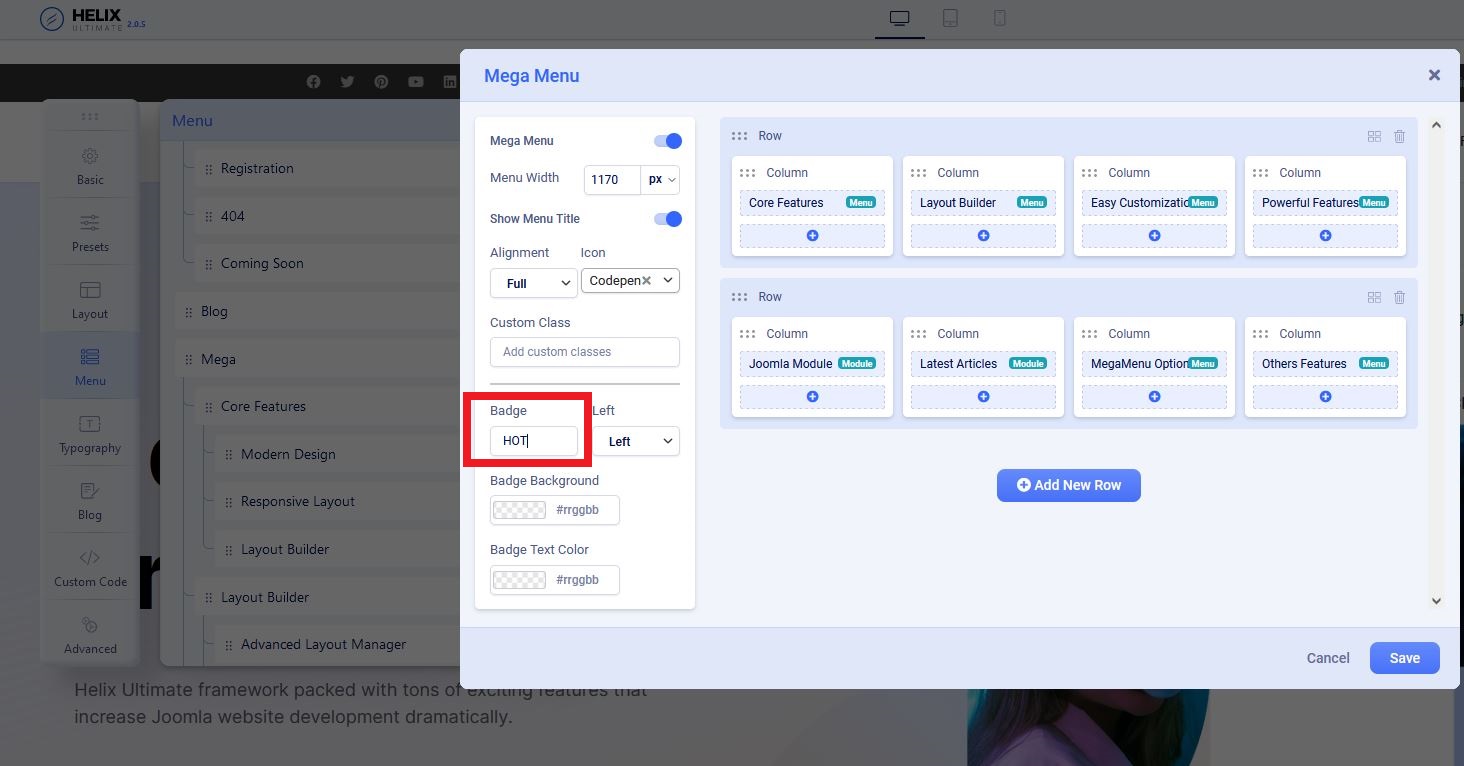
OR
You can add the following css in Custom css section to remove both the labels:
.sp-menu-badge {
    display:none;
}
Hope this helps you :)
A
Arthur
Accepted AnswerThanks for info, but I am not using Mega Menu. This section looks like this on on site:
I am assuming Menu and Mega-Menu are two different objects. Why they share the same properties ? this is no god and this property sharing happens all over the place in the template. This really needs to be corrected, because one small change in one place afftect (negatively) settings in another place. It really seems like your classes in CSM are messad up and need to be rearranged.
I tried to apply the CSS in the "Befor /head" but it has no effect.


