After installing manually SPB v3,8,3 the icons are gone. Any ideas what could have happened ???
https://ibb.co/QJkWjfX
Staff replied
SP Page Builder
Icons are gone
8 replies

Paul Frankowski Senior Staff
4 years ago
· edited
Hi,
to be honest, I don't know. I have this same version and all icons are still there.
But please check those things:
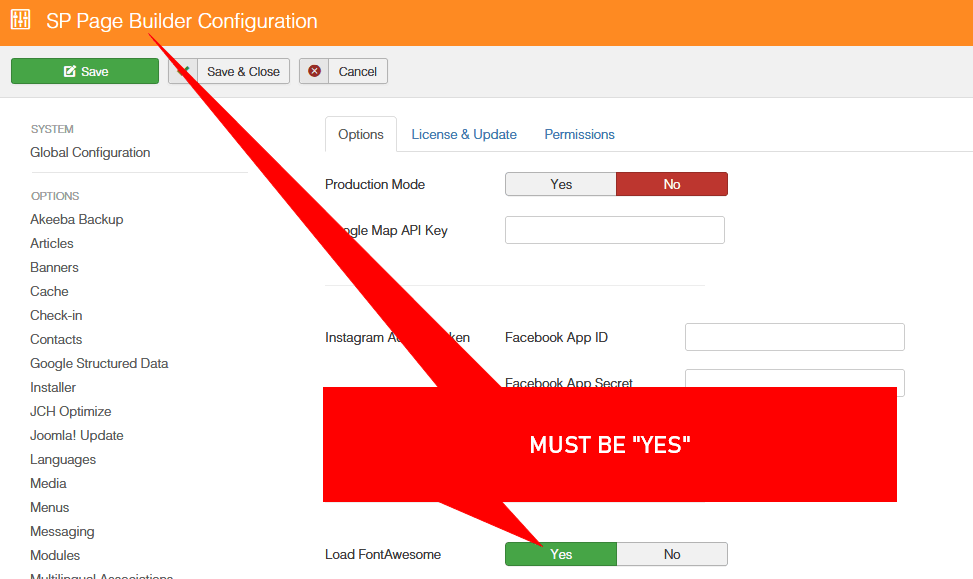
- SP Page Builder - Options - if you have enabled Font Awesome icons
- Check list of icons in Icon addon
- Switch template to Joomla core one for 90sec and then check Icon addon and Feature Box addon again. If on 2nd template all icons will be there it means that your current template override that addon and is using "old" code.
Paul Frankowski Senior Staff
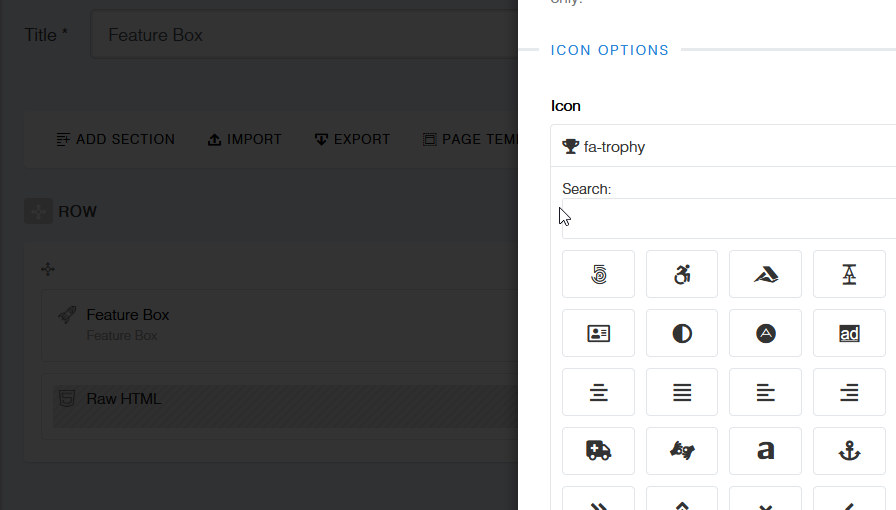
This is screenshot from Joomla 3.10 + Helix Ultimate + SPPB 3.8.3 + Feature Box addon from my site - where FA are enabled.
Arthur Asked this
OK, when I place the ICON object on the page, I have no problem selecting icons from the list. Tehy do not show up when I use the TEXT object.
Arthur Asked this
WHAT IS GOING ON ?
Paul Frankowski Senior Staff
4 years ago
· edited
BTW
If you talk about Text addon or Text area in Feature Box, it's TinyMCE that may cut off icons from text, not SPPB.
Paul Frankowski Senior Staff
4 years ago
· edited
I have idea
Please check if you enabled Font Awesome in SPPB Options, this may cause missing icons on the front-end editor. If they are not enabled - they are not displayed, right.
Arthur Asked this
OK, that was a problem.
Thank You
Paul Frankowski Senior Staff
You're welcome.
When looking at the glass, try to see how much water it contains, and not how much is missing.
Log in to reply.