Black Friday 2026 50% off every plan Our biggest deal of the year on #1 Joomla products.
Ends in 12d 07h 30m 33s
Claim 50% off
Awaiting an answer Templates

Joomshaper templates: Font Awesome

Asked by Christian GRENIER 4 years ago Last activity 4 years ago

Hi

With shaper Helix Ultimate, in template Style option, item Advanced/Font Settings, I can enable Font Awesome.

With my Travus template, I haven't Advanced/Font Settings item. So one of my estension, needing Font Awesome, doesn't work correctly.

Is it possible to fix this problem? Thanks

5 replies

Paul Frankowski Senior Staff

Hi Christan,

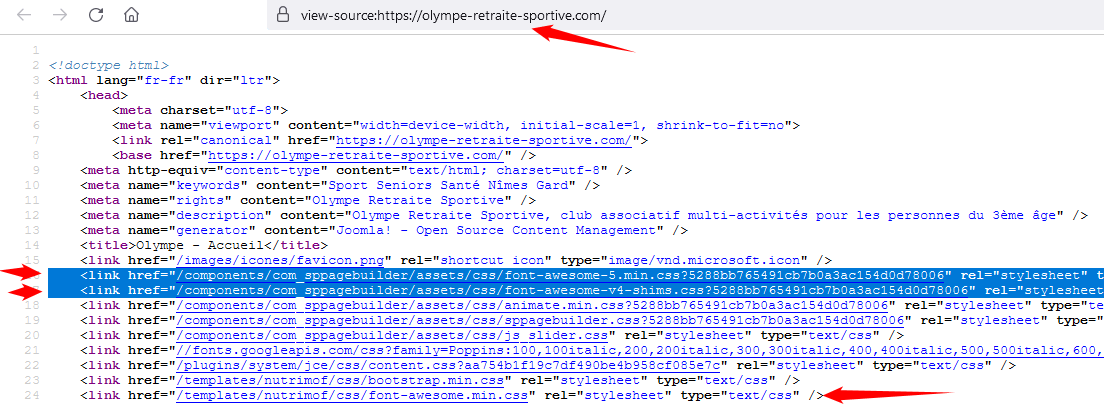
On your site Font Awesome are loaded from template folder and SP Page Builder, evidence

foto_7981_2022.png

But indeed your Nutrimof template made by Windstripe Themes, that is based on Helix is using old Helix engine, with Font Awesome 4.7, not 5.x as you could have if you would use template directly from us..

Paul Frankowski Senior Staff

Option Font Awesome On/Off is available only for new templates, made in the last months, not years.
But almost all templates are using Font Awesome.

Paul Frankowski Senior Staff

Christian,
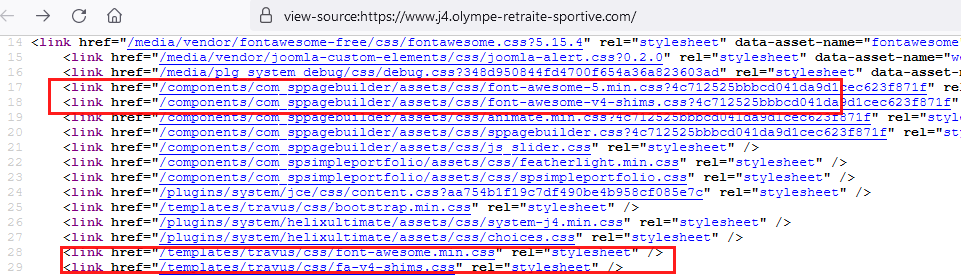
also in Travus template Font Awesome 5.x Free is loaded by default, you don't have to enable anything extra, screenshot

foto_7982_2022.png

Christian GRENIER Asked this
4 years ago · edited

Hi

Yes, I have seen that...

But with a css rule like {content:"\f00d"}, it works with Shaper Helix Ultimate template, but not with Travus Template.

My brower consol say: GETlocalhost:84/templates/travus/fonts/fa-solid-900.woff2: not found

But this file exist...

Thanks for your help.

Edit: this link is missing in Travus template...

<link href="/media/system/css/joomla-fontawesome.min.css" rel="stylesheet">
Log in to reply.