

No Option For Fluid In SP Module Row Options/General Settings
MR
Morten Bracker Rasmussen
Hi,
I am creating a Hero-section and have discovered, that there is no option for Fluid in the settings for SP module (as there is in SP builder page) under Row Options/General.
Why is that? And will it be implemented?
Thanks and best regards, Morten
4 Answers
Order by
Oldest

Paul Frankowski
Accepted AnswerIn that case you have to set container inside module content or set image as section bg.
This is the only way, if you don't want to use custom CSS.
Paul Frankowski
Accepted AnswerHi Morten,
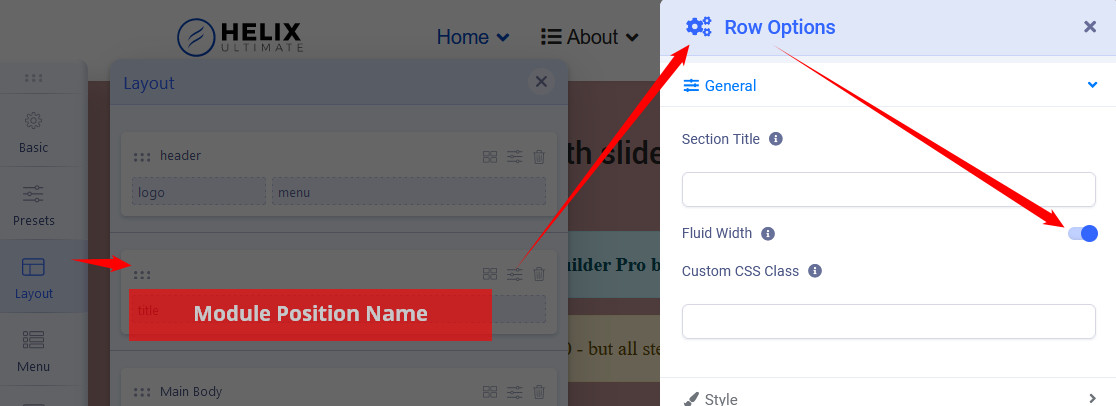
it's becuase modules works inside template layout - module positions it's not possible to predict what template styles (container) would be. It's a box grid. But if your template is based on Helix - in Layout and chosen section settings you can set module position full width. Just one switch and save changes.
MR
Morten Bracker Rasmussen
Accepted AnswerHi Paul and thanks for your fast reply.
The thing is, that if I use the Hero within a Page, the background image wil be full page width and the Hero content wil still be limited to the general content width. This is the wanted situation. When using the Hero from module though (and setting the layout as you sugest to Fluid) the content of the Hero will then also be in full page width wich is not the wanted behavior. Does this makes sense? :-)
By the way, I am using the Helix Ultimate.
Best regards, Morten