

CSS Issue After Migration To J4
S
Sandra97
Hi,
I have some CSS which are not applied anymore after upgrading a site to J4 (on my dev server - the production site is still under J3).
That's the display before the upgrade

The display after the upgrade

The CSS for the text display and for fontawesome are not applied anymore, don't know why
I have also a SP Builder menu in the backend which is not supposed to be there and doesn't wwork anyway:
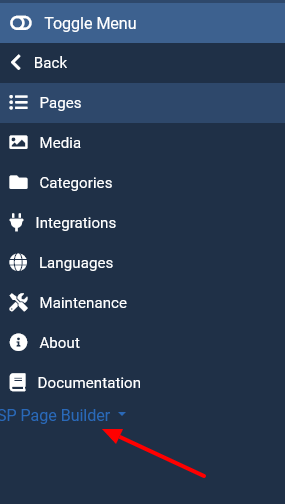
Can you tell me what's going on and how to fix?
Sandra
14 Answers
Order by
Oldest

Rashida Rahman
Accepted AnswerHi there!
Thanks for your query.
Kindly, check if you have enabled the fontawesome within the Advanced tab of your Template Options.
And the following doc will help you about the SP Page Builder menu:
However, I could not visit your site to check the Heading text issue.
Hope this helps!
Best Regards
S
Sandra97
Accepted AnswerHi Rashida,
Thanks for your answer.
- I have no Fontawesome option in the advanced tap of the template options (whatever it's under 3 or 4). Only options are compression / scss / import export. Note that Fontawesome is enable on SP Page Builder option
- Thanks for the link, it's now ok.
- I can grand you an access, as the test site is offline
Looking for your help,
Regards,
Sandra

Paul Frankowski
Accepted AnswerHi Sandra,
- yes, please share access to admin area using "Hidden Content" field
- Please disable CSS compression in Template Options - Advanced
- Make sure that you updated SP Page Builder Pro to last version.
Paul Frankowski
Accepted AnswerAbout missing icons, you forgot to check that SP Page Builder Pro (new) is using Font Awesome 5 Free, not older 4.7, And your icons CSS style was for for old version only.
So do not use
font-family: FontAwesome;
anymore, but use
font-family: "Font Awesome 5 Free";
please update everywhere.
Paul Frankowski
Accepted Answerand you have to use
font-weight: 600;
for those icons (!) as well, to make them work.
S
Sandra97
Accepted AnswerYes about Fontawesome 5 but it appears that font-family: "Font Awesome 5 Free"; doesn't work either
S
Sandra97
Accepted AnswerUpdate: when adding the font weight, it nows works fine. Thanks. One issue solved :)
Paul Frankowski
Accepted AnswerAfter I added (bold) look above it works. It's becuase "FREE" icons are only bolded :(
S
Sandra97
Accepted AnswerLast thing about this thread, any idea why the title 'Each new patient' is not where it's supposed to be? The negative margin I had on J3 is not working anymore in J4 (in fact I noticed for several heading addons that the set up margins stopped to be applied)
Paul Frankowski
Accepted AnswerI am checking that .... weird, give me few minutes, please do not edit those home pages
Paul Frankowski
Accepted Answerfixed, somehow negaive value for left margin wasn't used.
Like you had to header above.
Now is OK in FR and EN version.