Instagram add on - Forum | JoomShaper
Solved SP Page Builder

Instagram add on

Asked by Andrew 4 years ago Last activity 4 years ago

Hello,
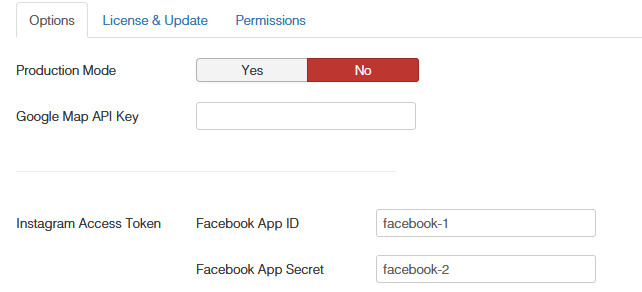
I have followed the prcoedure to install the instagram add on on page builder. I am at the stage where i have generated the token and i am on the insert & save page. However, i click on the button nothings happens. I can't seem to be able to paste this manually to SP page builder config page just under FACbook ID
and App secret.it looks like the boxes are greyed out...

any bright ideas ?
thanks ,

Andrew

Accepted answer

Marked as the solution
Paul Frankowski Senior Staff

you're welcome. You have to close, I cannot.


  • BTW . You were a first person who had this problem. *

18 more replies

Paul Frankowski Senior Staff

Hi Andrew,

Make sure that you have SP Page Builder Pro installed.

In Lite version that feature may be disabled.

In case of , download and reinstall with sppb Pro 3.8.6.

Andrew Asked this

Hi,
I purchased the pro version and it is the one that is defined in my joomla 4 dashboard under components.
so i presume thats ok?
cheers,
A

Andrew Asked this

I can send you a screen grab if you wish ..I tried this again today and when i click insert and save token nothing happens..i confirm that i have 3.8.6...could this be browser related ? i have chrome and safari installed on my mac...

Paul Frankowski Senior Staff

Yes, please make a screenshot

if you 100% sure that you have PRO installed.

Paul Frankowski Senior Staff

Code seems to be OK, but you cannot save it or what exactly?

Andrew Asked this
The insert and save button does not work it seems ..as it fails top copy anythjing in access token and instagram id..i cannot copy and paste it manually it seems..
Paul Frankowski Senior Staff

Do you have similar problem in other extensions?

Have you tried from different browser? if not , try

Andrew Asked this

hI,
No not all.. i have swicthed OS from Macos to windows and with chrome and edge still the same problem. Is there no way of forcing the token and id in the sppb component ?

thanks,
Andrew

Paul Frankowski Senior Staff

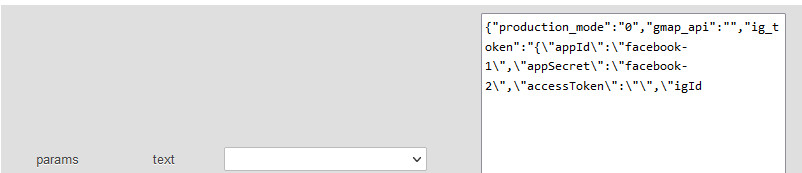
If somehow you cannot save those values in SPPB Options, probably you have to add them inside database tables. If you used PHPMyAdmin before, I can show you where.

BTW

Do you have this problem on only one site or more sites, please check.

Log in to reply.