

SP Page Builder Requests Database Update But Cannot do It
SF
Sabine Friedrich
Joomla 4.1.5. Template "Dylan".
The Extension update requested a SP Builder update. The update-link did not work, even when I am logged in to Joomshaper and have paid for SP Page Builder Pro.
The manual installation gave me "com_sppagebuilder_pro_v3.8.8.zip" - not version 4. After the successful installation, access to the SP Page Builder menu shows: "SP Page Builder database update required SP Page Builder has been updated. To keep things running smoothly, we need to update your database. We strongly recommend you to take a backup in case anything goes wrong." Click onto the available button "Update SP Page Builder Database" fist lists "Missing Tables
Table #__sppagebuilder does not exist.
Table #__sppagebuilder_integrations does not exist.
Table #__spmedia does not exist.
Table #__sppagebuilder_languages does not exist.
Table #__sppagebuilder_sections does not exist.
Table #__sppagebuilder_addons does not exist."
Click on the button "Update SP Page Builder Database" results in "Fixed Missing Tables
Created #__sppagebuilder table successfully!
Created #__sppagebuilder_integrations table successfully!
Created #__spmedia table successfully!
Created #__sppagebuilder_languages table successfully!
Created #__sppagebuilder_sections table successfully!
Created #__sppagebuilder_addons table successfully!"
Fine - but any access to any of my pages reverts to "SP Page Builder database update required SP Page Builder has been updated. To keep things running smoothly, we need to update your database. We strongly recommend you to take a backup in case anything goes wrong." So obviously it did not do it at all.
Why did the update link not point to SP Page Builder Version 4? Is v4 still in beta stage?
Will version 4 work? (Well, I read other forum entries and by confidence is lacking a bit).
Plesae advise.
15 Answers
Order by
Oldest

Ariba
Accepted AnswerHello
Apologies for the inconvenience. Please take a full site backup before applying the fix mentioned below. I am Inside the maintenance.zip there are two files.
Please replace the administrator/components/com_sppagebuilder/helpers/maintenance.php file with the maintenance.php file and replace the administrator/components/com_sppagebuilder/sql/install/mysql/install.mysql.utf8.sql file with the install.mysql.utf8.sql from the zip. Hopefully, it will solve the issue. For your reference: https://www.joomshaper.com/forum/question/7
SF
Sabine Friedrich
Accepted AnswerActually, it still isn't resolved. After the horrible incident with Page builder 4.0.7 opening pages with empty views and no add-ons, I started all over again. After a major upgrade. and stay now on Page Builder 3.8.9.
So now it is: Joomla 4.2.7, Helix ultimate template, php 8.1.16, mySQL 8.1.15, and SP Page builder 3.8.9 (Pro).
I have replaced the 2 files as indicated above. I have checked and yes, the sppagebuildertable has its "id"-field flagged as "Autoincrement". But the SP Page Builder continues to request Database Update But Cannot Do It. Again and again. Please advise.

Paul Frankowski
Accepted AnswerHi Sabine,
If I may join...
please create a Super User access for Us + give us website URL, we will check and correct.
Are you able to share also access to FTP or PHPMyAdmin tool ?
Paul Frankowski
Accepted AnswerThanks Sabine,
I understand and thanks.
About shared file - we have error404, The requested URL/File was not found on this server. It's misspelling somewhere. But don't worry, I found that file using other method.
About message in SPPB "SP Page Builder database update required...." I already fixed it.
Paul Frankowski
Accepted AnswerAbout data problem in the database please in PHPMyAdmin compare your settings
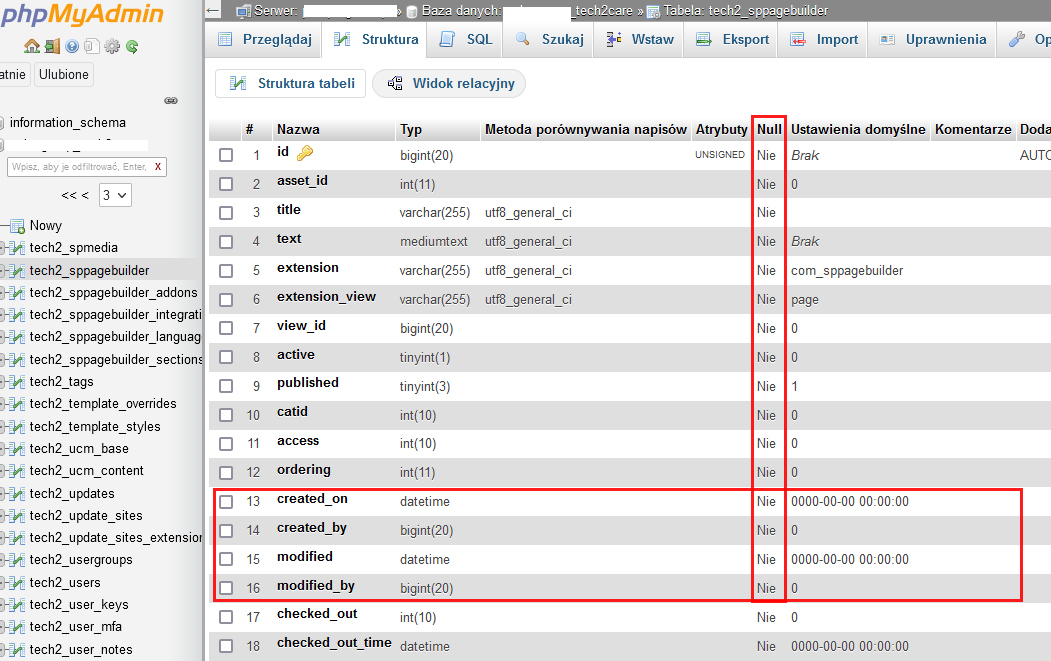
Nie = No - must be everwhere for all fields!
Paul Frankowski
Accepted AnswerI looked again, I saw now...
must be "No" in Null column everywhere(!), you missed that. Edit and Correct!

SF
Sabine Friedrich
Accepted AnswerI still must do something wrong. I adjusted the DB as instructed, I only have "yes" against the field "hits" now. BUT: I cannot (before or after the last adjustment) create articles anymore. The error message is "Save failed with the following error: Field 'id' doesn't have a default value". Please help. I added the screenshots.
SF
Sabine Friedrich
Accepted AnswerDid I mention that after the last change I cannot create or update articles anymore? Could the issue be any more urgent? Please! Upgrading Joomla to 4.2.8 did not "fix" anything.
SF
Sabine Friedrich
Accepted AnswerI had another look at your changes. Auto-increments is gone. The table definition for SPPAGEBUILDER-Addons is gone (not just the content, the whole table definition. Heavens! What happened???
SF
Sabine Friedrich
Accepted AnswerDon't bother. I lost my nerves and rolled back. Now I try to recover from the backup before the roll back all the changes I applied in 2 days.
Paul Frankowski
Accepted AnswerSorry Sabine,
but your issue is very unusual error, it doesn't happen so often. Besides we don't have access to your database only screenshots.
You used whole website backup or only database backup?
SF
Sabine Friedrich
Accepted AnswerThanks Paul, Having a look at the errors in Joomla, I rolled back just the sppagebuilder related tables. Dropped them and recreated them from my last SQL export (from 15/02). I used your instructions to check, if they all now existed and all still showed "Auto-Increment". No problems since, but trying to frantically re-create all the changes I made in the meantime.