

Edit Input Color
S
Sandra97
Hello,
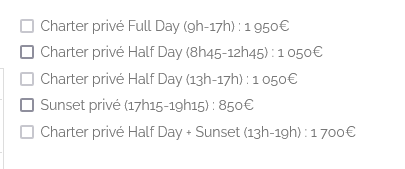
On this page https://www.stbarthexcursions.com/booking, when a cruise is already booked, the input turns light grey (as it's then disable). I would like to make white but I didn't find how to do.
Could you please help?
Thanks
Sandra
13 Answers
Order by
Oldest

Mehtaz Afsana Borsha
Accepted AnswerBut actually this is appear by default that's why its not working. You may try this one.
input:disabled{
border-color: red!important;
    appearance: none;
    width: 10px;
    height: 10px;
    display: inline-block;
    border: 1px solid;
    border-radius: 2px;
}Mehtaz Afsana Borsha
Accepted AnswerHi
Thanks for contacting us. Could you please give me a screenshot of your issue?
-Regards.
S
Sandra97
Accepted AnswerHi,
Apparently I missed your message.
You can see it on this page for example: https://www.stbarthexcursions.com/booking/wayayai Go to November, click on a date with a buebackground and then on the right you'll see that the input of unavailable cruises has a grey border, available cruises input has a black border. We would like more contrast, with for example a white border for unavailable cruises but I have no idea how to do that for disabled input.
Thanks in advance
Mehtaz Afsana Borsha
Accepted AnswerTry this custom CSS
input:disabled {
  border-color: white!important;
}
Path towards custom CSS: Extensions>Templates>Styles> Click on your current default template name then choose Template Options. Then find custom CSS within the custom code.
S
Sandra97
Accepted AnswerThanks Mehtaz for your answer. Unfortunately, this custom CSS doesn't work. The border color is still light grey
Mehtaz Afsana Borsha
Accepted AnswerGlad to know that:) You are always welcome!
It would be very kind of you if you can manage some moment to give us feedback here:
https://extensions.joomla.org/extension/sp-page-builder/
https://www.trustpilot.com/review/www.joomshaper.com
Please let me know your name on the review. Thanks for being with us :)