

Missing Module After A Restore With AKEEBA BACKUP
SI
Simmetria Institute
Hi!. I have a strange Issue after a restore of web site...... Usually I use a TEST site that is BUILD from PRODUCTIVE. I use AKEEBA BACKUP to BACKUP & RESTORE....
I noticed tha after the restore . IN the home page (The most edited page) some MODULE are missing. Seems that SP PB lost them .... How can be possible?
Even in the Admin side of the page. The part is missing!
14 Answers
Order by
Oldest

Paul Frankowski
Accepted AnswerCiao,
sorry, but we are not Akeeba Support. But check if you didn't disable any sppagebuilder nor module tables in Akeeba Backup settings, I mean check here: Include and Exclude Information > Database Tables Exclusion. No red (disabled), just grey (OK ready for backup!)
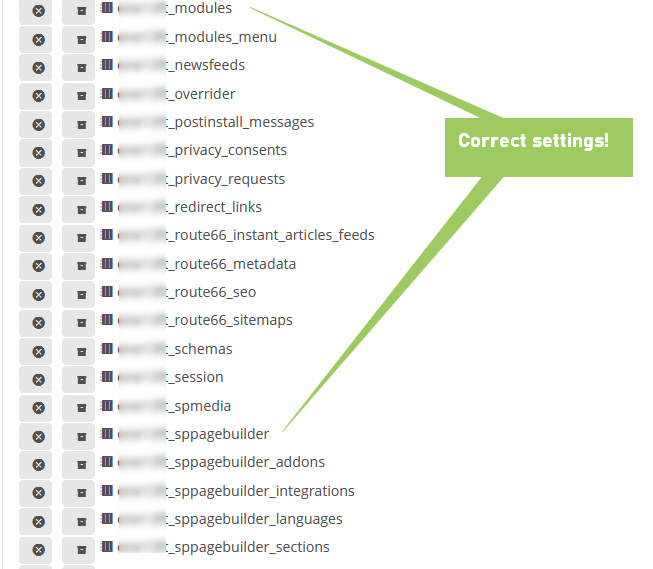
if not, you have to set that module manually as you had on the orginal site. That's all I can help.

Mehtaz Afsana Borsha
Accepted AnswerHi
You can follow Paul's instructions. And you can also follow our documentation properly.
https://www.joomshaper.com/blog/backup-and-restore-your-joomla-site-with-akeeba-backup
-Regards.
SI
Simmetria Institute
Accepted AnswerHi The Akeeba configuration seems to be correct. The ONLY table I DO NOT BACKUP are:
- _____action_logs
- ____finder*
- _____session
ALL the _sp* tables are backed up. P.
SI
Simmetria Institute
Accepted AnswerI have also noticed that the issue is not only on HOME page. But even in the other pages that have some kind of transiction on picture or similar. For example: SOURCE PAGE (OK): https://www.simmetriainstitute.com/it/il-museo-e-la-biblioteca/ritualita-e-alchimia.html
TARGET SITE RESTORED (KO): https://www.simmetriainstitute.gq/it/il-museo-e-la-biblioteca/ritualita-e-alchimia.html As you can see after the word "CATALOGO" a piece of page is missing!!!
Paul Frankowski
Accepted AnswerSo maybe just export - import that page (as .json file), as you probably know SPPB allows that >> https://www.joomshaper.com/documentation/sp-page-builder/sp-page-builder-3/export-import-and-save-how-to-reuse-custom-designs
As I said before, it's good to ask Akeeba Support what is a reason of missing elemets.
SI
Simmetria Institute
Accepted AnswerI tried to export\import one page from SOURCE to TARGET website. Unfortunately the page - after imported - is MISSING some functionality. As the restored backup.
What can be the problem ?
Paul Frankowski
Accepted AnswerThat page used modules? If yes, they have to be inside "new / 2nd" Joomla as well, otherwise it will not work.
SI
Simmetria Institute
Accepted AnswerYes, the page uses modules. Of course the module - due to the fact the the site is a backup of the source site - the module are present even in the new/2ns site. But there is something strange into the source HTML PAGE. I think this is a issue related to the SP PAGEBUILDER update to version 4.x.
I'm not 100% sure but this seems to be related to thic update.
SI
Simmetria Institute
Accepted AnswerHi Support! I have performed other test and open a support tkt even to Akeeba support team.
The problem seems NOT to be related to the backup\restore process - but to SP Pagebuilder that do not recognize the content (tables are all present!) on restored website! Can you please support us??
For me can be even a good solution to restore the previus version of SP Pagebuilder (Ver. 3.8.8) - BUt I perform a test on my cloned website and even this process do not finish well!!
P.
SI
Simmetria Institute
Accepted AnswerHi Support, below the answer from Akeeba Support team.
I'm Davide from Akeeba Ltd. After the customer pointed out that some data was missing from his restored website, I decided to run some tests. First of all, I took a full backup of the original, working website. I restored it locally on my machine and indeed in the homepage there was some missing data.
To be sure that everything was included in the backup, I uploaded a single file database manager tool (adminer) and exported the whole contents of the table #_sppagebuilder . In my local machine, I copied the new data using the command line, using the native mysql command. I opted to cut out any third party tool to exclude any data manipulation.
After inserting the data locally, the homepage is still missing some data.
At this point, I can exclude that Akeeba Backup is not including some information from the database. SP Page Build team should review customer website to understand why their extension is not displaying the same layout even if the data is the same.
Paul Frankowski
Accepted AnswerHmm, in that case Sherlock Holmes help is needed, I don't know too, I always had copy 1:1
Maybe copy database using PHPMyAdmin in that case.
SI
Simmetria Institute
Accepted AnswerHi Support as I already wrote above... we have already perform a backup\restore with ADMINED (better than PhpMyAdmin). The TABLEs are all present on target system, but the pages created with Pagebuilder do not recognize this !! Can you help us ?
SI
Simmetria Institute
Accepted AnswerI have performed a new COPY of the DATABASE using PhpMyAdmin. The result do not change. The target pages missing some component (mainly Joomla Modules - but not only!)
Paul Frankowski
Accepted AnswerThanks for trying.
Suggestions:
- Check all Module addons settings if they have correct module chosen, and save changes.
- Check if those modules SP SimplePortfolio still exist on the list of modules.
- Check content of SP Simple Portfolio component as well
In your case it looks that Module addon cannot load module, and the question is why? No module or server security settings?
This 2nd website (RESTORED), uses this same PHP version and server ?