
Hello,
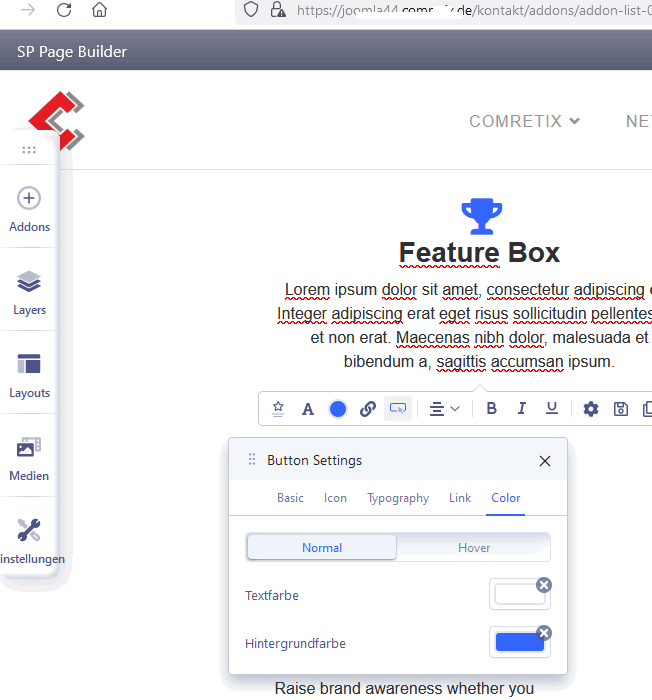
I can not change the button color of some buttons because the options are missing.
-Michael-
Solved
SP Page Builder
Button Color can not be changed
Asked by Michael
3 years ago
Last activity 3 years ago
Accepted answer
Marked as the solution
Paul Frankowski Senior Staff
Thanks / Danke.
Solution is easy
You have to add a NEW feature Box addon then those colors options will appear in new addon. And delete old addon.
Somehow in addons created by SPPB 3.x and used in SPPB 4.0.x this is not visible (but don't ask me why!).
7 more replies
Paul Frankowski Senior Staff
Hi Mike,
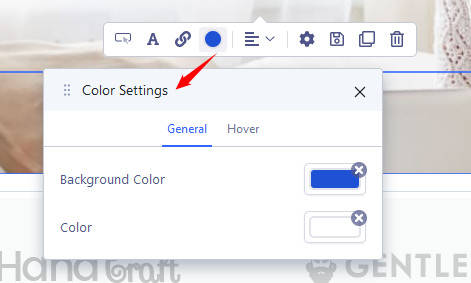
In Button addon you should see that
.
...but about what addon we are talking about ? (And template name please, becuuse some have overriden addons inside)
Paul Frankowski Senior Staff
3 years ago
· edited
In Feature Box addon you also should see colors options.
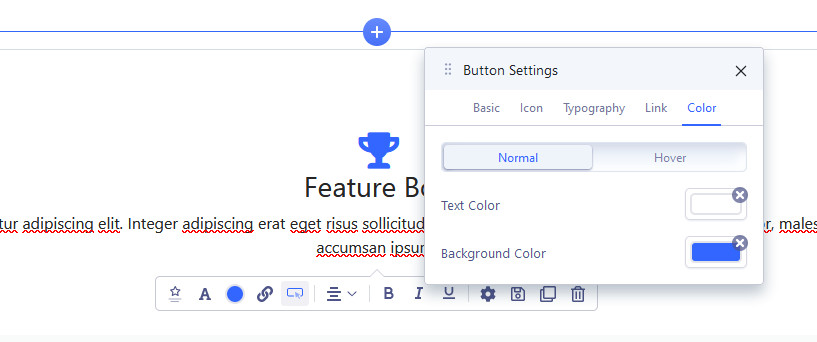
So probably you have to delete "feature" folder from:
templates\THEME-NAME\sppagebuilder\addons\feature
if you have it.
Check also from 2nd browser, in case of..
Paul Frankowski Senior Staff
And as You remember from "Yes Man" movie with Jim Carrey, all is possible. Just say "Yes"!
Custom CSS is also an option in difficult cases ;)
Michael Asked this
Hi!
First of all... sorry for my late reply. To busy these days.
My template is folium. Main problem is, that in the button color options is the feature box, the option to change the color ist not there. The window below the button settings is not fully present.
This behavior is in different browsers (firefox and edge).
The described folder is not inside the path you mentioned.
Thanks for your efforts
-Michael-
P.S.: Sometimes it would be nice if everything is possible with "yes" but...
Paul Frankowski Senior Staff
In that case, YES, I need access to admin area.
Michael Asked this
Ok...
Michael Asked this
Thank you,
tested... works. I am aware of the problem working with modules from the template. In the future I will create new modules.
-Michael-
Log in to reply.