Please see this screencast to show my problem.
https://screenrec.com/share/8gYsWNU1vH
Your docs and videos show something different. I can't find where to put in the URL to my audio files or even to a youtube video in the new editor.
Please see this screencast to show my problem.
https://screenrec.com/share/8gYsWNU1vH
Your docs and videos show something different. I can't find where to put in the URL to my audio files or even to a youtube video in the new editor.
Hello Chad Criswell
You have to put it here: https://prnt.sc/oMrAHcDnTWbK
You have opened the general addon settings. Please take your mouse over the addon and left click it. Then you will find this music icon for Audio addon. The same goes for the Video addon. Follow the addon settings.
Best regards
Chad, If I may....
About Video addon - by default is youtube - first you have to remove YT, then switch to MP4 tab (all is there)
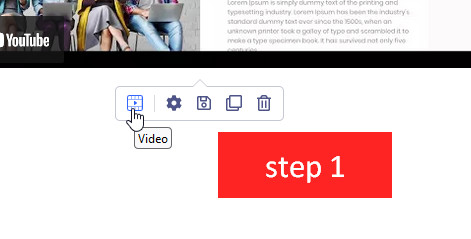
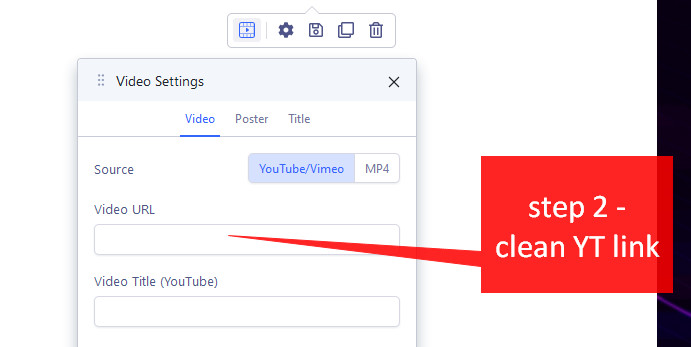
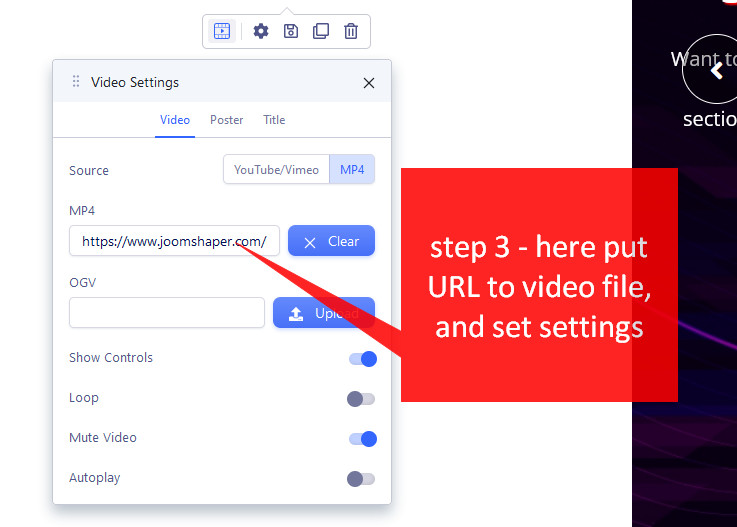
Of course if your Video addon wasn't overriden by template it should look like above.

