Awaiting an answer Templates

local google font not displayed after upgrade to Joomla 4

Asked by Martin Seidl 3 years ago Last activity 3 years ago

Hi,

I use shaper_oneclip.

in the custom.css I use this styling and it worked with Joomla 3 but after upgrade Joomla 4 it does not display this font any more....

/ source-sans-pro-regular - latin /
@font-face {
font-family: 'Source Sans Pro';
font-style: normal;
font-weight: 400;
src: url('templates/shaper_oneclip/fonts/source-sans-pro-v21-latin-regular.eot'); / IE9 Compat Modes /
src: local(''),
url('https://www.patlector-patentanwalt.net/templates/shaper_oneclip/fonts/source-sans-pro-v21-latin-regular.eot?#iefix') format('embedded-opentype'), / IE6-IE8 /
url('https://www.patlector-patentanwalt.net/templates/shaper_oneclip/fonts/source-sans-pro-v21-latin-regular.woff2') format('woff2'), / Super Modern Browsers /
url('https://www.patlector-patentanwalt.net/templates/shaper_oneclip/fonts/source-sans-pro-v21-latin-regular.woff') format('woff'), / Modern Browsers /
url('https://www.patlector-patentanwalt.net/templates/shaper_oneclip/fonts/source-sans-pro-v21-latin-regular.ttf') format('truetype'), / Safari, Android, iOS /
url('https://www.patlector-patentanwalt.net/templates/shaper_oneclip/fonts/source-sans-pro-v21-latin-regular.svg#SourceSansPro') format('svg'); / Legacy iOS /
}

see https://patlector-patentanwalt.net/en/

thnx

4 replies

Paul Frankowski Senior Staff
3 years ago · edited

HI Martin,

It's problem with security settings, why?

Reason: CORS header 'Access-Control-Allow-Origin' missing

Compare URL with and without WWW : https://www.patlector-patentanwalt.net/en/

font is there :)

Easy to fix it:

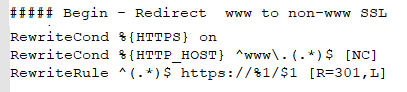
  1. In .htaccess set only one type of displaying website URL
  2. then edit custom.css file and use URL for fonts without "www."

example (1)

info_1133_2023.png

Martin Seidl Asked this

You are right again. Before it was just relative url path...this would be easiest solution....and the new server is not apache, I guess htaccess does not work there...
thnx

Paul Frankowski Senior Staff

In general you have to use/set ONLY ONE URL for whole website and loaded content like font files.

for browser (and sometimes Google) - www. and non-www are treated as separate URL ;/

Martin Seidl Asked this

ok I know, you found out the error, great. I have to ask the hosting admin for it seems htacces wont work here.

Still often it seems that the central custom. css does not work, I have to use template options > custom.css which is limited as u know

Log in to reply.