Just uploaded a new quickstart installation with DENTRO TEMPLATE. Cannot configurate the template, keep getting this error:
An error has occurred.
0 Missing field in database: Joomla\CMS\Table\Extension   extension_id. How do I fix it?
Just uploaded a new quickstart installation with DENTRO TEMPLATE. Cannot configurate the template, keep getting this error:
An error has occurred.
0 Missing field in database: Joomla\CMS\Table\Extension   extension_id. How do I fix it?
Share link to that topic here, I can take look...
Hi Cecilia,
Had similar issue with a different template and followed the suggestion posted by Steve Johnson in this Joomshaper Forum Post. Scroll about halfway down the post and you'll find his information. I used the table.php from Joomla! v4.1.0; you'll want to download the full or upgrade package and extract the table.php file. After following his instructions, I was able to get past this issue. YMMV.
Regards.
Hi Cecilia,
you should start from Joomla update from 4.0.x - this is very important step every single time.
In your case:
From joomla.org download: Joomla_4.3.3-Stable-Update_Package.zip
Upload on server
Unzip file using Extract button in File Manger in CPanel
OR
unzip on your Laptop and upload all folders and files using FTP tool.
Then in Joomla Admin: Maintenance > Database > Update structure
Those steps should fix all major problems.
Hello, tried this and didnt work. Can I send you my login credentials ? can you do it for me please?
please
please
thank you!
Please send me FTP access as well.
sending in hiddent content
it was cPanel, but it has file manager so it's OK, thx.
I will check soon :)
Solved, it was problem with PHP version. Joomla 4.0.x there was in QuickStart doesn't support PHP 8.1, so I had to switch to PHP 8.0 for few minutes to update CMS, and now all is OK, yes - back to PHP 8.1 and reinstalled with Joomla 4.3.3 and SPPB 3.8.10.
screenshot below
thank you so much! You are very kind. I have a different problem now, with a different template. I have posted in the forum and the answered I have received didnt solve my problem can you help me out? please
Thank you so much, this was my original post:
I have realized that since the beginning of the installation of this demo, there must have been some issue in the CSS code. As you can see in the image, the words appear in an almost transparent tone. What I did to solve this is to make the text bold, but I haven't been able to fix it in many modules that don't provide me with this option. For example, in the 3CX module as you can see in the image, the words are not noticeable. How can this be fixed? Your assistance is appreciated.
thank you so much!
I was given this answer... done that.. but nothing has changed.
Use this custom CSS
.action_option_ZalYy{
font-weight:bold;
}
.action_option_ZalYy{
font-weight:bold;
}
Go to system--> https://prnt.sc/tDbSUJh6LiGu --> Default template-->Template options--> https://prnt.sc/A5nlsBvCQsqs And add your CSS there.
Please your help
thanks
It's contact popup script, I don't recognize him or we don't have it. So maybe on plugin developer site there are tips how to change color of font.
I do not know the name or origin of this object, so how can I advise more :/well... it wasnt a problem of this specific module but the whole demo website installation, the thing is I changed to bold all texts in order to fix this... however... i cannot change this specific module.
But like I said.. since the begining of the installation .... all text was like this... almost transparent... everything like this.
what template name?
you can try this custom CSS, for whole website
body, p, li, strong {color: #333;}
the name of the template is FLOOX
@Cecilia, Thanks for access.
BTW
you missed Customization 2nd step - during code generation, guide from 3cx.com.
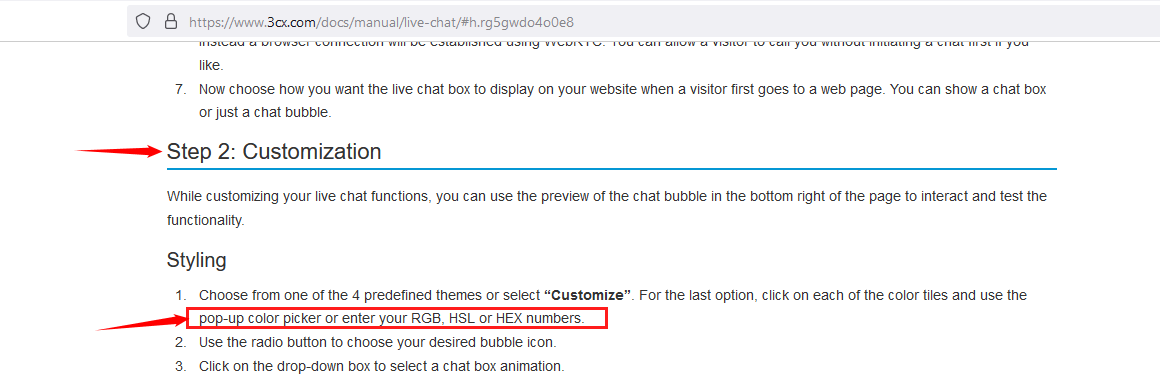
That's why my role ends here.
Thank you so much!!!! your support was great.. looks fine now. Have a wonderful day
Hello again! I´ve got 2 new issued and I hope you can help me out:
ISSUE NO. 1
The texts on the sliders are disproportionate. How can I fix it?
ISSUE No. 2
I am using portfolio module and componet from portfolio template in demo: https://www2.fils.bo/index.php/zona
when you click on any of the products you see this banner:
https://prnt.sc/GUgf0a-fSSid
where does it come from? how can I change it? I cannot find it anywhere
please your advice
thanks