Hello
on a layout in a slideshow, I would like to click on the image link (view details) => video in modal window
https://sppagebuilder.com/corporate-home
How do I do it?
It's not a matter of putting a video in place of the image.
Regards
Hello
on a layout in a slideshow, I would like to click on the image link (view details) => video in modal window
https://sppagebuilder.com/corporate-home
How do I do it?
It's not a matter of putting a video in place of the image.
Regards
I've tried in the advanced options of the "Js Slideshow" setting the width to 100 (for the laptop only) but it doesn't work.
Hi. There is no this settings in the Slideshow, because it does not depend on the Slideshow. Go to the settings of the section in which the Slideshow is located and switch to Fluid Row.
slideshow I don't understand whether with an addon, this one or another with only 1 image, it's possible to have a background image with the header (logo, menus, etc.) on top, like a slideshow. cf https://ascension.fr/ or https://www.altiplano-voyage.com/
Again, it does not depend on the Slideshow, but depends on your template. You must write CSS to make your header (Astroid header) transparent and place it in an absolute position. Then you will get what is in the your examples.
I don't understand about the preloader. It's only for the home page? and therefore with SPPB? Is it because I didn't set the SPPB parameter for production? Could this be due to the theme? Yet I haven't activated any optimization settings, neither for caching nor gzip for joomla?
Not related to SPPB. The preloader is turned on for the entire site and it will very much irritate users. I suppose it can be disabled in the settings of your template (Astroid settings)
Hi,
I'm afraid this is not yet possible by default (no option for that), this requires changes to the addon code.
But there is a simple hack that should work, at least worked on my demo site.
<a class="sppb-btn sppb-btn-success sppb-btn-rounded sppb-magnific-popup sppb-modal-selector" data-popup_type="iframe" data-mainclass="mfp-no-margins mfp-with-zoom" href="https://www.youtube.com/watch?v=ou_7LNceE5g" id="sppb-modal-33493f30-cde2-45a4-88cc-0f194a2a1faf-selector">Play Video Modal</a>
put https:// before www (it cut off here)
after using it - the green button will open youtube player. Evidence.
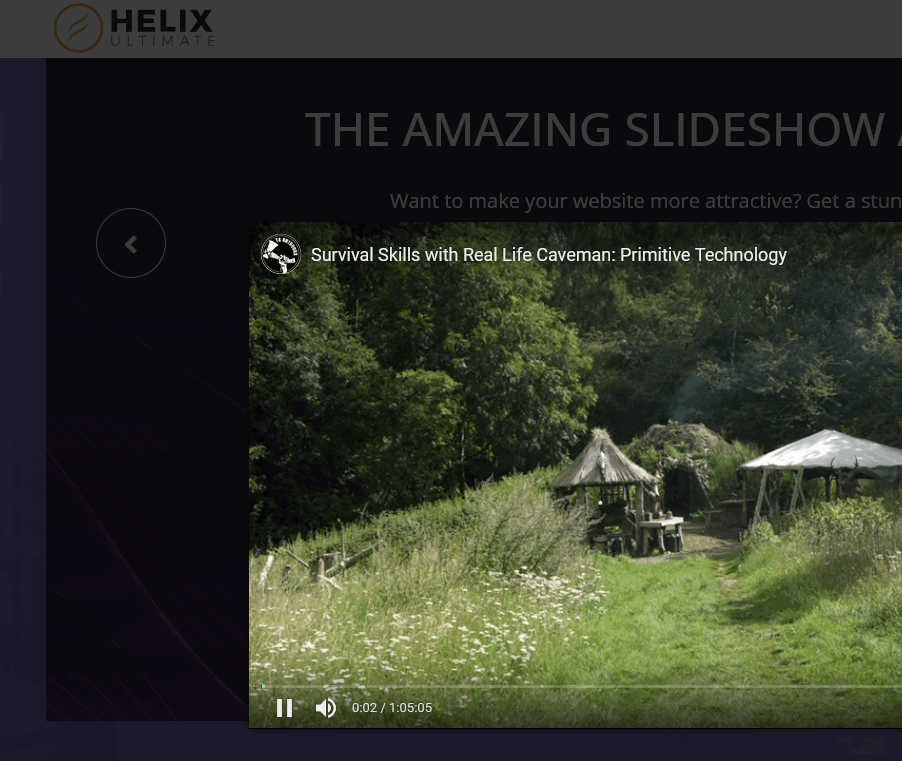
Hello
Thank you for this suggestion.
In fact, I did not want a 3rd element but that this video is displayed on the 1st image of the slideshow, after clicking on the link of this same 1st image.
preprod2.altius.fr/fr/#
Perhaps this is another addon, as I seem to have seen it on your site?
By now we have only Modal addon. Therefore, you have to improvise.
HI
I would like to download an mp4 video but it is not recognized.
But there are the right settings in joomla 4
https://pic.infini.fr/gallery#4Rhbp5vY/OhPQBYsY.png
Any ideas?
Regards
One of many ---> Upload file using FTP tool
Hello
Oh, I forgot to mention that I'd already asked the question on the forum, but there weren't many people there at the time.
I didn't specify I downloaded an 11mo dailymotin video via FTP but I can't see it either.
Even if you don't see it in files preview - the file exist and you can use path to that file in any addon or article etc.
For example:
/images/videos/demo.mp4
hello
a/ ok I managed to copy/paste it directly into the 3rd slide
Now I'd like this video to be displayed in full size, like the images
https://pic.infini.fr/gallery#4EewAsBU/SN43YoHf.png
preprod2.altius.fr/
b/ SPPB>videos
https://pic.infini.fr/gallery#Q6rhOmMG/EHW94Cw5.png&gid=1&pid=1
I managed to see the video in SPPB but I can't see how to add it? other addon?
where is the location of SPPB videos? because here I see the video that I can't retrieve if I'm in a local joomla file!
Regards
Hello
I always have a problem with an unsupported video.
1/ I would like to get a slideshow with image and/or video
2/ if possible with logo AND header overlay like https://www.altius.fr/fr/
See image See image https://pic.infini.fr/gallery#YCMO2ojD/u2J4uQj0.png
I put the video as the 1st item,
I put this video preprod2.altius.fr/images/0_theme/videos/sortir908.mp4
and it's not what's displayed in the iframe
preprod2.altius.fr/fr/
please do not put https to not index the site
Regards
Hi.
This field not for selfhosted video, but only for YouTube or Vimeo
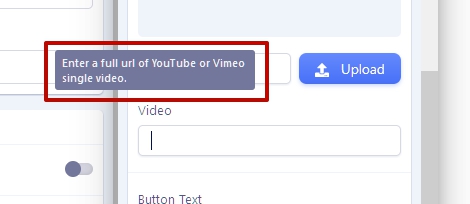
If you want to have a button when you click on which a video opens in a pop -up window, you need to use only this field containing HTML code in which you are encoded, both a button and a pop -up window containing a video.
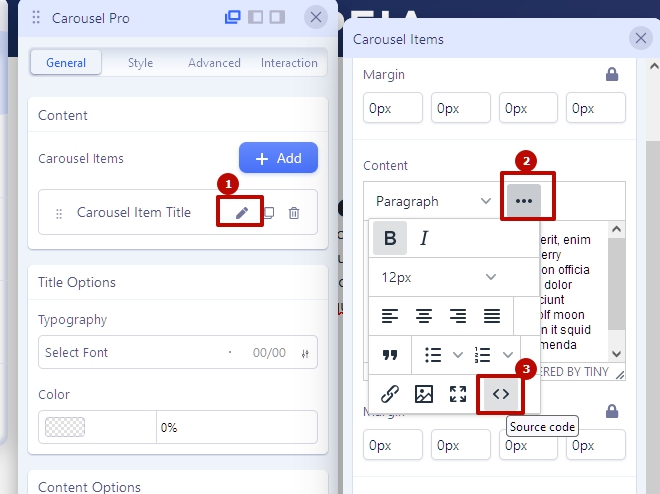
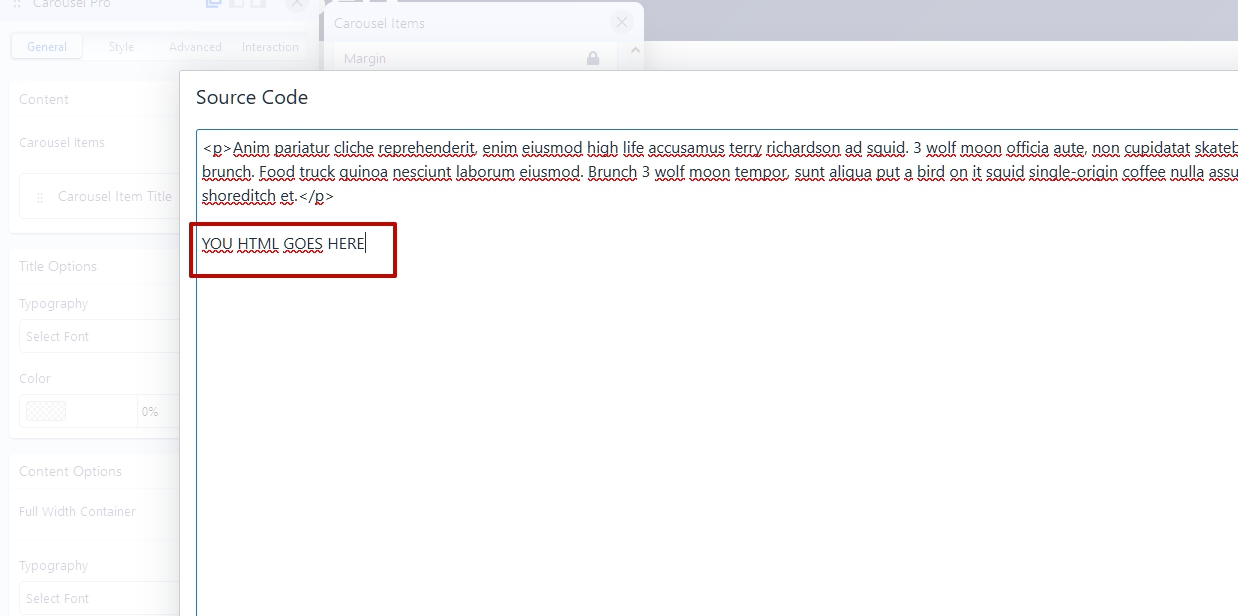
You can use an example of a ready -made code from Bootstrap by adding inside code with your selfhosted video.
Video HTML tags are used to insert the selfhosted video.
If you want to have a slide show with background videos in slides, use Slideshow Addon. There is this option. But there is no in Carousel Pro Addon.
And advice - turn off the preloader. This very slows down the loading of your site and will annoy users. I had to turn it off through Dev Tools to see your site. The preloader should be used only on one -page sites.
Hello
Thanks :-)
1/ slideshow
thank you, it's very interesting and prettier.
I'd like to set it to full width, like the current site. I've tried in the advanced options of the "Js Slideshow" setting the width to 100 (for the laptop only) but it doesn't work.
j4test.88h.ovh/addon
2/ slideshow
I don't understand whether with an addon, this one or another with only 1 image, it's possible to have a background image with the header (logo, menus, etc.) on top, like a slideshow.
cf https://ascension.fr/ or https://www.altiplano-voyage.com/
3/ I don't understand about the preloader.
It's only for the home page? and therefore with SPPB? Is it because I didn't set the SPPB parameter for production?
Could this be due to the theme? Yet I haven't activated any optimization settings, neither for caching nor gzip for joomla?
Regards
Thanks




