I just updated to SP Page Builder 5 and I noticed that it broke the display of the mega menus (they spill beyond the container's width).
I no longer see a place in the admin backend where to modify those.
Solved
SP Page Builder
mega menu educon
Accepted answer
Marked as the solution
Ofi Khan Staff
I have added Custom CSS in Template Options -> Custom Code -> Custom CSS. Please check now.
9 more replies
Saint Maur International School Asked this
I have rolled back to Page Builder 3.8 and this has fixed the display issue, but I still cannot edit the content of the mega menu. Please adise.
Ofi Khan Staff
Hello Yokohama AikiDojo
Apology for the inconvenience. Please share your administrator access here to check the issue. Use the Hidden Content box to share the credentials. Make sure that you have a full site backup with you before sharing.
Best regards
Saint Maur International School Asked this
Thanks for your response, please find the details below
Ofi Khan Staff
It is now in SP Page Builder 3 and I do not see any issue as you said. Please take a full site backup with Akeeba Backup in ZIP format and share here. Follow this tutorial. I will check it on SP Page Builder 5 on localhost and then share my feedback.
Saint Maur International School Asked this
I have reset to SP Page Builder 5 on the website, could you please go and have a look? thank you.
Ofi Khan Staff
I have checked your site and it is working fine. Please check the screencast shared in the hidden content.
Saint Maur International School Asked this
3 years ago
· edited
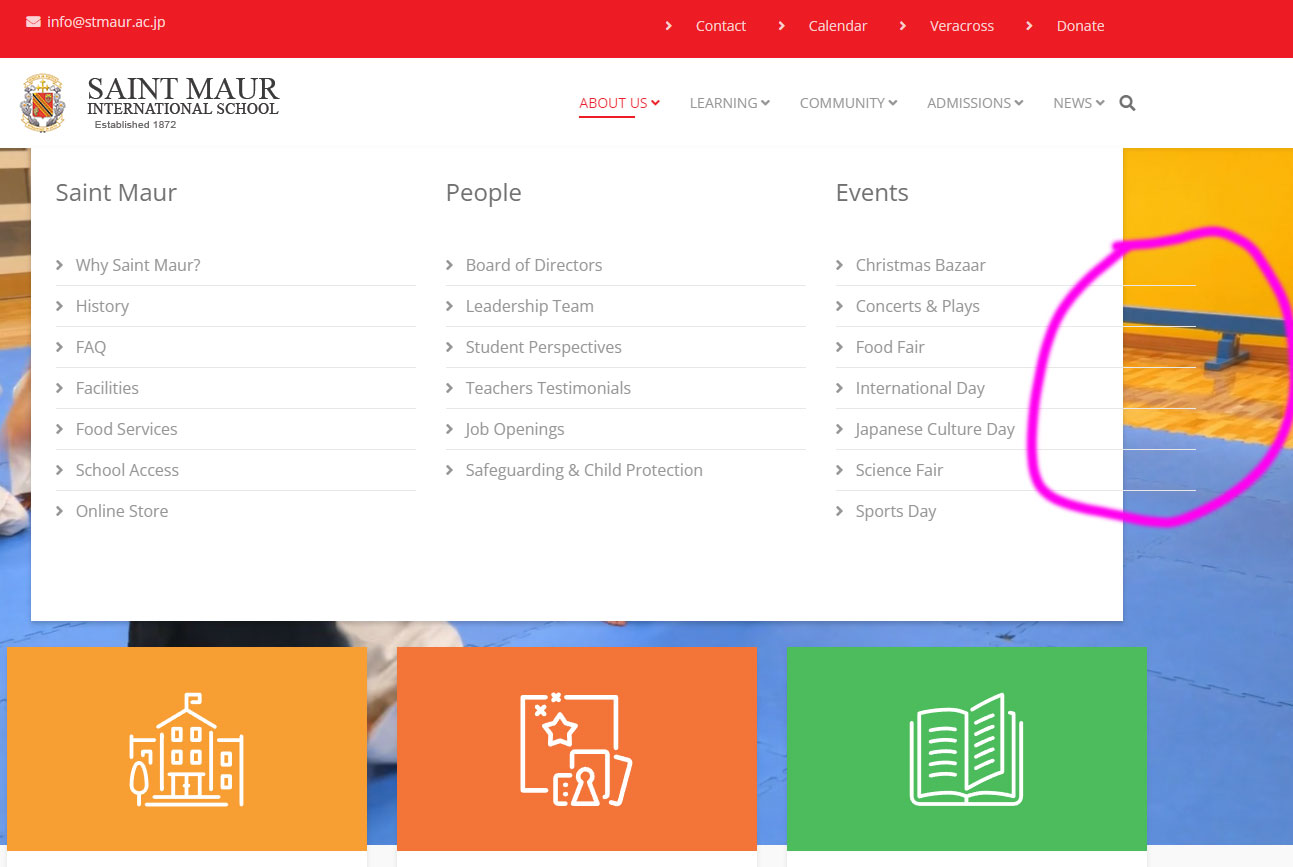
Thanks for looking into it. Please hover again on the "About Us" menu, you will see that the column content spills out on the right, our of the white box. Example here.
Saint Maur International School Asked this
Thay did the job, thanks a lot!
Ofi Khan Staff
You are welcome 😊
I have a humble request. It would be very kind of you if you can manage some moment to give us feedback on
This will inspire us to improve.
Log in to reply.