I created articles with sp page builder, the article is full page when I work. I created a menu link for my article but it is no longer full page, there is a container however it is the investa template when I change the template for caaseopia it is full page but I want it to be the template investa how to solve this problem? It seems to be the template when linked to a menu
Staff replied
Templates
Container on my article
10 replies

Pavel
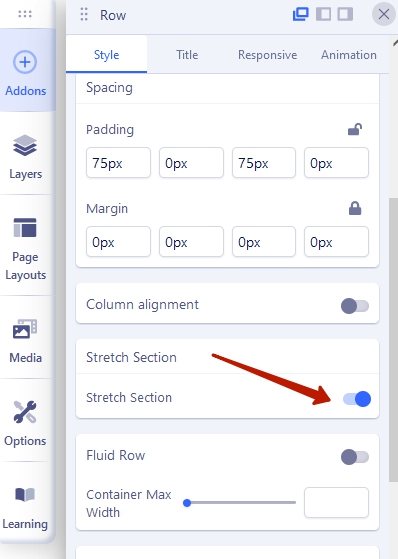
Hi. Use this option in each section settings

Mehtaz Afsana Borsha Staff
Hi Sonia,
Thanks for contacting us and sorry for your issue. You can follow Pavel's instructions.
-Regards.

Paul Frankowski Senior Staff
2nd idea:
Template Options > Blog > Details > Full-width Layout: On/Yes
Sonia Rioux Asked this
Hi Paul! It's the same,
https://prnt.sc/dpqLxrZj_mID look https://lecellierdelestrie.ca/clos-albertus-2018
when i clic to
https://prnt.sc/9OQrMx8YaoT5
https://prnt.sc/WprMtayAM69y
My page is ok but when i register, my page becomes again as if in a container smaller than my template.
Paul Frankowski Senior Staff
Sonia, about broken language strings - please read Helix documenation >> tip 9. >> https://www.joomshaper.com/documentation/helix-framework/troubleshooting-faq#missing-language-phrases-in-helix-after-joomla-update
Paul Frankowski Senior Staff
About Article width, I found it, please use that custom CSS:
.com-content.view-article #sp-main-body .article-body {
  max-width: 100%; }
That template has defined max-width (840px) for article view, that's why width was limited.
Sonia Rioux Asked this
Thankyou very much Paul!
Now the problem is resolved for article.
Paul Frankowski Senior Staff
2 years ago
· edited
You're welcome.
This is typical front-end template, so .ini file is always here: language/en-GB
Sonia Rioux Asked this
2 years ago
· edited
This file : https://prnt.sc/dWFYEWvCCiQy
What i am supposing to erase?
Paul Frankowski Senior Staff
No comment :/
Log in to reply.