Helix Update Crash - Forum | JoomShaper
Staff replied Helix Framework

Helix Update Crash

Asked by elsmachimo 2 years ago Last activity 2 years ago

Hello,

My website is down after doing the Helix update, and now my SP Page Builder Pro back-end displays this error on everything:

An error has occurred.
0 Failed opening required '/home/itspo967/floathouseedmonton.ca/plugins/system/nrframework/j3bc.php' (include_path='.:/opt/alt/php80/usr/share/pear:/opt/alt/php80/usr/share/php:/usr/share/pear:/usr/share/php')

Can you tell me how to fix this? I just did the helux update and now the website crashed. Thank you.


4 replies

Rashida Rahman Staff
2 years ago · edited

Hi there!

Sorry for your issue.

I could not reach to your administrative URL, hence can not login either. However, in the error it mentions nrframework. Are you using there any thirt party framework also? It seems that framework is causing the issue. Would you please try to uninstall that framework? If it's not possible, kindly restore your last working backup. You may ask your hosting provider to help you with this either.

Best Regards

Paul Frankowski Senior Staff
2 years ago · edited

Hi,

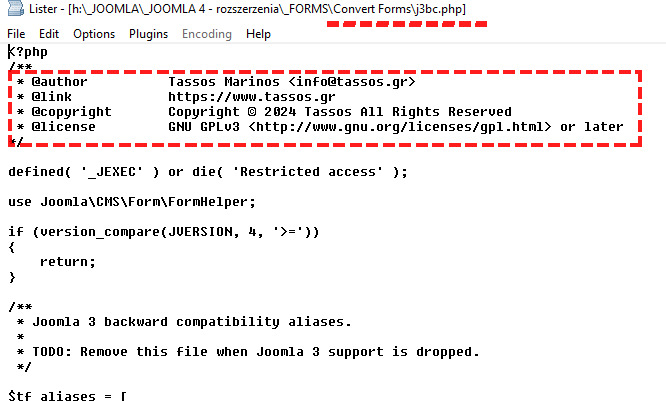
plugins/system/nrframework/j3bc.php

Is NOT from Helix Ultimate nor Helix3, it's from Extensions from Tassos.gr / Convert Forms or other.

I had this same on my private sites, so I know how to fix it. It happends after last framework update, then legacy j3bc.php file is missing.


Download > Unzip > Use FTP to upload it:

j3bc_UNZIP_UPLOAD.zip

elsmachimo Asked this

Thank you Paul!

I am not very technical, so just to confirm, when I upload this file through my host's FTP, will I need to do anything else or will it simply resolve the issue after this is completed?

Paul Frankowski Senior Staff

Evidence #1

info_2500_2024.jpg


The jury, Joomshaper is innocent :)

Paul Frankowski Senior Staff

Just upload that file here: plugins/system/nrframework/

(of course unzipped)

Log in to reply.