Error 500 when saving page - Forum | JoomShaper
Staff replied SP Page Builder

Error 500 when saving page

Asked by LAURENT ROCHE 2 years ago Last activity 2 years ago

Hello,
I'm working on a local computer with XAmpp, php 8.212, Joomla 5.1, SPPB 5.31...
I have a page on which I have a large number of objects: 2 sections, 1 accordions, text blocks... The saving is going well. At some point, when I add 1 object, the save returns "Request failed with status code 500".
After some research on the forum, I changed the following settings:

  • post_max_size=256M
  • upload_max_filesize=512M
    If you have an idea... Thanks in advance.
    Laurent

11 replies

Toufiq Senior Staff

Hi there,

Thank you for reaching out, and I apologize for any inconvenience caused by this oversight. Can you tell me which type of object added? And can you share a screencast video about the full scenario?

I appreciate your cooperation and will ensure to get back to you as soon as possible.

Best regards,

Toufiqur Rahman (Team Lead, Support)

LAURENT ROCHE Asked this

There is no particular object... text block, Image or another.
The error occurs at some point when adding an object. If we remove this object and add another, the error is reproduced.
I have the impression that it depends either on the number of objects on the page, or perhaps on the size of the recorded frame.
Image

Toufiq Senior Staff

Could you kindly grant me access to your Joomla administrator area so that I can investigate the issue you're experiencing? Prior to providing access, please ensure that you have backed up your site. Additionally, it's important to note that providing login credentials is entirely voluntary on your part; we respect your decision either way. However, if you do choose to share the login details, it would greatly expedite the resolution process. Thank you for your cooperation.

LAURENT ROCHE Asked this

Hello,
I'm sorry but I only work locally on my computer.
I can just possibly provide you with a backup.

Toufiq Senior Staff
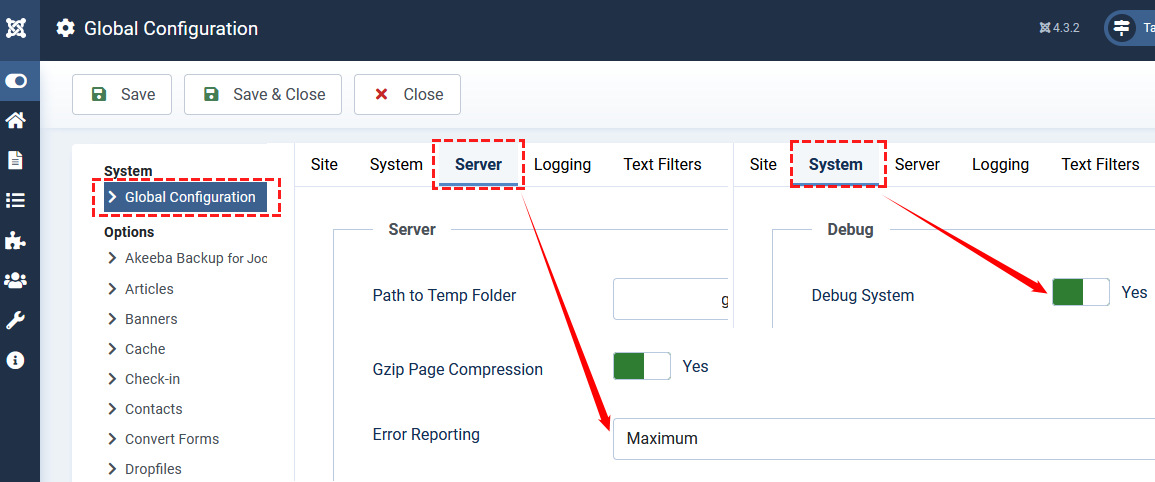
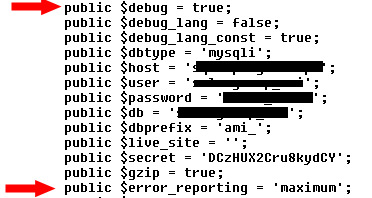
  1. Enable Debug mode and Error Reporting to check if there are any issues.

Maybe memory limit issue. You can see the error when error reporting and debug mode enabled. Thanks

LAURENT ROCHE Asked this

Hello,
Sorry but how can I activate debug mode and error reporting ?
For technical requirements, I have :
Joomla 5.1
php 8.2.12
memory_limit = 1024M
post_max_size=512M
upload_max_size=256M
MariaDB 10.4.2

Paul Frankowski Senior Staff

Here are two methods

error_reporting_debug.jpg

OR

by configuration.php file edition
debug_configuration_php.jpg

LAURENT ROCHE Asked this

I have activated the 2 options in Joomla, what information should I send you now?

Toufiq Senior Staff

Could you kindly grant me access to your Joomla administrator area so that I can investigate the issue you're experiencing? Prior to providing access, please ensure that you have backed up your site. Additionally, it's important to note that providing login credentials is entirely voluntary on your part; we respect your decision either way. However, if you do choose to share the login details, it would greatly expedite the resolution process. Thank you for your cooperation.

Log in to reply.