Pages and Categories in SP Page Builder - Forum | JoomShaper
Awaiting an answer SP Page Builder

Pages and Categories in SP Page Builder

Asked by joflatz 2 years ago Last activity 2 years ago

Hi there,
I am using Page Builder Pro for a while and want to learn how to create a blog.
I have created pages with sp pagebuilder
I have allready created categories
I have choosen categories for my articles

I dont know how to to create a blog with this articles

Is there any kind of Turorial on your websites that shows how to create a blog of articles?
similar to a casual joomla blog ( 3 colums, 1 leading article.) ...

any hint welcome

kind regards from austria

jo flatz

5 replies

Paul Frankowski Senior Staff
2 years ago · edited

Hi,

If you created "blog" using a Pages, you have a big problem, becuase there is NO blog view for page(s) category. Yes, we informed about that in SPPB documenation > Category section.


But if you used Articles with SPPB Integration enabled there is chance for success, but you have to:

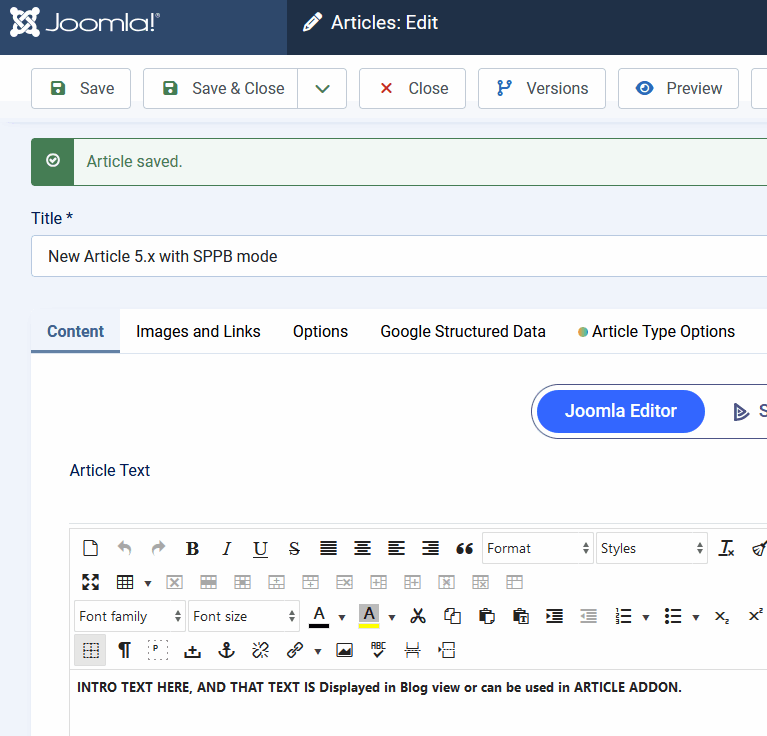
  1. Add intro text using "Joomla Editor" tab (not SPPB tab) - screenshot #1
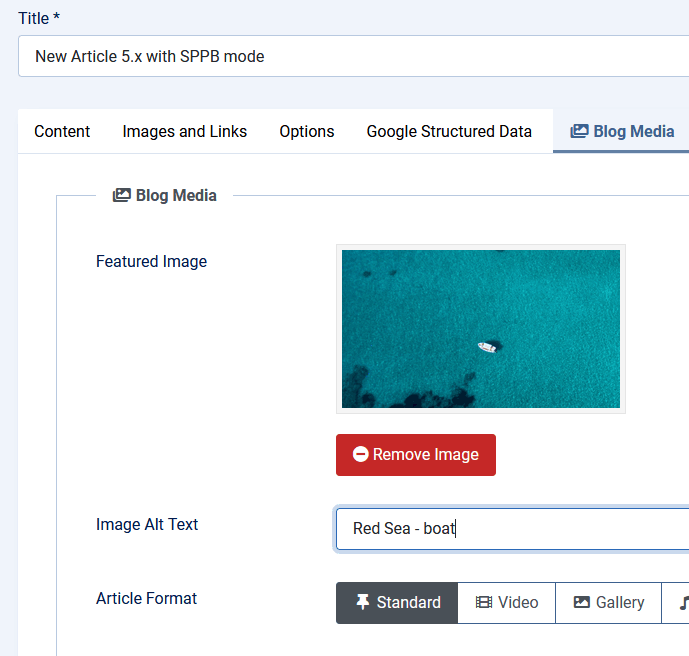
  2. Add image using "Blog Media" Tab, Helix Ultimate - screenshot #2
  3. Then create a Menu item "Category Blog" view and (1 & 2) will be displayed.

(#1)
info_2923_2024.gif

(#2)
info_2924_2024.gif

joflatz Asked this

Hi Paul,
thank you so much for that hint, i have allready placed my sp pages into a plain joomla article
shown in your description - and it works, thoug is feels a little complicated but if thats the only way
to come to a solution well thats it i guess.

May I ask you a further question - how can I limit the amount of previewtext im my 3 colum blog preview.
At the moment the whole text of all articles is shown there and I cant find a read more addon in the toolbox of sp pagebuilder do devide the content in two parts.

kind regards Jo
here is a link to my project, on a testserver
http://iq663nap.at.edis.global/libratus/index.php/abo-testen

Paul Frankowski Senior Staff

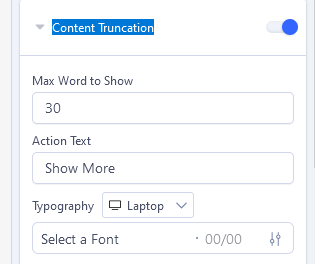
Text addon does not have typical Read More as Articles has - but it has similar option "Content Truncation" - that allows you to hide part of text with "Show more" link.

info_2925_2024.gif

joflatz Asked this

you are my hero, i will try to fix that as shown in your description ...
thanks a lot

regards Jo

joflatz Asked this

Dear Paul,
It work ..... I am elated
many thx
J

Log in to reply.