I'm using Joomla 5.1, SP Page Builder 5.3.2 and Helix Ultimate template. I have installed the HU template only, not the Quick Start. I am trying to use the HU blog and but it is using the native J4 blog settings. Can you help?
Solved
Templates
Helix Ultimate Blog Settings
Accepted answer
Marked as the solution
Paul Frankowski Senior Staff
2 years ago
· edited
Look up, read & follow tips. Fix two artilces and all will be OK.
Marie-Claire Asked this
Thanks for your help
5 more replies
Paul Frankowski Senior Staff
2 years ago
· edited
Hi Marie,
You had trash "HTML" code inside intro text. Probably you copied text from different website, and you forgot to remove opened <div> at the beginning before <p> . With that browser got crazy and damanged the Blog layout, becuase layout grid is based on div-s.
Paul Frankowski Senior Staff
2 years ago
· edited
That line <div class="general_text"> must be removed from all BLOG posts using SourceCode mode in TinyMCE.
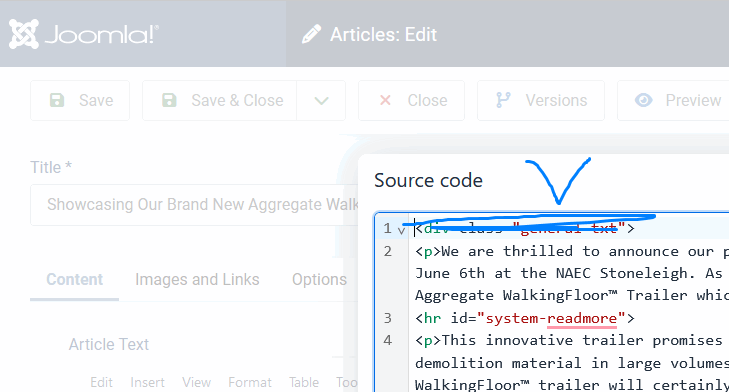
I removed / cleaned only 3 articles, whole rest is your task.
Marie-Claire Asked this
Hi,
Many thanks for looking at this. I have tried the next one on the list and done as you have said but its still showing the same: 6 Uses Of Ejector Trailers. I have even completely taken out <br/> and <p> tags in that one.
Paul Frankowski Senior Staff
2 years ago
· edited
You have to remove only those two HTML tags <div> </div> inside articles. Whole rest can stay :]
This is not an error of the template or the Blog view, on any template you would get the same crash.
You can disable one or two articles to check which one makes the mess. Easy way!
You can also use RegularLabs > DBReplacer and remove <div class="general_text"> or <div class="general-text"> (one of those) and </div> from all Articles (Content) in one minute.
Marie-Claire Asked this
Thank you. The reason i stripped that article was it didnt work when i just removed that div. So i have just removed <div> tags on this one: https://bmitrailers.ie/index.php/blog/understanding-moving-floor-trailers and it's still hasnt worked?
Log in to reply.