

Blank Page With "error" Text For Front And Backend
LC
Lon Czarnecki
After installing corporex_quickstart_j3_v2.2 the front and back end of the website simply show a white page with the text "error". After the Joomla installer ran, I had a warning that the configuration file was not installed and that I would need to install one. It even gave me the file to copy and paste as the configuration.php file. After adding the configuration file is when I got the white "error" page. If I change the htaccess.txt to .htaccess, then I get a 500 Internal Server error.
To track down the real error, I added error reporting line of code to the index page and see 10 deprecated errors on .../libraries/vendor/joomla/string/src/phputf8/ord.php lines 23, 28, 34, 38, 45, 49, 58 62, 71, 81, and one Error: Failed to start application: syntax error, unexpected 'class' (TCLASS), expecting identifier (TSTRING).
Would re-installing the quickstart file be best? Is there a fix for this?
31 Answers
Order by
Oldest

Toufiq
Accepted AnswerHi there,
Thanks for contacting us. Sorry for the inconvenience. Please provide me the FTP access & Joomla administrator access. I will check & get back to you soon.
Please update the Joomla & let me know.
-Thanks
LC
Lon Czarnecki
Accepted AnswerI don't know how to update Joomla without admin access. FTP access in hidden content.
LC
Lon Czarnecki
Accepted AnswerThat is correct. All I get is a blank page with "error" on it for both the front end and administrator access. I can't get to either.
This is the development URL: dev.rathsburg.com
I have added error reporting code to the index.php page.
ini_set('display_errors', TRUE); error_reporting(E_ALL);
LC
Lon Czarnecki
Accepted AnswerSo do I need to re-install the quickstart files? I need to get this website up and running soon.
Thanks
LC
Lon Czarnecki
Accepted AnswerI already responded to that question. There is no administrator access.
https://rathsburg.com/RathsburgJoom/
and the administrator access looks like this: https://rathsburg.com/RathsburgJoom/administrator
LC
Lon Czarnecki
Accepted AnswerThis is a new install. Brand new site I'm building with corporex_quickstart_j3_v2.2. No previous backup.
Toufiq
Accepted Answer
LC
Lon Czarnecki
Accepted AnswerThat is the file I used to install the first time. I'm trying the install again now and I see that the configuration.php file shows as not writeable. Before finishing the instalation I went to check the site files to change the permissions on the configuration.php file, but there isn't one. There is no configuration file. Is this supposed to be this way? I'll have to create one myself and upload it?
LC
Lon Czarnecki
Accepted AnswerI completed the install and manually built the configuration file and uploaded it. Same result. Still a blank homepage, and blank administrator login page. Each page just show the word "error".
Two things to note on the instalation process:
- There was no configuration.php file in stalled.
- The instalation folder could not be deleted using the install "remove instalation file" button. I had to delete the instalation file manually.
Could the problem be with the configuration.php file?
LC
Lon Czarnecki
Accepted AnswerMore information.
The servers I'm trying to install this on are Liquidweb.com servers. They do meet all the Joomla requirements.
However, I installed the site on a GoDaddy server without any issues. So using Akeeba backup, I moved the website to the Liquidweb server. I still get errors on the front end, but at least now I can see the adminstrator login!
The front end error I am getting now is: .border-radius is undefined: /home/raths4/public_html/RathsburgJ2/templates/corporex_helix3/less/master.less on line 13
LC
Lon Czarnecki
Accepted AnswerI rolled PHP back to 7.3. It didn't seem to change anything on the front or admin side. I was playing around with the configuration file. I alternated between the original one I built on the GoDaddy server and a rebuilt one. The word "error" on the blank page will show up with one configuration file and does not show up with the other configuration file.
But at least we can get into the back end. Is there anything there that we can modify?
LC
Lon Czarnecki
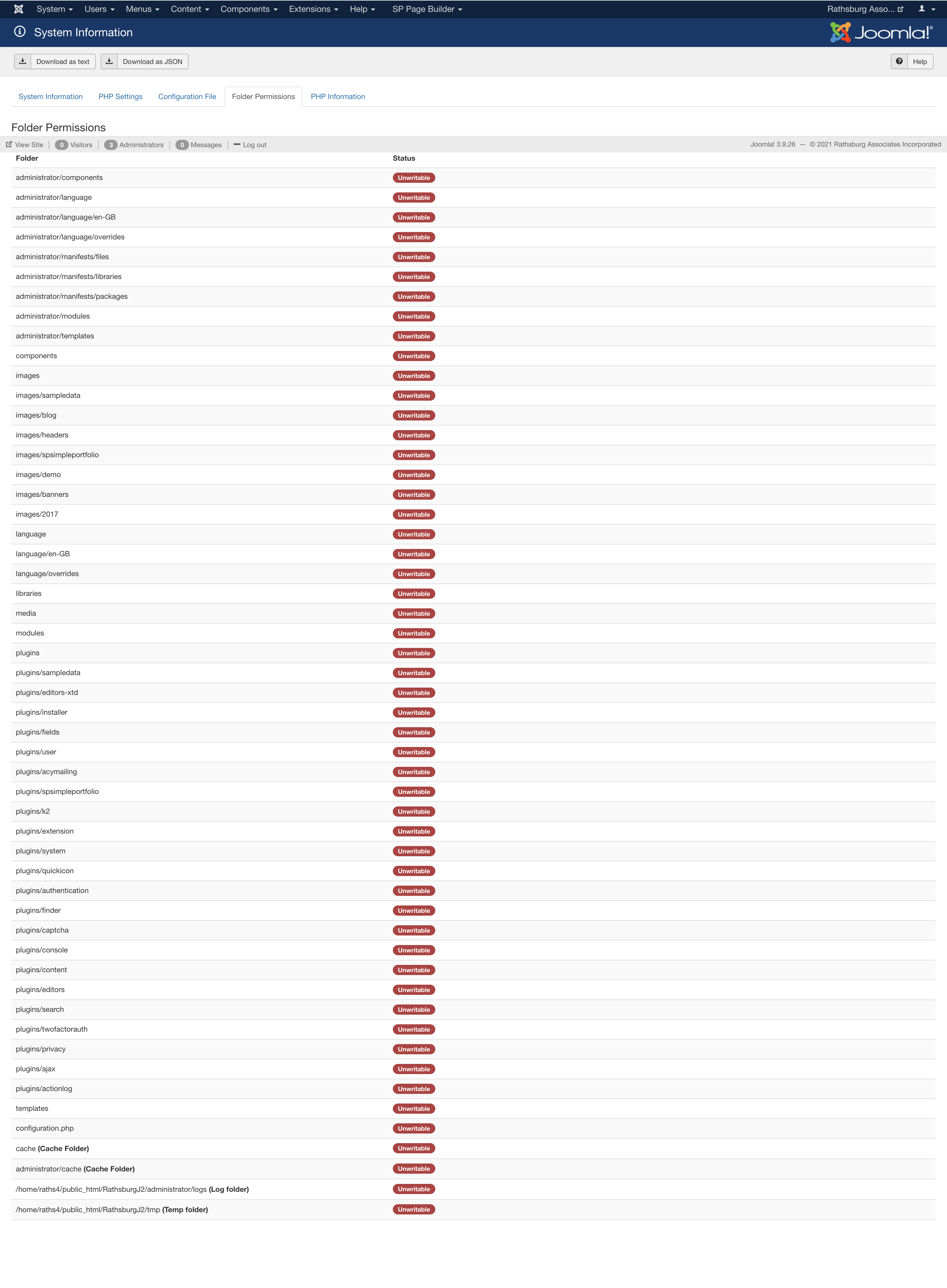
Accepted AnswerUpdate: I was on chat with the server providers and they figured that the issue of not being able to load the site was something to do with the PHP limits. They were able to get the front end of the website to showup, but it does have errors. I still cannot update any plugins on the Administrator side. Here is what they said:
You might have just 2 options: - With your tech guys help you can adjust some of these values until your website is working properly - You migrate your configuration so you dont have to go over the try and test process. But most important remember to check the File.php rules
LC
Lon Czarnecki
Accepted AnswerToufiq,
I am still working with the hosting provider to fix their issues, but in the mean time, I was able to install the quickstart file on my GoDaddy server to make sure the website works correctly. The administrator site is accessable but the front end shows this error:
.border-radius is undefined: /home/cakeman2/publichtml/RathsburgTest/templates/corporexhelix3/less/master.less on line 13
I have set up admin access for you:
LC
Lon Czarnecki
Accepted AnswerGetting through the issues one by one, but I have another one. Frontend page editor is blank.
The web host was able to fix all the upload issues when I tried to install plugins and update Joomla. I have now updated everything, but when I go to edit a page on the Frontend editor, I get a blank page. It does ask me to log in on the front end, but once I do, it goes blank.
Toufiq
Accepted AnswerPlease contact your hosting provider to fix the HTTP ERROR 500
LC
Lon Czarnecki
Accepted AnswerWithout the hosting provider making any adjustments, the frontend editor does work... sometimes.
I don't know which errors are the template and which are the host, so I'm showing them to you as well as them.
I made some edits to the home page (with frontend editor) and I received this error when I refresh the home page to see the changes: "Object of class stdClass could not be converted to string"
Now I can't get the home page back.
When I go back to Pagebuilder Pages in the backend and try to edit the home page using the frontend editor button, sometimes the homepage editor comes up, sometimes it doesn't.
Is this a template issue or server issue?
LC
Lon Czarnecki
Accepted AnswerI do believe this issue is with the template as the test site I have set up on another server is giving the same issues:
LC
Lon Czarnecki
Accepted AnswerThat looks great, but I needed the updates done to the main server site (rathsburg.com/RathsburgJ2). I appologize if I wasn't clear with the two different sites.
What was changed? Can we get the changes on the main server site?