

Facebook Post Image Missing
SC
Shari Chambers
I notice that when I post a page to facebook, the image doesnt show up - it is a background image, with a graphic over top. How can I over come this so I see the image and the logo?
11 Answers
Order by
Oldest

Rashida Rahman
Accepted AnswerHi there!
Would you please let me know which page you have the issue with Open Graph image?
Or the whole website?
Best Reagrds
SC
Shari Chambers
Accepted AnswerEvery page..
Rashida Rahman
Accepted AnswerHi,
Sorry for the delay!
How did you set those OG images?
You can use the pages Open graph option from the frontend editor of SP Page Builder just to add OG image to your pages.
There are two OG options in our products.
One for Template:
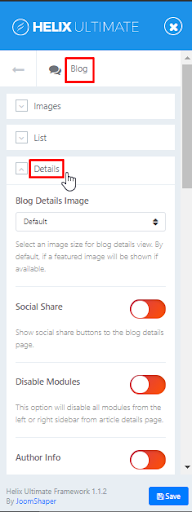
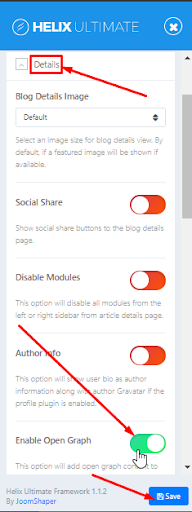 Another for the SP Page Builder:
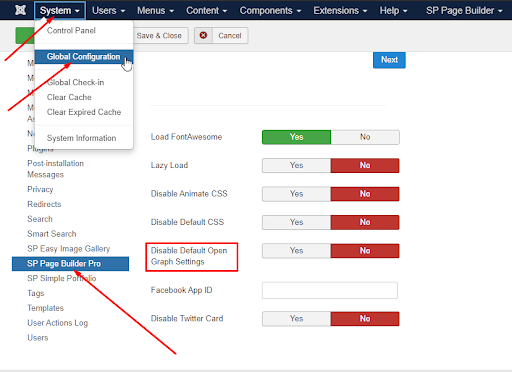 The Open Graph can be set only for Pages from SPPB, check options in each page.
Hope this helps!
Best Regards

apostolos
Accepted AnswerI have the same problem and the proposed solution doesn't work for my site.
Rashida Rahman
Accepted AnswerHi apostolos,
Sorry for your issue.
Would you please open up a new question about the issue along with details and your admin access in hidden content?
That would be helpful.
Best Regards
SC
Shari Chambers
Accepted AnswerI added a photo in sppagebuilder and followed instructions. Still doesnt work https://developers.facebook.com/tools/debug/?q=sweetwaterbay.ca
SC
Shari Chambers
Accepted AnswerNo answer to how to make open graph work for Facebook posts? I follwed instructions and even send access to my site...
Rashida Rahman
Accepted AnswerHello,
Sorry for the unwanted delay.
I have checked and found out that maybe you havn't refresh after checking the site with the developer panel. It's suggested to scrap the link after changing the site's content.
So I have just click on the "Scrap Again" button from the facebook developer panel i.e. https://developers.facebook.com/tools/debug/?q=sweetwaterbay.ca and everything looks good now.
Would you please check and let me know?
Best Regards
R
Rodenger Garibay Ramírez
Accepted AnswerHola este plugin te puede ayudar; https://www.roosterz.nl/joomla-extensions/tagz