

Unfold

francesco_f
Hi, on color switcher I would like only black and white... how can I disable others?
11 Answers
Order by
Oldest

Rashida Rahman
Accepted AnswerHi there!
Thanks for reaching out.
You can remove the colors from the options of your SPPB settings. Sample screenshot: https://share.cleanshot.com/Y5sHHgX8
The following doc may help:
https://www.joomshaper.com/documentation/sp-page-builder/color-library
If it doesn't help, kindly give me your admin access to check.
Best regards,
francesco_f
Accepted Answer...most likely I explained myself badly. I would like to remove these from the switcher...https://www.ideasti.it/images/switcher.png
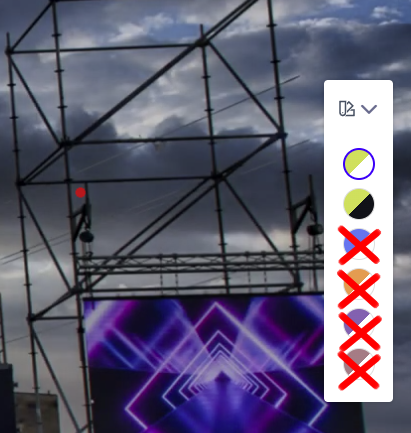
Rashida Rahman
Accepted AnswerHello,
I hope you’re doing well. I’m sorry for the experience you’ve had so far. Still I think the above doc link should help though.
However, to look into this issue more closely, could you please share temporary Super Admin access (inside the hidden content box)? I’ll check this and update you as soon as possible.
Please make sure to keep a full site backup before sharing the credentials, just to be safe.
Best regards,
francesco_f
Accepted Answer...I'm still waiting for clarification on how to disable unwanted colors from Switche Color...
M
Michał Helbin
Accepted AnswerHello. Following a security vulnerability in the SP Page Builder extension and subsequent attacks, the site and its extensions were updated and further secured; however, the site has slowed down significantly. It turns out that during loading, it attempts to access multiple directories to load style.css.
Below are a link and a screenshot; naturally, these directories—such as /iconfont/icosfrdty/ and the subsequent ones—do not exist at that location:
How can I remove these erroneous references, and where might they be stored?
Rashida Rahman
Accepted AnswerThanks for accepting an answer here:)
Have a nice day!
M
Michał Helbin
Accepted Answerlogin and password below, I would be grateful for a quick solution to the problem, because the website cannot be used :(
Rashida Rahman
Accepted AnswerHi @Michał Helbin,
Did you post a new question as I requested earlier?
Also, please remove your credentials from this post, as this is not your own support topic and the credentials are visible to the post owner as well.
For security reasons, please avoid sharing login credentials in forum posts created by other users.
Best regards,