

Section Background Image are No More Visible After Recent Update
SI
Simmetria Institute
After some recent Update (SPPB 6.3.0 and JOOMLA 5.4.3) the image background in my pages (at top and bottom of the page) are disappeared.
This is How the page should BE: https://prnt.sc/oKQTFgoAH-2o Ant this HOW IS IT NOW (background image Missing) https://prnt.sc/c16eBpuQEvBI
12 Answers
Order by
Oldest

Paul Frankowski
Accepted AnswerI can share to our developers on MONDAY, it's their task to investigate code.
yes, it will be useful.
Paul Frankowski
Accepted AnswerHi,
Edit Section and check background image settings.
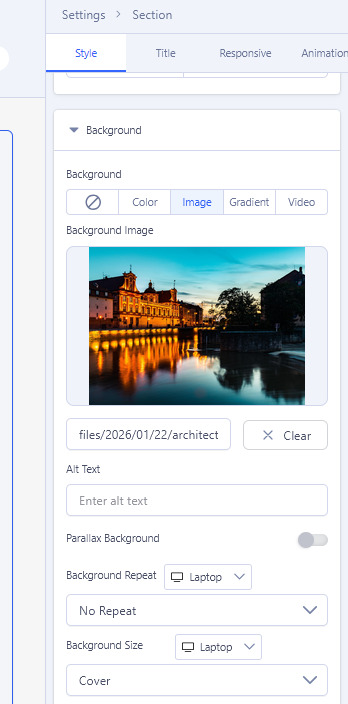
In case of, please share access to admin area
SI
Simmetria Institute
Accepted AnswerHi! Here my settings for one of the several IMAGE: https://prnt.sc/jbnAYIvoZErG What I have to cnange ? The image is already set. But is not show in the frontend. This is for a lot of pages I have.
Paul Frankowski
Accepted AnswerSettings looks OK.
Can you make simple thing
Remove image, and add it again, Save.
SI
Simmetria Institute
Accepted AnswerI did it for just One page, but do not work. Also the preview from inside SPPB looks wrong. I also tried to first HIDE the section and then un-hide. The changed to page layout are recognized, but the image is still covered by page background colur and no image is shows
It is possible to do a ROLLBACK to previus version?
Paul Frankowski
Accepted Answeryes, install older version of component.
I hope you downloaded it few weeks ago, or just remover all files from backup.
SI
Simmetria Institute
Accepted AnswerI do not have th elder version because I did an online Update. Is there possibility do MANUALLY download somewhere ?
S
Schuster
Accepted AnswerI have the same problem. The background image is visible in the backend view, but not in the frontend view.
CA
Chris Austin
Accepted AnswerChange each background image from Cover/save, Contain/save, and then back to Cover/save. See: https://www.joomshaper.com/forum/question/43804
According to Ziaul Kabir, the next software release will supposedly resolve the problem.
SI
Simmetria Institute
Accepted AnswerCan someone confirm that problem is solved with release 6.3.1 , please ?