Hey, on this website the menu is all open and there are no drop downs showing. I'm sure I'm missing something but can't see it in Helix?
Staff replied
Helix Framework
Off Screen Menu - No Drop Downs - Menu all Open
7 replies

Toufiq Senior Staff
Hi there,
Thank you for reaching out, and I apologize for any inconvenience caused by this oversight. To better address the issue, could you kindly provide Joomla administrator access? This will enable me to thoroughly investigate the matter and provide you with a prompt resolution.
I appreciate your cooperation and will ensure to get back to you as soon as possible.
Best regards,
Toufiqur Rahman (Team Lead, Support)
Toufiq Senior Staff
Your site is country blocked. We are from Bangladesh.
Andrew Freeman Asked this
Hey, unblocked.
Toufiq Senior Staff
Your site is broken.
Andrew Freeman Asked this
Strange, was looking fine this end (numerous browsers and cleared caches).
Anyway, I've turned off JCH and the menu is still not showing the drop downs for off screen.
Toufiq Senior Staff
Administrator URL doesn't work and your site is blocked again.
Andrew Freeman Asked this
Hi, you shouldn't be blocked. I've put the admin link below.
Toufiq Senior Staff
Again ip blocked and login credential doesn't work.
Andrew Freeman Asked this
See login below
Andrew Freeman Asked this
If you have an IP, I will add it to the whitelist.
Toufiq Senior Staff
I just checked your off-canvas issue and it works fine on my phone.

Paul Frankowski Senior Staff
6 months ago
· edited
I am more than sure it's caused by too strong compression from JCH Optimize, please check that.
As 1st step, disable (developer mode), check & compare, then check one by one.
Compression tools are great, but with "every power comes responsibility"!
Paul Frankowski Senior Staff
6 months ago
· edited
@Andrew, at least now, I see that (desktop view)

And Mobile (iPhone) view
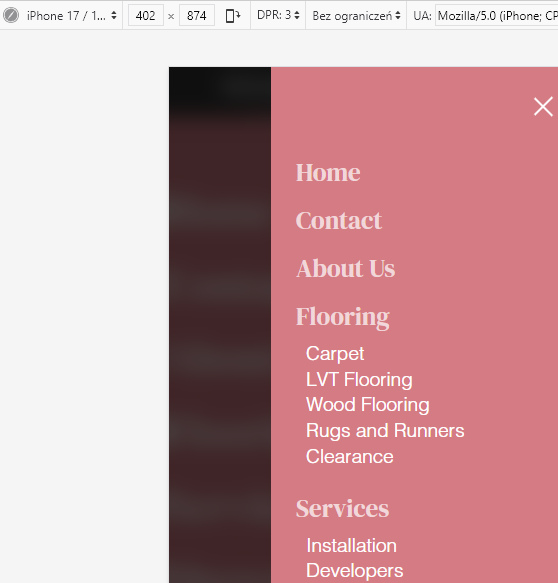
Andrew Freeman Asked this
Hi Paul,
yes that's how I see it. I wanted to know if there was an easy way of showing the menu on mobile as a drop down with the chevron icon. Rather than it showing the entire menu as you see there.
Paul Frankowski Senior Staff
6 months ago
· edited
In default Helix Ultimate it works this way, you have to click small ">" to see submenu.
But you changed that default behavior by using custom.css styles (line 55, 59). Tunning was on your side.
Looking from UX point of view, it's easier when you see all menu items as is now. Just only reduce top-padding , then menu items will be more up.
Log in to reply.