

How do I Change Custom Heading
J
Jo
Hi there.
I am working on this website https://ourworx.co.za/doorking/
Template "Dylan"
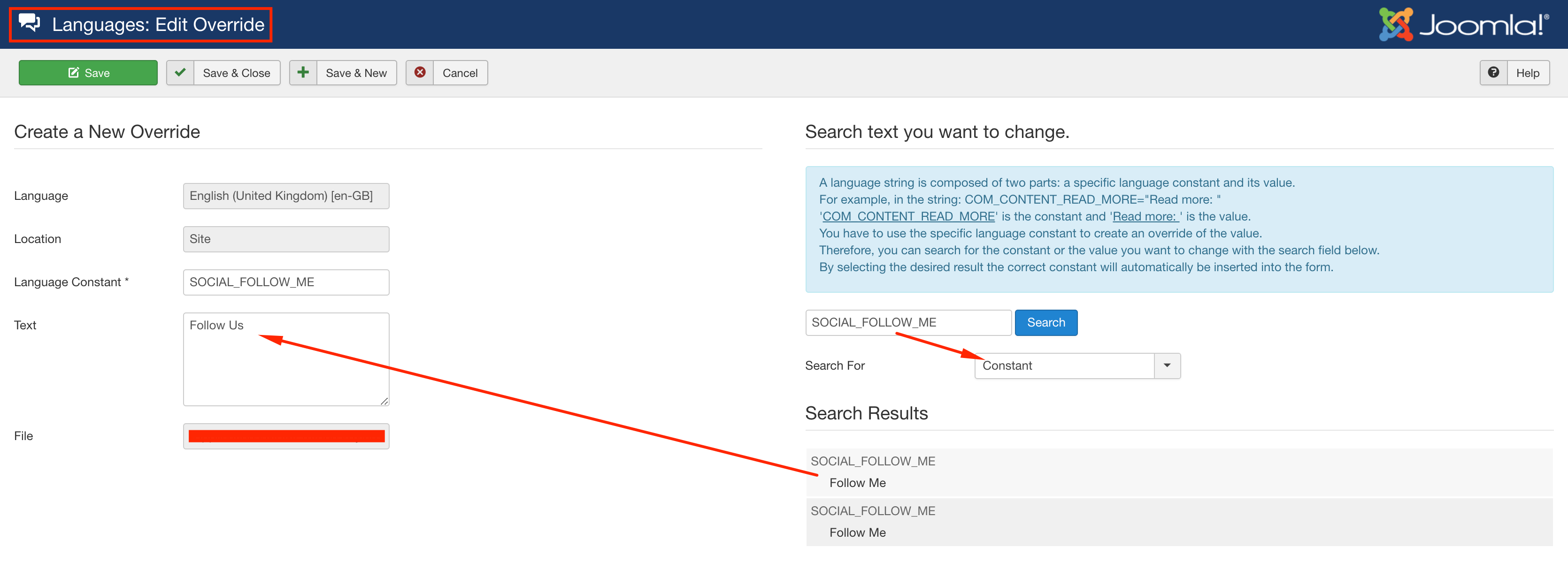
How do I change "Follow Me" to "Follow Us"
Please see printscreen here https://prnt.sc/15i7sla
Your help will be appreciated.
6 Answers
Order by
Oldest

Ariba
Accepted AnswerPlease edit this file -> en-GB.tpl_dylan.ini
Find the string SOCIAL_FOLLOW_ME="Follow Me" and change "Me" to "Us"
And use the following code in Custom CSS section for spacing problem -
.social-icons-wrap ul.social-icons {
    width: min-content;
}
ul.social-icons > li {
    margin: 1px 15px;
}
.social-icons-wrap ul.social-icons {
    padding: 10px 5px;
}
J
Jo
Accepted AnswerAlso this area is not properly spaced https://prnt.sc/15i841m
Please help :)
Ariba
Accepted AnswerHello
Thank you for your query. Kindly allow me some time, i will get back to you soon.

Ofi Khan
Accepted AnswerHello Jo
Apology for the miscommunication. Please do not edit the en-GB.tpl_dylan.ini file. Whenever we release an update, it will be overridden and your all translation will be lost. Better go to Language -> Overrides and create an override for the string SOCIAL_FOLLOW_ME and translate it. Please let me know if you need any further help.
Best regards